Displays
Vehicle equipment
This chapter describes all standard, country-spe‐
cific and optional equipment available for the
model series. It may therefore describe equip‐
ment and functions which are not installed in
your vehicle, for example on account of the spe‐
cial equipment selected or the country specifica‐
tion. This also applies to safety-relevant func‐
tions and systems. Please comply with the
relevant laws and regulations when using the
corresponding functions and systems.
Instrument cluster
General
Depending on the equipment, changes to the
displays in the instrument cluster can be deacti‐
vated via iDrive.
The displays in the instrument cluster can some‐
times differ from the illustrations in the Owner's
Handbook.
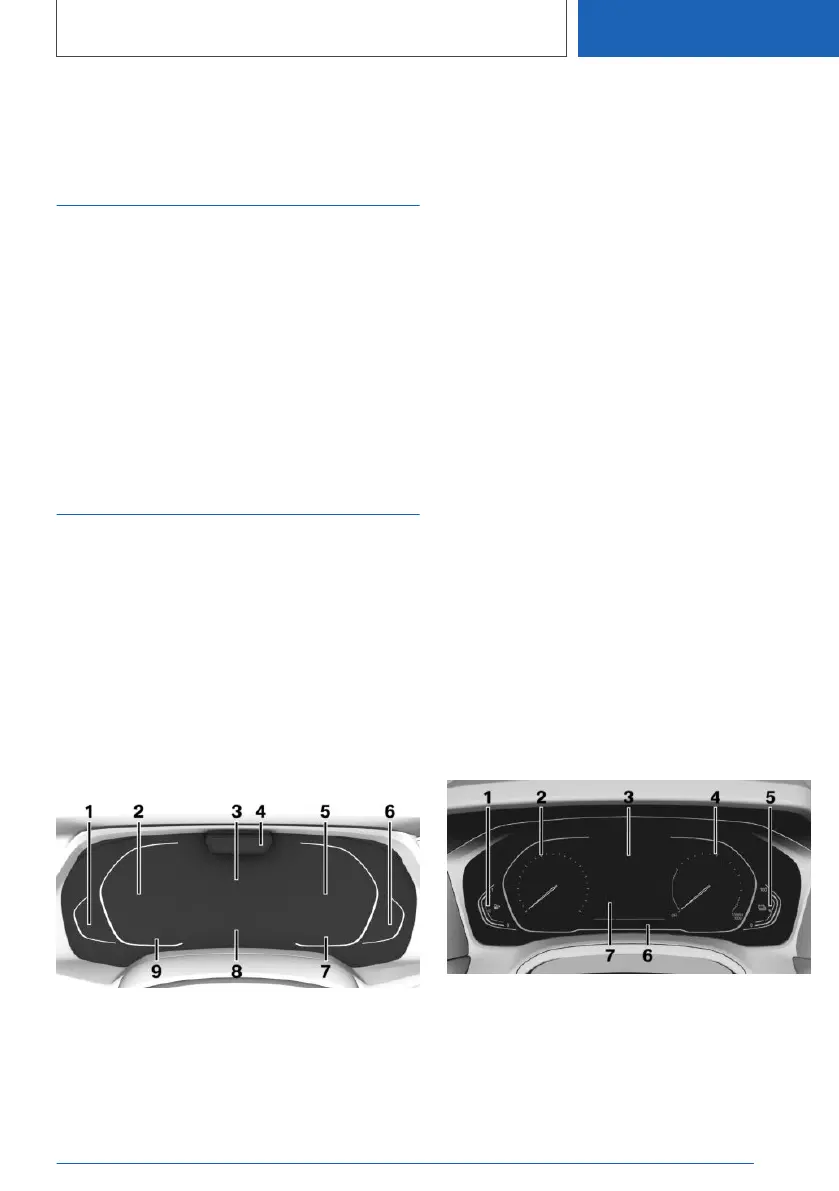
Full Black Panel Display:
Overview
1 Fuel gauge 185
Total range 188
2 Speedometer
3 Central display area 172
Navigation display
Charge screen 176
4 Depending on the vehicle equipment: Driver
Attention Camera
5 Selection lists 193
Widgets 173
Trip distance recorder, see Journey
data 194
Performance display 186
Status of Driving Experience Control 155
Gear indicator 165
6 Charge state indicator the high-voltage bat‐
tery 177
Electric range 177
7 Outside temperature 187
8 Check Control 179
9 Speed Limit Assist 264
Speed Limit Info 190
Time 75
Instrument cluster without
extended functionality: Overview
1 Fuel gauge 185
Charge state indicator the high-voltage bat‐
tery 177
2 Speedometer
3 Check Control 179
Seite 171
Displays
CONTROLS
171
Online Edition for Part no. 01405A1EA53 - X/20



 To Next Page