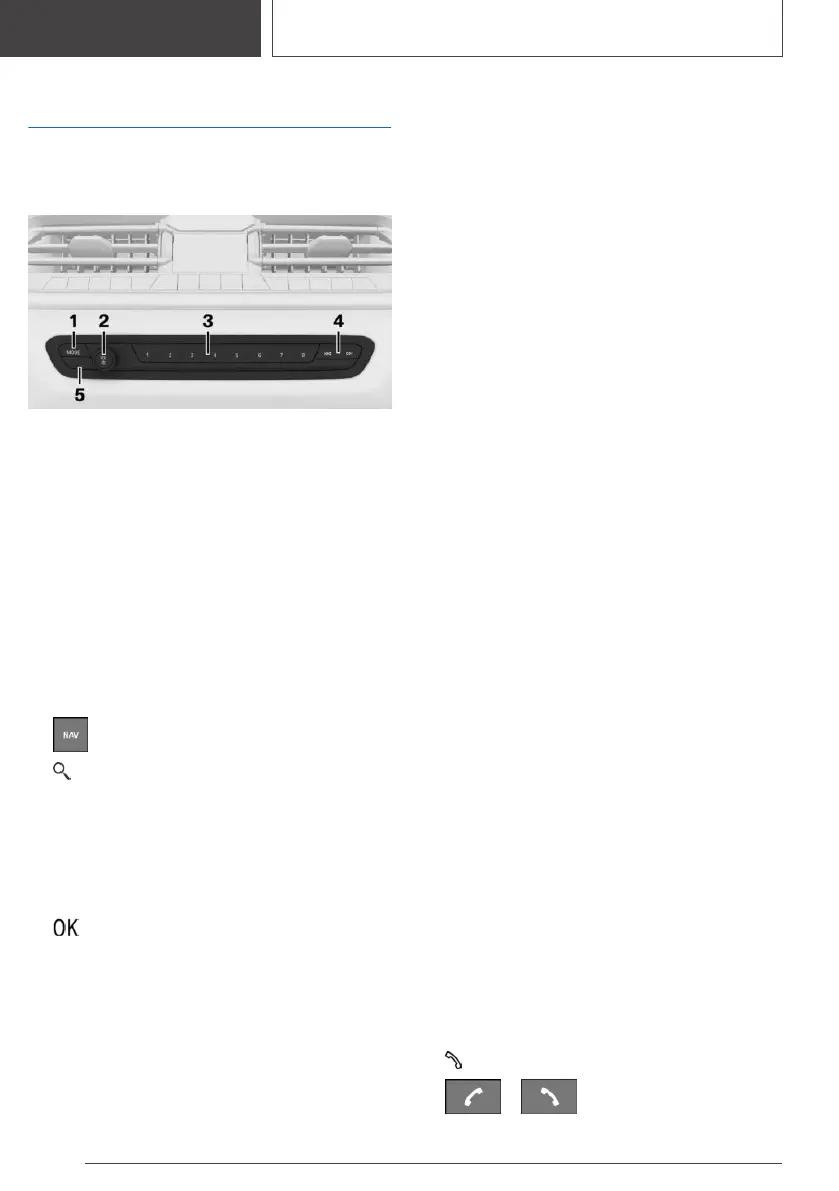
Infotainment
Depending on the national-
market version: radio
1 To change the entertainment source
2 Sound output on/off, volume
3 Favourites buttons
4 Changing station/track
5 Traffic information
Change waveband
Navigation destination entry
Entering the destination using the
quick-search function
1. Press the button on the Controller.
2. "Search"
3. Enter at least two letters or characters.
If applicable, the search term will be automati‐
cally completed in grey text.
Press the Controller or tilt it upwards to ac‐
cept the suggested search term.
4. Select symbol as appropriate.
The results are shown as a list.
5. "Search location": select search location if
applicable.
6. Tilt the Controller to the right.
7. Select the desired destination.
Connecting mobile telephone
General
Once the mobile telephone has been connected
in the vehicle, it can be operated using iDrive and
the buttons on the steering wheel.
Connecting the mobile telephone via
Bluetooth
1. "COM"
2. If applicable, set the following setting:
"Telephone"
3. "Connect new telephone"
4. To perform other operations on the mobile
telephone; see the user manual of the mobile
telephone: for example finding/connecting
Bluetooth device or new device.
The Bluetooth name of the vehicle is shown
on the display of the mobile telephone. Se‐
lect the vehicle's Bluetooth name.
5. Depending on the mobile device, either a
control number is displayed, or you will have
to enter the control number yourself.
▷ Compare the control number shown on
the Control Display with the control num‐
ber in the device display.
Confirm the control number in the device
and on the Control Display.
▷ Enter the same control number on the de‐
vice and via iDrive then confirm.
The device is connected and displayed in the
device list.
Telephony
Accepting a call
Depending on the vehicle equipment, incoming
calls can be accepted in different ways.
▷ Via iDrive:
"Accept"
▷
/
Seite 30
QUICK REFERENCE
Adjustment and operation
30
Online Edition for Part no. 01405A1EA53 - X/20



 To Next Page