Additional vehicle keys
Additional vehicle keys are available from a Serv‐
ice Partner of the manufacturer or another quali‐
fied Service Partner or an authorised workshop.
Loss of vehicle keys
A lost vehicle key can be blocked and replaced
by a Service Partner of the manufacturer or an‐
other qualified Service Partner or an authorised
workshop.
If a driver profile has been assigned to the lost
vehicle key, the connection to this vehicle key
must be removed. A new vehicle key can then be
assigned to the driver profile.
Malfunction
General
A Check Control message is shown.
It may be difficult for the vehicle to detect the ve‐
hicle key in some conditions, including the
following:
▷ The battery of the vehicle key is discharged.
▷ Disruption of the radio link by transmission
masts or other equipment transmitting pow‐
erful signals.
▷ Shielding of the vehicle key by metallic ob‐
jects.
Do not transport the vehicle key together with
metallic objects.
▷ Disruption of the radio link by mobile tele‐
phones or other electronic devices in the im‐
mediate vicinity of the vehicle key.
Do not transport the vehicle key together with
electronic devices.
▷ Interference with the radio transmission
caused by the charging of mobile devices, for
example a mobile phone.
▷ The vehicle key is located in the immediate
vicinity of the wireless charging tray.
Place the vehicle key somewhere else.
If there is a malfunction, the vehicle can be un‐
locked and locked from the outside with the
integrated key.
For further information:
Integrated key, see page 102.
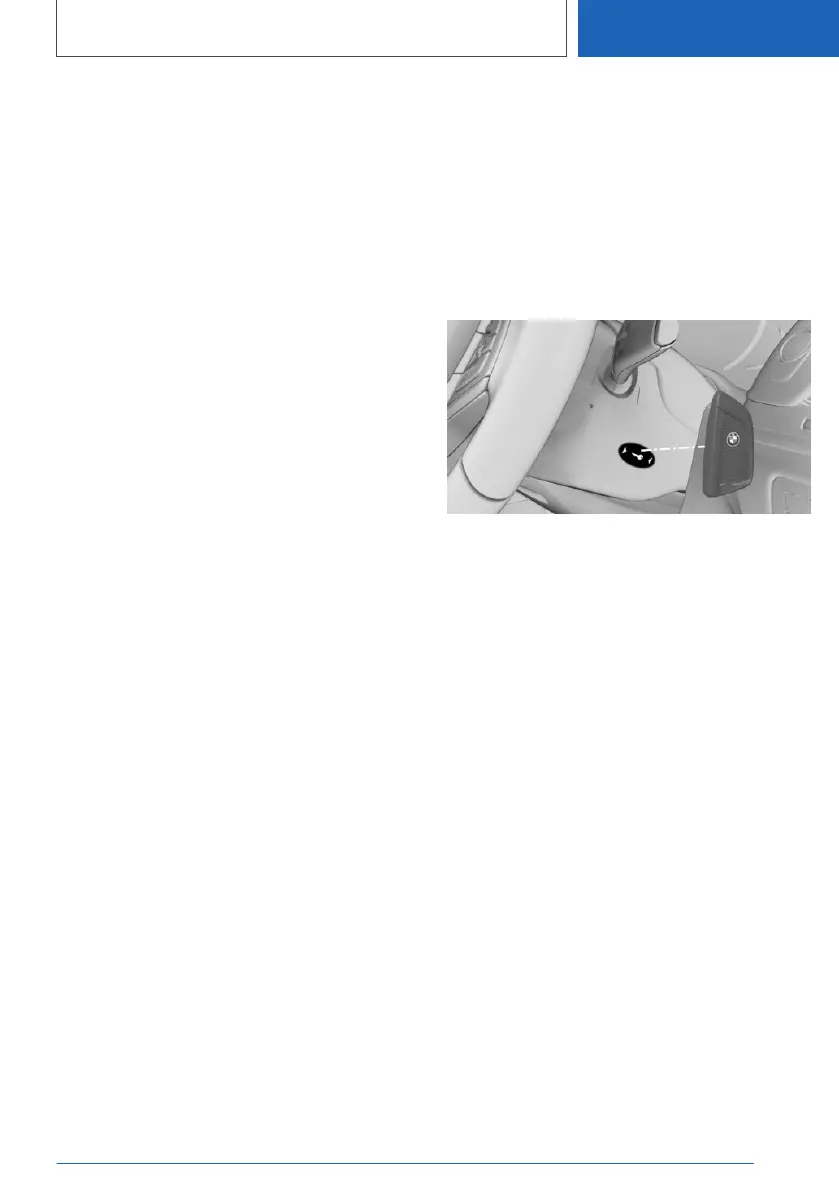
Switching on drive-ready state via
the emergency detection feature of
the vehicle key
Drive-ready state cannot be switched on if the
vehicle key has not been detected.
If this happens, proceed as follows:
1.
Hold the rear side of the vehicle key against
the mark on the steering column. Pay atten‐
tion to the display in the instrument cluster.
2. If the vehicle key is detected:
Switch on drive-ready state within 10 sec‐
onds.
If the vehicle key is not detected, change the po‐
sition of the vehicle key slightly and repeat the
procedure.
Frequently Asked Questions
What provisions can be made to enable a vehicle
to be opened if the vehicle key has accidentally
been locked inside the vehicle?
▷ The Remote Services of the BMW Connec‐
ted app can be used to lock and unlock a ve‐
hicle.
This requires an active BMW Connected‐
Drive contract and the BMW Connected app
must be installed on a smartphone.
Seite 97
Opening and closing
CONTROLS
97
Online Edition for Part no. 01405A1EA53 - X/20



 To Next Page