TeleService, BMW Assist
210
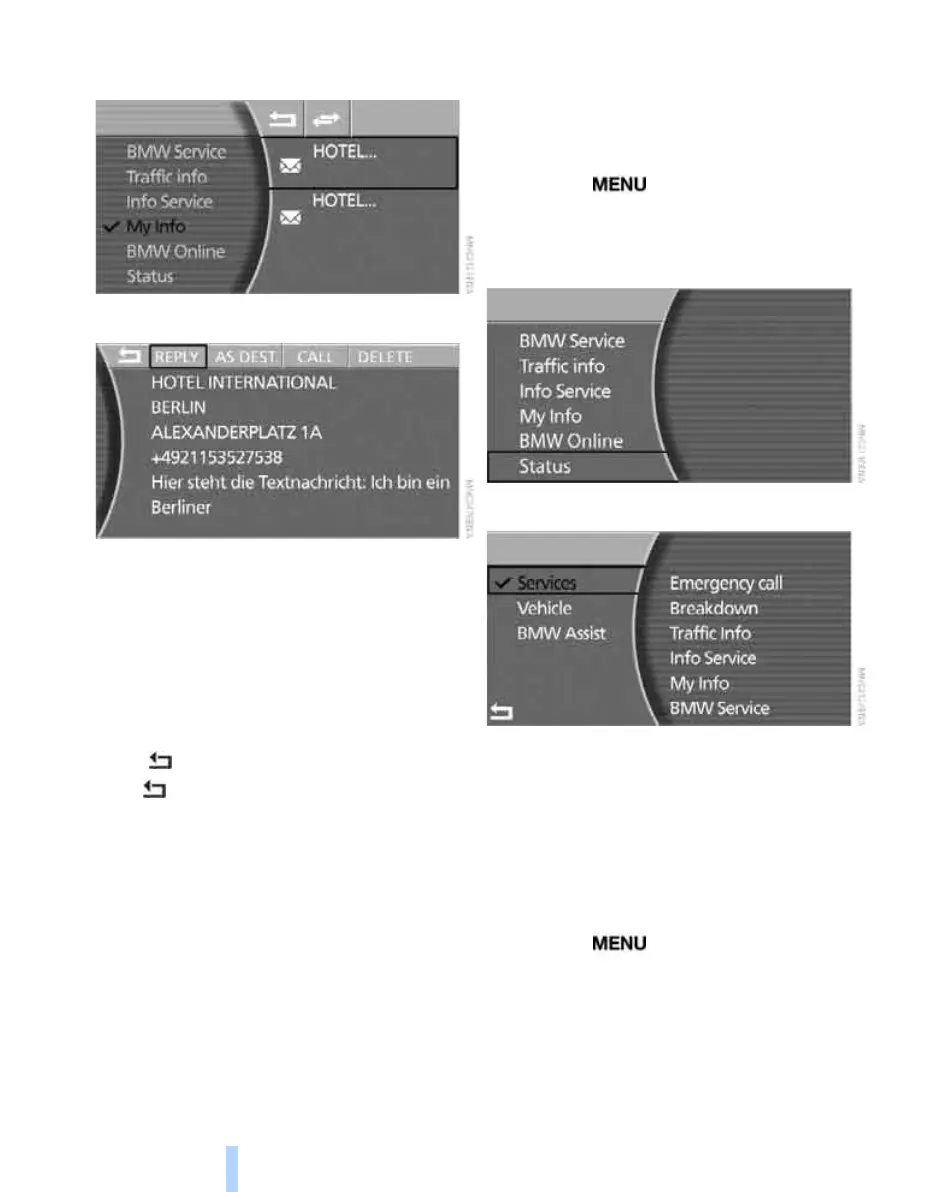
5. Select the desired short message from the
displayed list and press the controller.
The short message will be opened.
> "REPLY" replies to the short message.
> "AS DEST." transfers the address from
the navigation system to route guidance.
> "CALL" dials the phone number dis-
played.
Your mobile phone must first be logged
onto the vehicle, see page 198.
> "DELETE" deletes the short message.
> exits from the short message.
Press arrow or turn the controller to the left
or right to exit the list.
Adapting TeleService or
BMW Assist
Displaying services
iDrive, principle, see page 14.
1. Press the button to call up the start
menu.
2. Move the controller towards "BMW Assist".
3. Select "Status" and press the controller.
4. Select "Services" and press the controller.
The current TeleService or BMW Assist serv-
ices are displayed.
Updating services
You will be notified if the scope of TeleService
or BMW Assist changes. In this instance, you
should update the services.
iDrive, principle, see page 14.
1. Press the button to call up the start
menu.
2. Move the controller towards "BMW Assist".
3. Select "Status" and press the controller.
4. Select "BMW Assist" and press the control-
ler.
Online Edition for Part no. 01 41 0 013 197 - © 02/07 BMW AG



 To Next Page