EasyManua.ls Logo

BMW DWA 6 - User Manual

BMW DWA 6
29 pages
Print Icon
To Next Page IconTo Next Page
Loading...
1
BA_Titel_Blank2.fm Seite 93 Donnerstag, 19. September 2002 5:18 17

Other manuals for BMW DWA 6

Question and Answer IconNeed help?

Do you have a question about the BMW DWA 6 and is the answer not in the manual?

Summary

Welcome to BMW

General Information

Overview and Operation

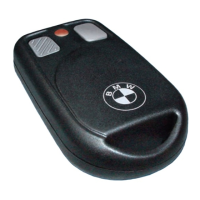
Remote Control Layout

Identifies the buttons and LED on the remote control unit.

Remote Control Functions

Details the operations of Button 1 and Button 2 on the remote control.

Alarm Functionality

Alarm Activation

Explains how to activate the anti-theft alarm function using the remote control or ignition.

Motion Sensor Control

Explains how to temporarily disable the motion sensor for transport.

Alarm Operation

Covers triggering, duration, and cancelling the alarm.

Alarm Deactivation

Provides instructions on how to deactivate the alarm function.

Programming the Alarm

Customising Alarm Features

Details how to personalize the anti-theft alarm system's features and preferences.

Accessing Programming Mode

Provides step-by-step instructions to enter the alarm system's programming mode.

Configuring Alarm Settings

Explains how to change settings within programming mode using buttons and indicators.

Exiting Programming Mode

Describes how to save or cancel custom settings and exit programming mode.

Remote Control Management

Accessing Registration Mode

Provides step-by-step instructions to enter the remote control registration mode.

Registering Remote Controls

Details the procedure for registering individual remote control units with the alarm.

Exiting Registration Mode

Describes how to end the remote control registration process.

Synchronising Remote Control

Explains the procedure for synchronising the remote control when its signals are no longer recognized.

Upkeep and Maintenance

Changing the Battery

Explains when and how to replace the battery in the remote control units.

Technical Data

Summary

Welcome to BMW

General Information

Overview and Operation

Remote Control Layout

Identifies the buttons and LED on the remote control unit.

Remote Control Functions

Details the operations of Button 1 and Button 2 on the remote control.

Alarm Functionality

Alarm Activation

Explains how to activate the anti-theft alarm function using the remote control or ignition.

Motion Sensor Control

Explains how to temporarily disable the motion sensor for transport.

Alarm Operation

Covers triggering, duration, and cancelling the alarm.

Alarm Deactivation

Provides instructions on how to deactivate the alarm function.

Programming the Alarm

Customising Alarm Features

Details how to personalize the anti-theft alarm system's features and preferences.

Accessing Programming Mode

Provides step-by-step instructions to enter the alarm system's programming mode.

Configuring Alarm Settings

Explains how to change settings within programming mode using buttons and indicators.

Exiting Programming Mode

Describes how to save or cancel custom settings and exit programming mode.

Remote Control Management

Accessing Registration Mode

Provides step-by-step instructions to enter the remote control registration mode.

Registering Remote Controls

Details the procedure for registering individual remote control units with the alarm.

Exiting Registration Mode

Describes how to end the remote control registration process.

Synchronising Remote Control

Explains the procedure for synchronising the remote control when its signals are no longer recognized.

Upkeep and Maintenance

Changing the Battery

Explains when and how to replace the battery in the remote control units.

Technical Data

BMW DWA 6 Specifications

General IconGeneral
TypeAlarm system
FunctionalityAnti-theft protection
CompatibilityBMW motorcycles
Alarm triggerMovement, vibration, inclination
Alarm signalAudible siren and flashing lights
Featuresbattery backup
InstallationProfessional installation recommended

Related product manuals