Controls
61
Reference OverviewDriving hintsCommunication NavigationEntertainmentMobility
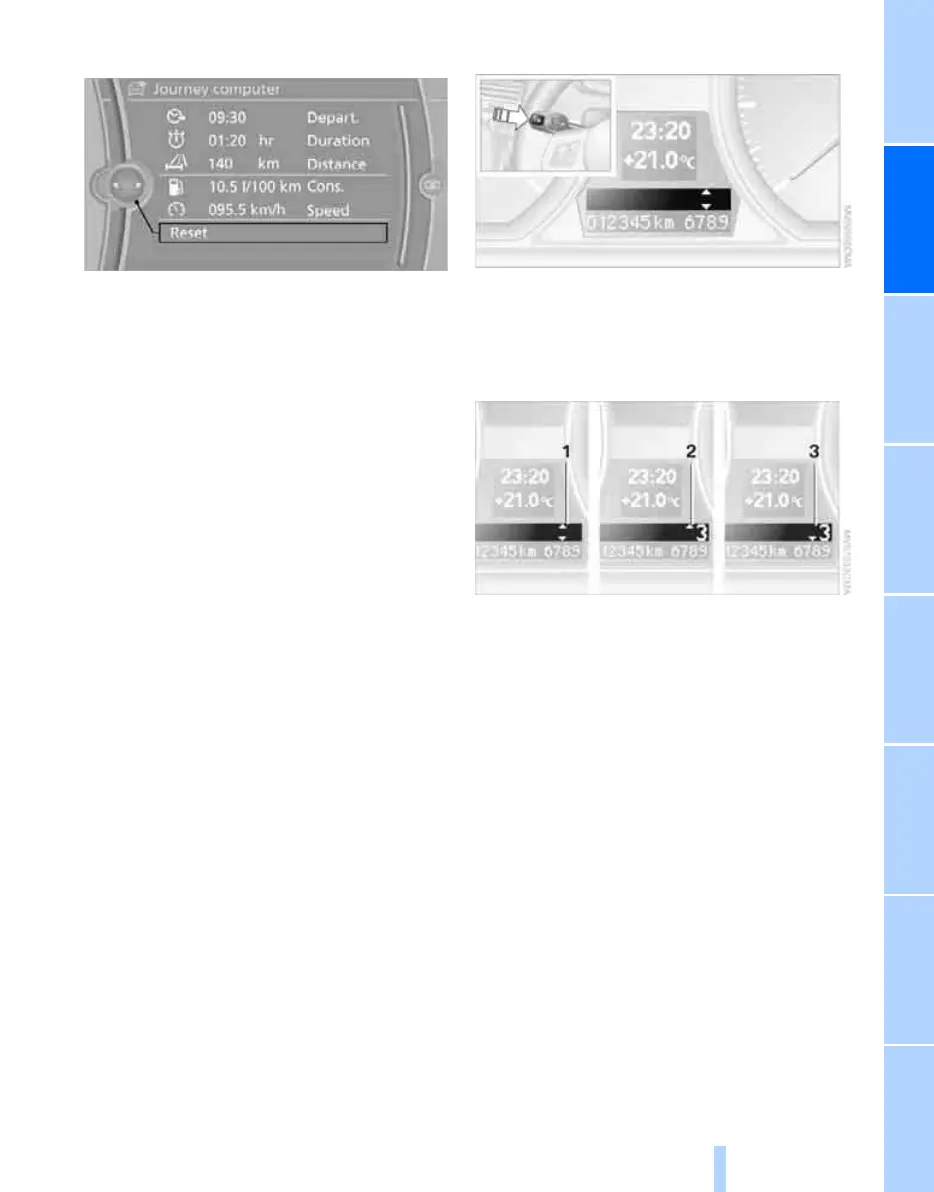
Displays in the "Journey computer":
> Departure time
> Trip duration
> Distance to be driven
For both displays:
> The average speed and
> average fuel consumption are displayed.
Resetting fuel consumption and speed
You can reset the values for average speed and
average consumption:
1. Select the respective menu item and press
the controller.
2. Press the controller again to confirm your
selection.
Resetting the journey computer
You can reset all the values:
1. "Vehicle information"
2. "Journey computer"
3. "Reset"
Gearshift point display*
The principle
This system recommends the gear allowing
optimal fuel economy in the current driving sit-
uation. Whenever that gear is different from the
one currently engaged, you are prompted to
shift up or down, respectively.
Enabling/disabling the system
If no information is displayed in the on-board
computer, see page 59, press the BC button on
the turn indicator lever for approx. 3 seconds.
Displays
1 You are driving in the gear allowing optimal
fuel economy
2 Fuel economy will increase if you shift up to
the displayed gear
3 Fuel economy will increase if you shift down
to the displayed gear
In parallel, you can call up any information from
the computer as usual.
Online Edition for Part no. 01 41 2 602 816 - © 08/09 BMW AGOnline Edition for Part no. 01 41 2 602 816 - © 08/09 BMW AG



 To Next Page