Symbol Measure
For efficient driving back off the accel‐
erator or delay accelerating to allow
time to assess road conditions.
Reduce speed to the selected ECO
PRO speed.
Indications on the Control Display
General information
Information on fuel consumption and technology
can be displayed while driving.
eDRIVE
Via iDrive:
1.
"My Vehicle"
2. "Technology in action"
3. "eDRIVE"
Driving style analysis
Concept
In this situation, the function helps develop an
especially efficient driving style and to save en‐
ergy.
For this purpose, the driving style is analyzed.
The assessment is done in various categories
and is displayed on the Control Display.
This display will help you adjust your driving style
and save some fuel.
The last 15 minutes of a trip are evaluated.
The range of the vehicle can be extended by
adopting an efficient driving style.
Functional requirement
The function is available in ECO PRO mode and
in ECO PRO+ mode.
Calling up ECO PRO driving style analysis
Via iDrive:
1. "My Vehicle"
2. "Technology in action"
3. "Driving style analysis"
Display on the Control Display
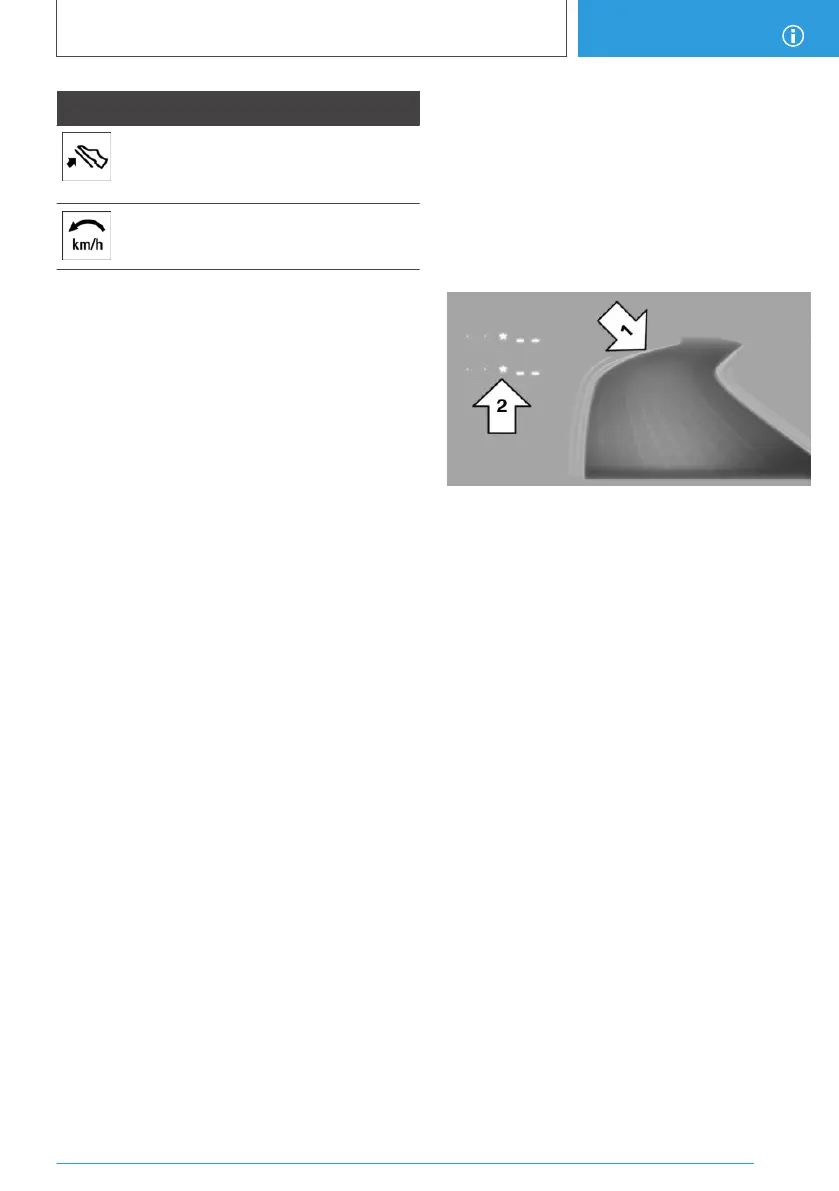
The display of the ECO PRO driving style analy‐
sis consists of a symbolized route and a lookup
table.
The road symbolizes the efficiency of the driving
style. The more efficient your driving style, the
smoother the depicted route becomes, arrow 1.
The table of values contains stars, arrow 2. The
more efficient the driving style, the more stars
are displayed in the table.
If, on the other hand, the driving style is ineffi‐
cient, a more wavy road and a reduced number
of stars are displayed.
To assist with an efficient driving style, ECO
PRO tips are displayed during driving.
Tips for an energy-saving driving style, Increas‐
ing the range, refer to page 204.
Seite 207
Increasing the range
DRIVING TIPS
207
Online Edition for Part no. 01402989267 - II/18



 To Next Page