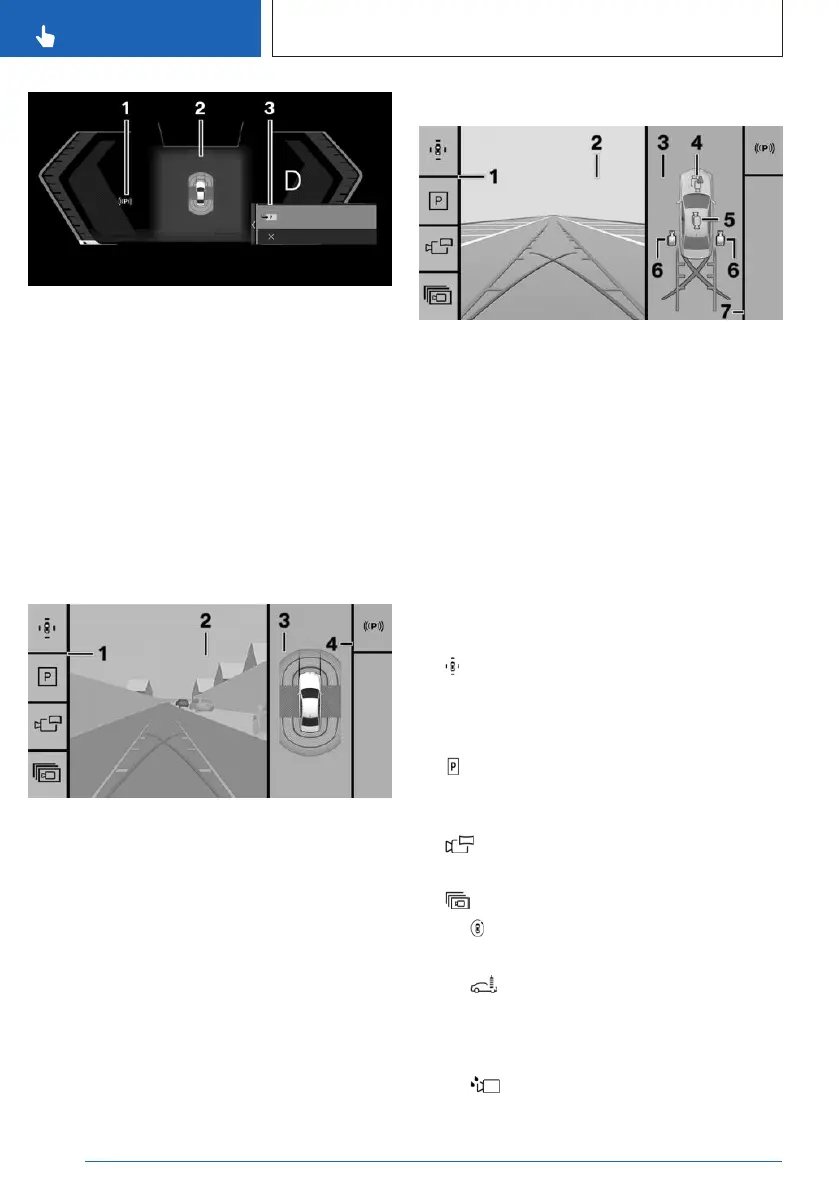
1 Status of parking assistance systems
2 Assisted View
3 Selection menu
Display on the control display
General information
Depending on vehicle equipment and on the
activated parking assistance system, the con-
trol display will vary.
Assistance view
1 Toolbar, left
2 Camera image
3 Vehicle top view
4 Toolbar, right
Parking view
1 Toolbar, left
2 Camera image
3 Selection window
4 Automatic camera perspective
5 Semi-automatic camera perspective
6 Side view
7 Toolbar, right
Toolbar, left
Different views and settings can be selected
via the left toolbar depending on the equip-
ment:
▷
"Parking view"
Depending on vehicle equipment, camera
views or the Park Distance Control view are
displayed.
▷ "Assist view"
A stylized top view of the vehicle is dis-
played.
▷ "Panorama view"
The cross traffic view is displayed.
▷ "More"
▷ "3D view"
A three-dimensional view is displayed.
▷ "Car wash view"
The display of your own lane can be
turned on for easier driving into the car
wash.
▷ "Camera cleaning"
Seite 246
CONTROLS
Parking
246
Online Edition for Part no. 01405A88D67 - VI/23



 To Next Page