Detach, refer to page 320.
2. Stow the charging cable as required.
3. Press the charging socket flap closed until it
engages.
4. Lock vehicle if it is unlocked.
Goodbye screen on control display
When drive-ready state is switched off, a menu
is shown on the control display, in which,
among other things, some settings can be ap-
plied for charging via iDrive.
Displays in the instrument
cluster
The charge state indicator light shows the
charge state of the high-voltage battery in the
instrument cluster, if standby state is switched
on.
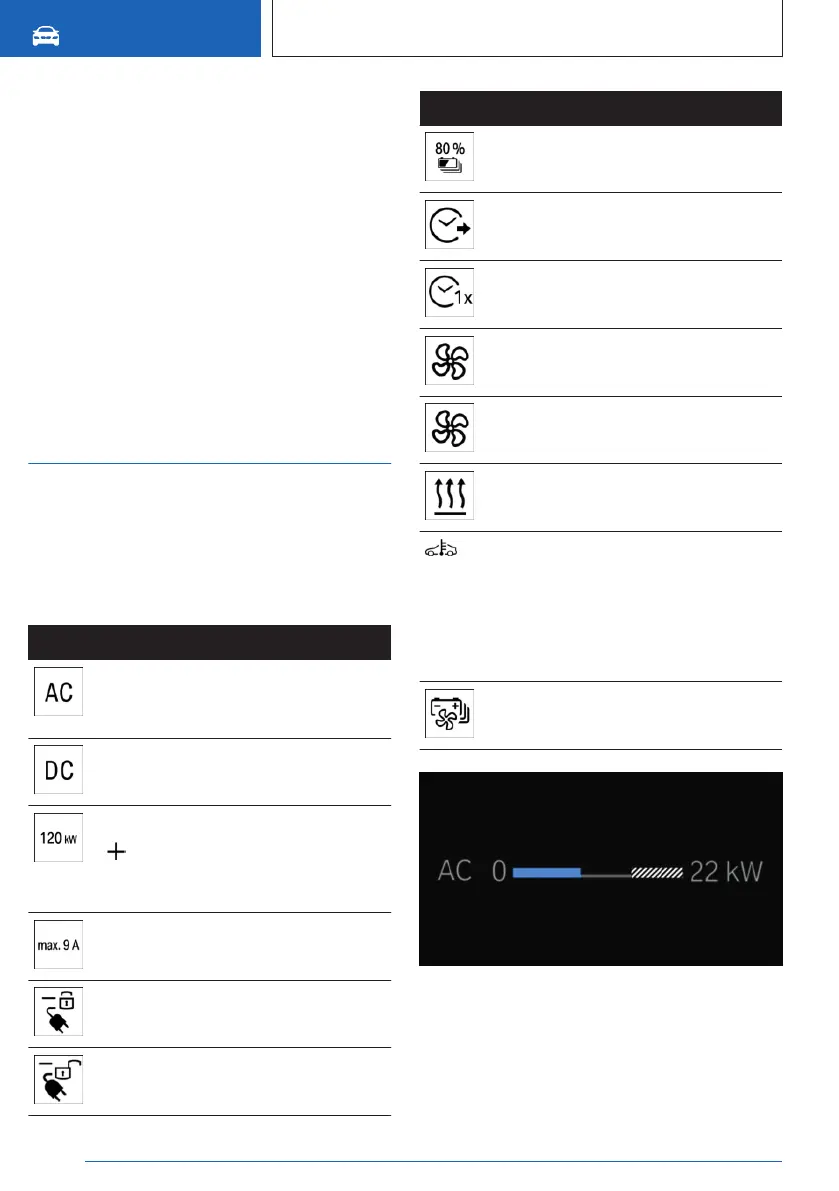
Information regarding the charging process is
shown on the charging screen.
Display Meaning
Charging the vehicle with a Mode 2
charging cable or Mode 3 charging
cable.
Charging the vehicle with a DC
charging cable.
Current charging capacity.
Icon indicates that the maximum
charging capacity of the vehicle has
been reached.
Maximum charging current strength
or currently set current limit.
Charging cable locked.
Charging cable unlocked.
Display Meaning
Set charge target.
Departure time set.
One-time departure time set.
Climate control activated at depar-
ture time.
Flashing: ventilation or cooling ac-
tive.
Flashing: heating active.
Blue icon: Charging capacity re-
duced due to low temperature of
the high-voltage battery.
White icon: Charging capacity re-
duced due to high temperature of
the high-voltage battery.
Battery thermal management ac-
tive.
The shaded area indicates a limitation in the
charging capacity that can occur, for instance
due to the connected charging infrastructure.
Additional information:
Seite 326
MOBILITY
Charging the vehicle
326
Online Edition for Part no. 01405A88D67 - VI/23



 To Next Page