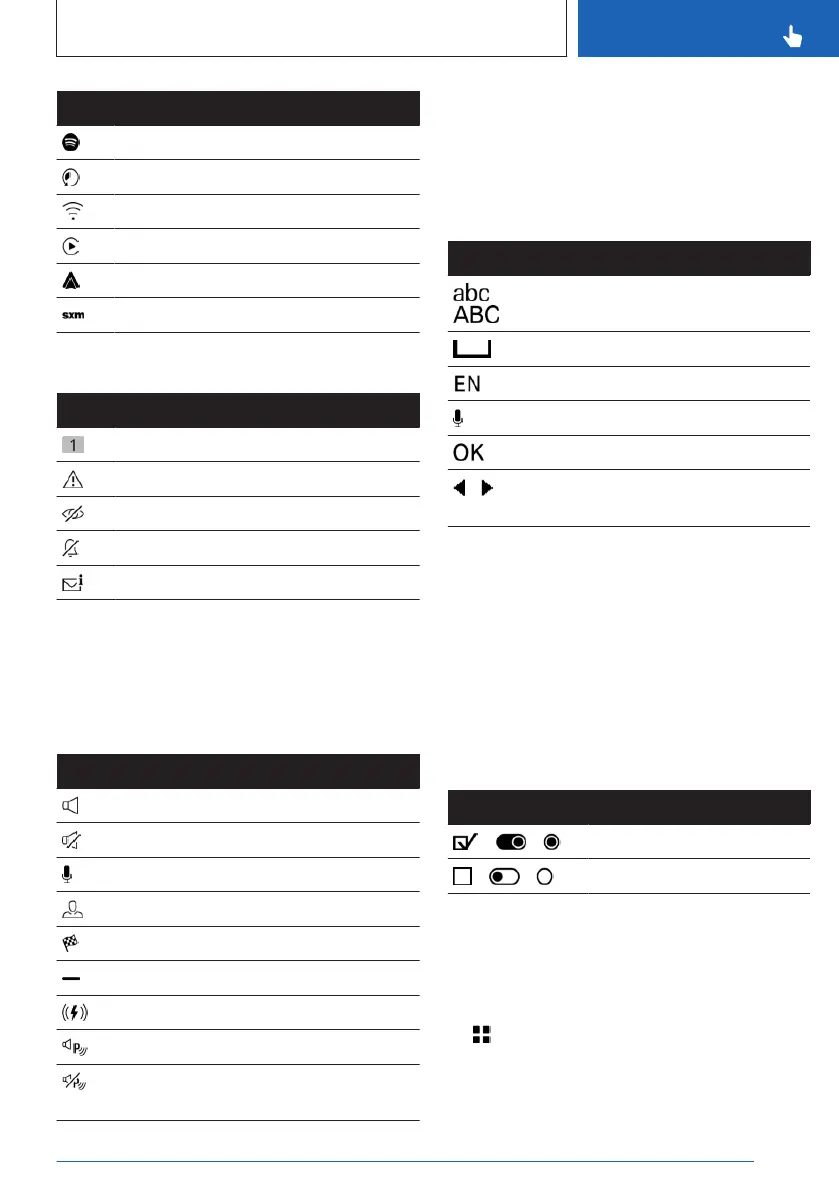
Icon Meaning
Connected Music with Spotify.
Time shift.
Wi-Fi.
Apple CarPlay.
Android Auto.
Satellite radio is switched on.
Status information messages
Icon Meaning
Number of notifications.
Check Control message.
Suppress private information.
Do not disturb.
Message.
Additional information:
Owner's Manual for Navigation, Entertain-
ment, and Communication, refer to page 6.
Other status information
Icon
Meaning
Sound output active.
Sound output deactivated.
Activation word active.
BMW ID or driver profile.
Destination guidance active.
Go to quick access.
Wireless charging active.
Park Distance Control: sound active.
Park Distance Control: sound deacti-
vated.
Input and display
Letters and numbers
Letters and numbers can be entered using the
controller, touchpad, control display, or voice
control, depending on vehicle equipment.
Icon Function
Change between capital and
lower-case letters.
Enter a blank space.
Switching between languages.
Use voice control.
Confirm entry.
Shift the input area to the left
or right.
Entry comparison
When entering data from a database such as
contacts, the selection is gradually narrowed
down for each character entered, with charac-
ters being added as necessary.
Activating/deactivating the functions
Some menu items are preceded by an icon.
Selecting the menu item enables or disables
the function.
Icon
Meaning
Function is activated.
Function is deactivated.
Enabling/disabling audible feedback
For some functions, audio confirmation is
given, e.g., sounds are emitted when operating
the control display.
1.
Apps menu
2. "Vehicle"
3. "System settings"
Seite 45
BMW iDrive
CONTROLS
45
Online Edition for Part no. 01405A88D67 - VI/23



 To Next Page