▷ At low speeds.
▷ When the windshield behind the interior
rearview mirror is fogged over, dirty or cov‐
ered with stickers, etc.
Instrument lighting
Adjusting
The parking lights or low beams
must be switched on to adjust
the brightness.
Adjust the brightness with the
thumbwheel.
Interior lights
General information
The interior lights, footwell lights, access lights
and courtesy lights are controlled automati‐
cally.
Thumb wheel for the instrument lighting con‐
trols brightness of some of these features.
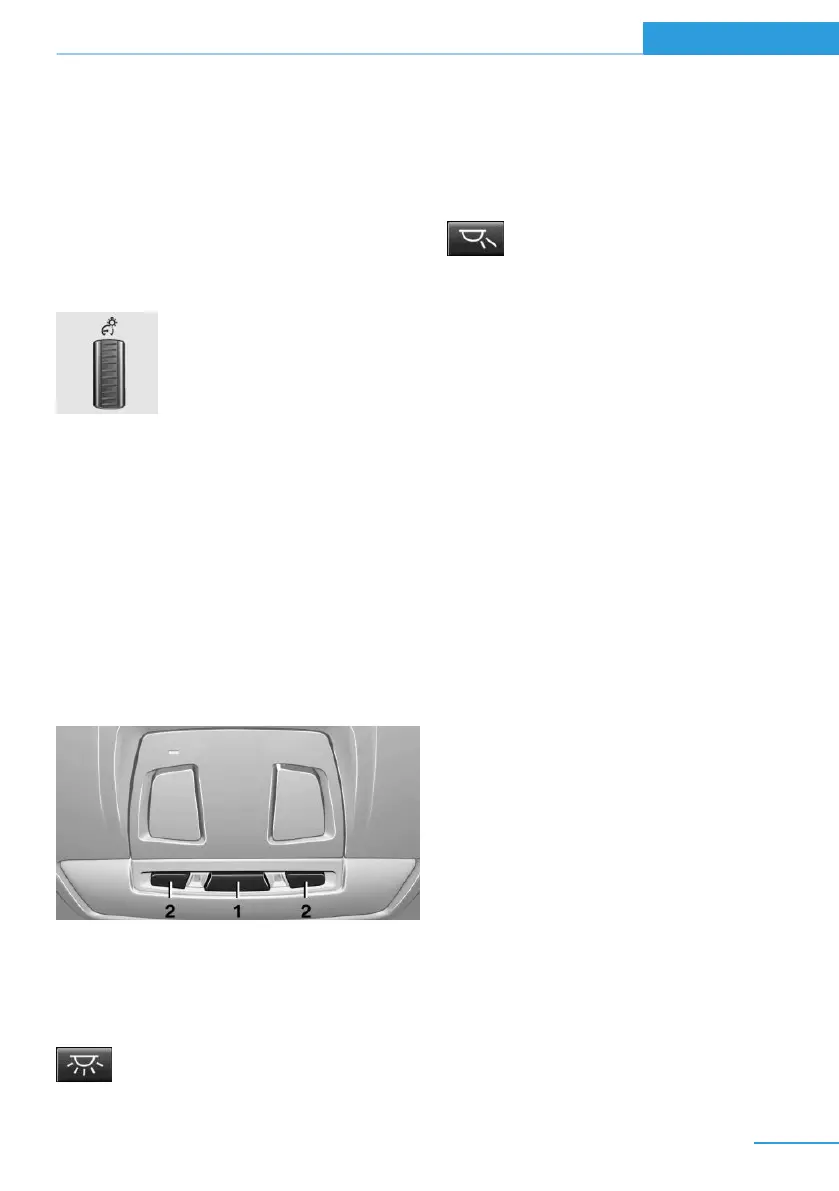
Overview
1 Interior lights
2 Reading lamp
Switching the interior lights on and off
Press button.
To reel off permanently: press the button for
approx. 3 seconds.
Switch back on: press button.
Reading lights
Press button.
Reading lights are located in the front next to
the interior light.
Ambient light
Depending on your optional features lighting
can be adjusted for some lights in the interior.
Selecting color scheme
On the Control Display:
1.
"Settings"
2. "Lighting"
3. "Lighting design"
4. Select desired setting.
To deactivate the ambient light: "Off".
Setting the brightness
On the Control Display:
1.
"Settings"
2. "Lighting"
3. "Brightness:"
4. Adjust the brightness.
Seite 95
Lights Controls
95
Online Edition for Part no. 01 40 2 960 891 - II/15



 To Next Page