Navigation Driving tips
145
Reference At a glanceControlsCommunications EntertainmentMobility
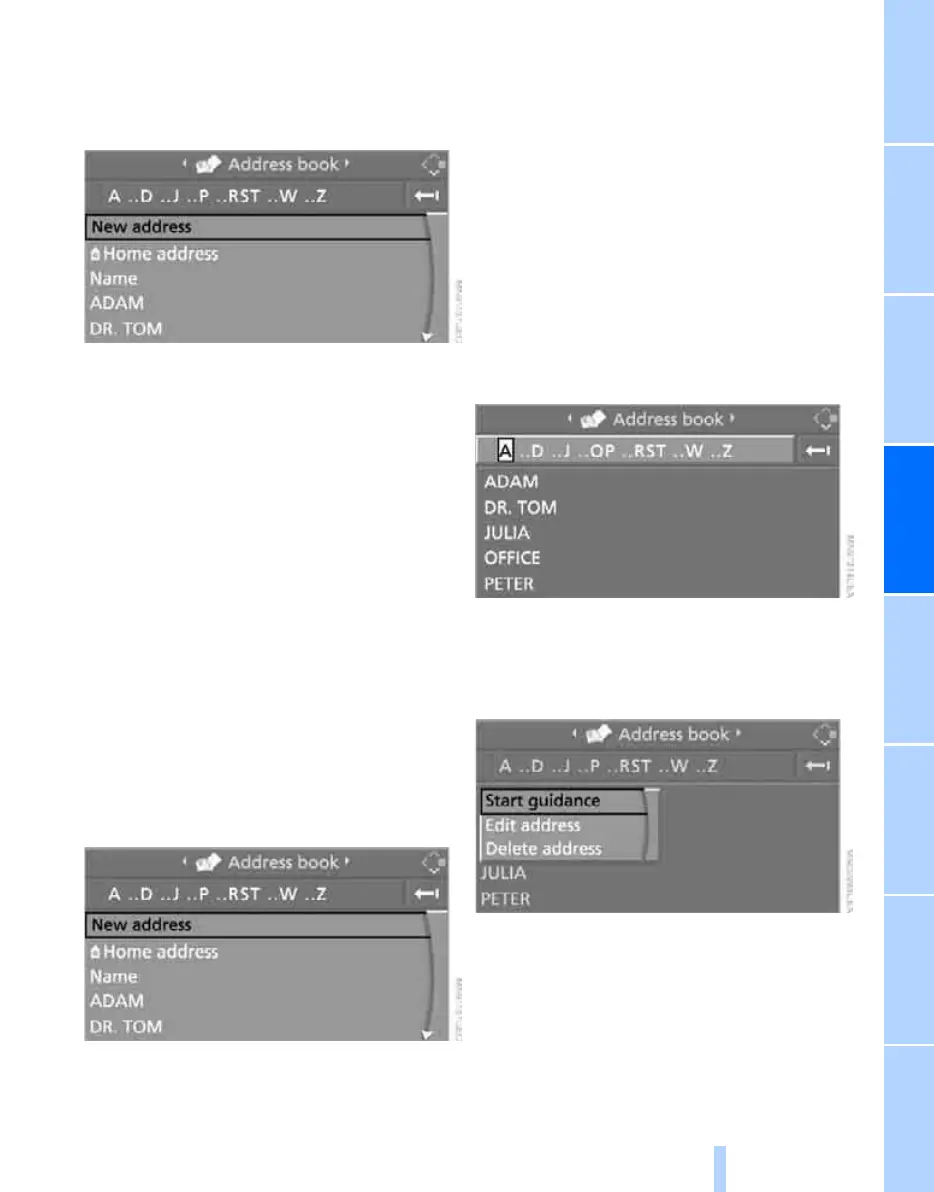
1. Select "Address book" and press the con-
troller.
2. Select "New address" and press the con-
troller.
3. Select "Enter address" and press the con-
troller.
4. Enter the name and address, refer also to
Entering a destination manually, page 136.
5. Select "Store in address book" and press
the controller.
The entry is stored in the address book.
You can also store a destination from the desti-
nation list in the address book, refer to
page 143.
Storing current position*
The current position can be transferred to the
address book.
1. Select "Address book" and press the con-
troller.
2. Move the highlight marker to the third field
from the top. Turn the controller until "New
address" is selected and press the control-
ler.
3. Select "Use current location as address"
and press the controller.
The name given can be changed. For oper-
ation, refer to Entering a destination manu-
ally, page 136.
4. Select "Store in address book" and press
the controller.
You can also enter your current position into the
address book if you have left the area covered
by the navigation DVD. In this case, you must
enter a name.
Selecting destinations from address
book
1. Select "Address book" and press the con-
troller.
The stored entries appear on the Control
Display.
2. Select the entry and press the controller.
To start destination guidance:
Select "Start guidance" and press the control-
ler.
Changing destinations from address
book
1. Select "Address book" and press the con-
troller.
2. Select the entry and press the controller.
Online Edition for Part no. 01 41 0 014 962 - © 02/08 BMW AG



 To Next Page