Everything under control
80
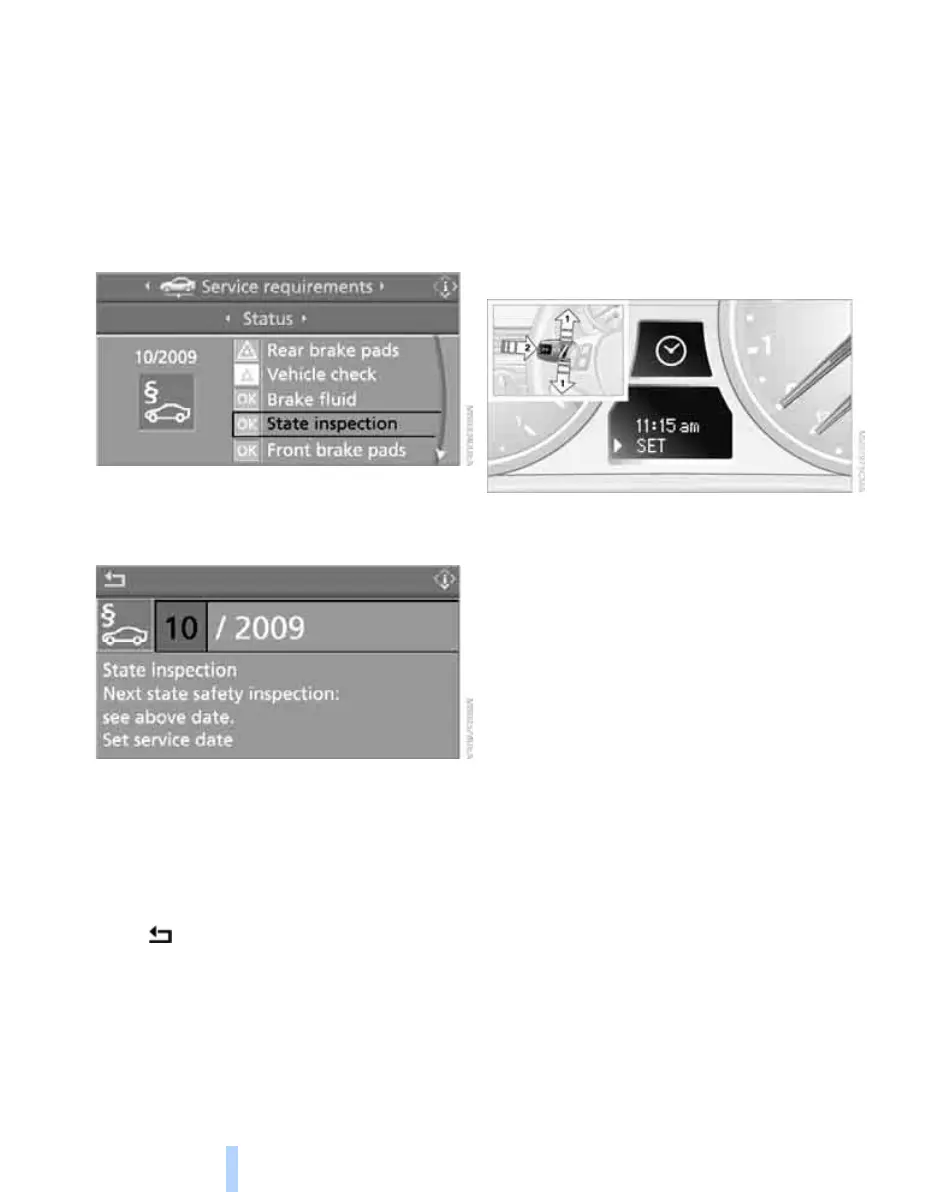
4. Select "Service Info" and press the control-
ler.
5. If necessary, move the highlight marker to
the uppermost field. Turn the controller
until "Service requirements" is selected and
press the controller.
6. Select "Status" and press the controller.
7. Select "State inspection" and press the
controller.
8. Select "Set service date" and press the
controller. The month is highlighted.
9. Turn the controller to make the adjustment.
10. Press the controller to apply the setting.
The year is highlighted.
11. Turn the controller to make the adjustment.
12. Press the controller to apply the setting.
The date entry is stored.
To exit from the menu:
Select and press the controller.
More information on the BMW Maintenance
System can be found on page 227.
Clock
The settings are stored for the remote control
currently in use, refer also to Personal Profile on
page 28.
Setting the time
In the instrument cluster
To set the 12h/24h format, refer to Setting the
12h/24h format below.
1. Push button 1 in the turn indicator lever up
or down repeatedly until the appropriate
symbol appears in the display, accompa-
nied by the time and the word "SET".
2. Press button 2.
3. Use button 1 to set the hours.
4. Press button 2 to confirm the entry.
5. Use button 1 to set the minutes.
6. Press button 2 to confirm the entry.
7. Press button 2.
The system accepts the new time.
Via iDrive
iDrive, for operating principle refer to page 16.
Online Edition for Part no. 01 41 0 014 962 - © 02/08 BMW AG



 To Next Page