Activating/deactivating
1. "CAR"
2. "Settings"
3. "Displays"
4. "Instrument panel"
5. "Engine display"
6. "Power meter"
When the setting for the drive mode view is acti‐
vated, the activated power indicator is only
shown in the COMFORT drive mode.
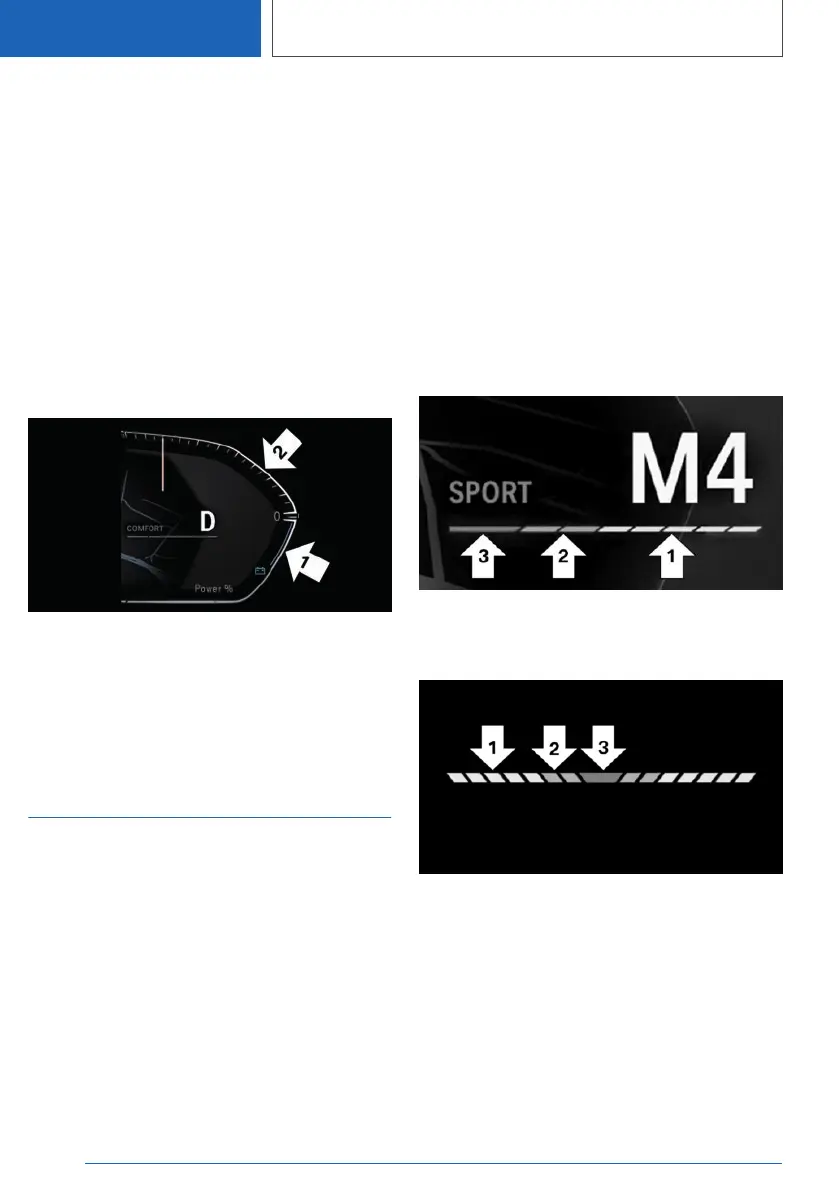
Display
Pointer in the area of arrow 1: display of the en‐
ergy recovered by coasting or when decelerat‐
ing, CHARGE.
Pointer in the area of arrow 2: output in percent,
POWER.
Shift point indicator
Concept
The shift lights indicate the upshift point at which
the best possible acceleration can be achieved.
Functional requirement
Instrument cluster with enhanced features: shift
lights are shown when the SPORT or SPORT
PLUS driving program is activated.
Instrument cluster without enhanced features:
shift lights are shown when the M/S SPORT pro‐
gram is activated.
Instrument cluster with
enhanced features: Switching
on/off
Steptronic Sport transmission:
1. Select SPORT or SPORT PLUS drive mode.
Press Driving Dynamics Control.
2. Activate the M manual mode of the transmis‐
sion.
Instrument cluster with
enhanced features: Display
Instrument cluster without
enhanced features: Display
Information about the driving
style
▷ Current engine speed is displayed in the
tachometer.
▷ Arrow 1: successive yellow illuminated fields
indicate an increase in the speed.
▷ Arrow 2: successive orange illuminated fields
indicate the upcoming shift moment.
Seite 156
CONTROLS
Displays
156
Online Edition for Part no. 01405A111C1 - VI/20









 To Next Page