▷ When the windshield in front of the interior
mirror is fogged up, dirty or covered by a
sticker, etc.
▷ In the event of incorrect detection by the
camera.
▷ If the speed limits stored in the navigation
system are incorrect.
▷ In areas not covered by the navigation sys-
tem.
▷ When roads deviate from the navigation,
such as due to changes in road layout.
▷ When passing buses or trucks with a speed
sticker.
▷ If the traffic signs are non-conforming.
▷ During calibration of the camera immedi-
ately after vehicle delivery.
▷ When signs that are valid for a parallel road
are detected.
Selection lists
General information
Depending on your vehicle's equipment, the
following can be displayed or operated using
the buttons and the thumbwheel on the steer-
ing wheel and via the displays in the instru-
ment cluster and the Head-up Display:
▷
Current audio source.
▷ Phone redial.
▷ Turn on voice activation system.
Activating a list and adjusting the
setting
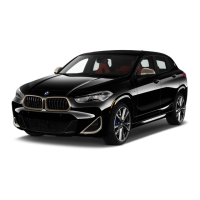
On the right side of the steering wheel, turn the
thumbwheel to activate the corresponding list.
1.
Turn the thumbwheel and select the de-
sired setting.
2. Press the thumbwheel.
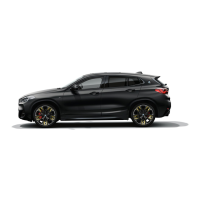
Display
Depending on the equipment version, the list
in the instrument cluster may differ from the il-
lustration.
Trip computer
Principle
The trip computer displays different vehicle
data in the instrument cluster, such as average
values.
Seite 129
Displays
CONTROLS
129
Online Edition for Part no. 01405A540A1 - II/22




 To Next Page