General information
Shifting
Gears will only be shifted at appropriate engine
and road speeds; for instance, downshifting is
not possible if the engine speed is too high.
The lowest possible gear is selected by simul-
taneously operating the kickdown and moving
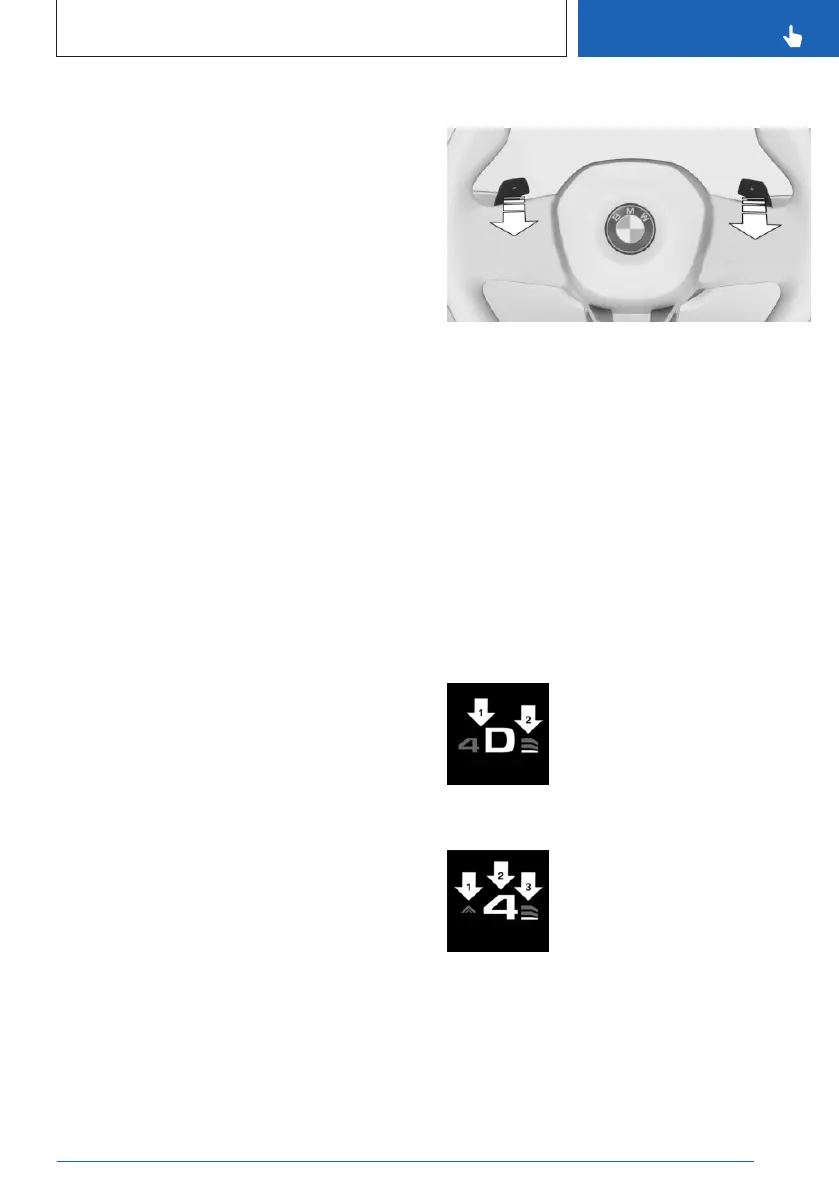
the selector lever forward or actuating the left
shift paddle.
Temporary sequential mode
After a shift paddle is actuated in Drive mode,
the system temporarily switches to sequential
mode.
After conservative driving in sequential mode
without acceleration or shifting via the shift
paddles for a certain amount of time, the
transmission switches back to Drive mode.
Permanent sequential mode
Sequential mode remains permanently active if
it was active before the shift paddle was actu-
ated.
Switching to Drive mode
It is possible to switch to Drive mode as fol-
lows: pull and hold the right shift paddle.
Switching via the selector lever
▷
Upshifting: pull the selector lever rear-
wards.
▷ Downshifting: press the selector lever for-
ward.
A shift in Drive mode causes a switch to Se-
quential mode.
Switching via the shift paddles
▷ Upshift: pull right shift paddle.
▷ Downshift: pull left shift paddle.
Display on the selector lever
The actually engaged transmission position
can deviate from the selector lever position in
some situations. The display in the selector
lever flashes.
Observe the display in the instrument cluster in
these cases.
Displays in the instrument cluster
Drive mode
▷
Engaged gear together with
a D, arrow 1.
▷ Selected Drivelogic program,
arrow 2.
Sequential mode
▷
Gear shift indicator, arrow 1.
▷ Engaged gear, arrow 2.
▷ Selected Drivelogic program,
arrow 3.
Notice
When the outside temperature is very low, the
display may not work. Current driving direction
is recognizable at the engaged selector lever
position.
Seite 125
Driving
CONTROLS
125
Online Edition for Part no. 01405A8A608 - VI/23


 To Next Page