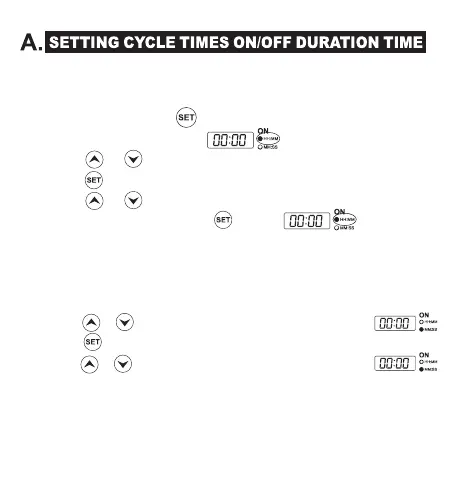
1. Set Cycle Time ‘ON’ Duration Time
1.1 When the programmed time exceeds 1 hour
To set the hour, press to enter ‘ON’ time setting, the timer
displays in HH:MM format.
Press or to set the ‘ON’ duration hours. (00~23)
Press again to lock in the setting.
Press or to set the ‘ON’ duration minutes. (00 ~ 59)
To lock in the setting, press again.
The current settings show the "ON" duration as xx hours xx
minutes 00 seconds.
1.2 When the programmed time is less than 1 hour
Press the SET button until the MM:SS display turns the red light on.
Press or to set the ‘ON’ duration minutes. (00 ~ 59)
Press again to lock in the setting.
Press or to set the ‘ON’ duration seconds. (00 ~ 59)
The current settings show the "ON" duration as 00 hours xx minutes
xx seconds.
Press the SET button to save the ON setting and enter the OFF
etting.
-3-


 To Next Page