Need help?
Do you have a question about the BNC 555 Series and is the answer not in the manual?
Contact information for questions and comments about operating the 555 pulse generator.
Lists the parts included with the 555 pulse generator, contact vendor if any are missing.
Details the 30-day money back guarantee and one-year limited warranty from date of delivery.
Discusses dangers of electrical shock and safety precautions for using the instrument.
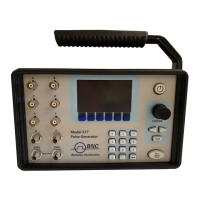
Describes the front panel, including display layout, indicators, and keypads.
Details the 4-line vacuum fluorescent display and its three enunciators.
Explains the function of the three keypad areas: Channel, Arrow, and Numeric.
Describes the use of the adjustment knob as an alternative to the arrow keypad for parameter adjustment.
Provides an overview of the pulse generator's architecture and timing generator sections.
Guides users through the default mode operation and how to generate a specific pulse train.
Explains how to navigate menus and select items for editing.
Details editing non-numeric items and entering alphanumeric values using different modes.
Outlines parameters for timing, pulse configuration, special functions, and gating.
Details MODE, #/BURST, DIVIDE-BY-N, GATE, and POLARITY for channels.
Describes the MODE menu for oscillator settings and RATE menu for period.
Details GATE/TRIGGER menus and the SYSTEM menu for communication and keypad settings.
Covers BAUD RATE, ECHO, and GPIB ADDRESS settings for serial and GPIB interfaces.
Explains Keypad Controls and Miscellaneous settings like Auto, Decimal, Brightness.
Outlines the STORE menu for saving configurations, including configuration number and name.
Describes the RECALL menu for retrieving stored or default system configurations.
Presents summary menus for pulsewidth and delay for semi-custom units.
Explains Continuous, Single Shot, Burst, and Duty Cycle modes without external trigger.
Details Continuous, Single Shot, Burst, and Duty Cycle modes with external trigger.
Lists serial port pinout and describes programming command types (IEEE 488.2, SCPI).
Explains the format of IEEE 488.2 common commands, including syntax and examples.
Details SCPI command structure, keywords, parameters, query syntax, and channel specification.
Defines SCPI parameter types and lists/explains the error codes returned by the unit.
Provides a detailed example of SCPI commands for continuous operation.
Shows SCPI commands for an external trigger, single shot mode.
Covers commands for instrument subsystem and channel selection (:INSTrument, :CATalog?, :FULL?, :NSELect, :SELect).
Details commands for channel state and pulse generation (:STATE, :PULSE, :WIDTH, :DELay).
Covers commands for pulse polarity, output type, and output mode (:POLarity, :OUTPut, :MODe, :AMPLitude).
Details commands for channel mode, burst counter, and divide counter (:CMODE, :BCOunter, :DCOunter).
Covers commands for channel gate subsystem and state (:CGATE, :STATE, :POLarity).
Details commands for display control and system status (:DISPlay, :BRIGhtness, :UPDate, :SYSTem, :STATE).
Covers commands for the beeper and communication interfaces (:BEEPer, :VOLume, :COMMunicate, :GPIB, :ADDRess).
Details commands for the serial interface and keypad lock (:SERial, :BAUD, :ECHO, :KLOCK).
Covers commands for autorun startup and querying the SCPI version (:AUTorun, :VERSion?).
Summarizes common commands like *IDN?, *RCL, *RST, *SAV, *TRG.
States that the pulse generator has no user-serviceable parts and advises contacting the distributor for repair.
Details the optional 35 volt output, its features, and specifications.
 General
| Output Impedance | 50 Ω |
|---|---|
| Pulse Width | 10 ns to 1 s |
| Duty Cycle | 0.1% to 99.9% |
| Pulse Width Range | 10 ns to 1 s |
| Trigger Input | TTL compatible |

 To Next Page