Model 670C Berkeley Nucleonics Corp. 45 of 96
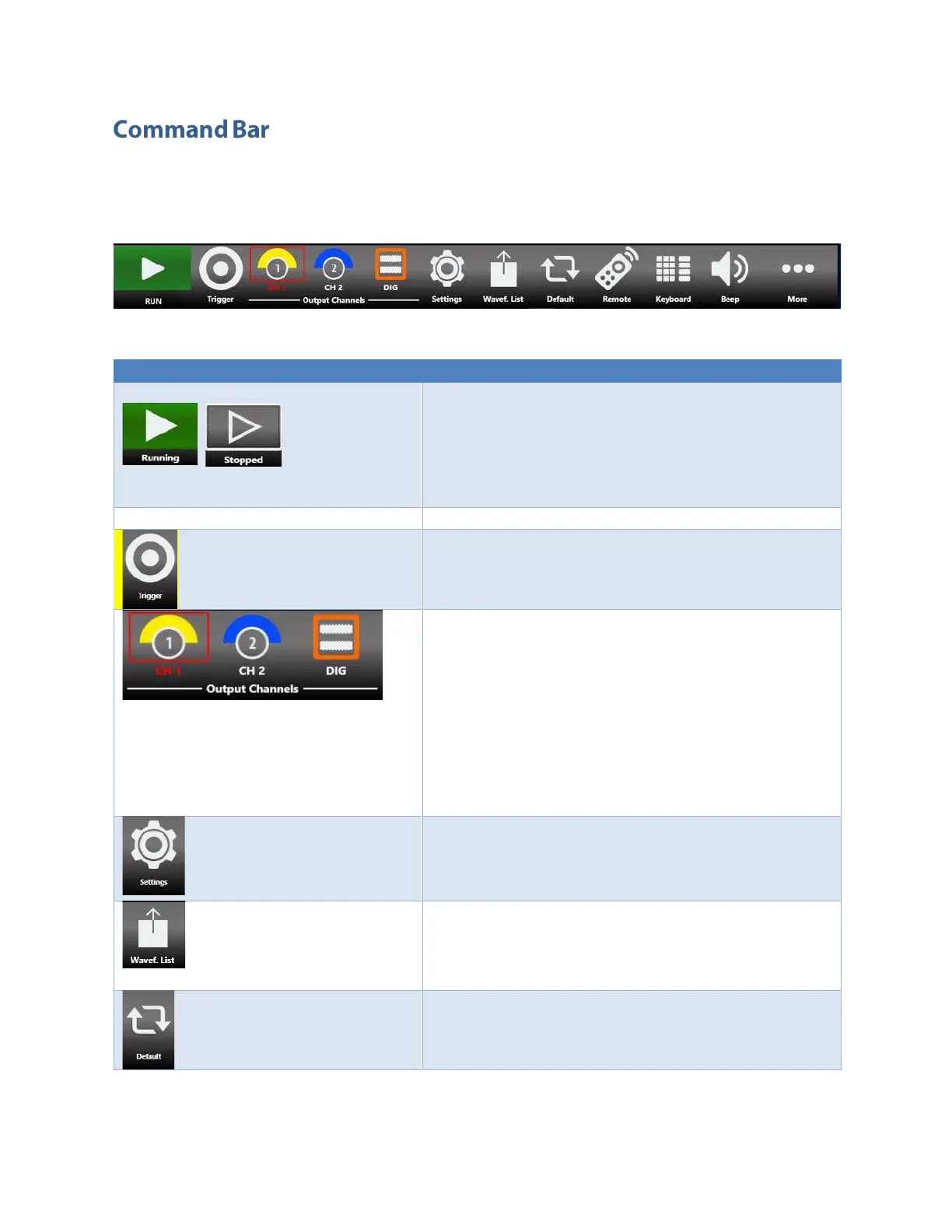
The command bar contains several touch buttons to control the instrument. Below a detailed
description of this bar is provided.
Please note that the position of the buttons described below may change due to instrument different
model.
Command Bar Buttons Description
RUN/STOP Button – Use this button to set the
instrument in Running state (or Ready to receive a
Trigger) or in the Stopped state. If the button is green the
instrument is running while if it is grey the instrument is
stopped. Bushing the button will change the instrument
state.
Trigger Button – Use this button to send an internal
software trigger to the instrument. Independently from
the setting this trigger is always received.
Output Channels Buttons - Press CH1, CH2,…CHN, DIG to
change the Output Channel page.
If you press again the Channel button, you will turn it
OFF/ON .
When a channel is OFF, it is mechanically disconnected
from the output.
The DIG button means “Digital” and it will
connect/disconnect the Digital Signals. When digital
signals are disabled, they will keep logic “zero” value at
the output.
Settings Button – Use this button to open the output
channel Settings, device Settings, Marker Settings and
Sequencer Settings. (For more information, please refer
to the relative section).
Wavef. List – Use this button to open a page where you
can Import/Export a waveform from file. (For more
information, please refer to the relative section).
Default – Use this button to restore the default value of
all parameters of the instrument.


 To Next Page
 Loading...
