Model 670C Berkeley Nucleonics Corp. 54 of 96
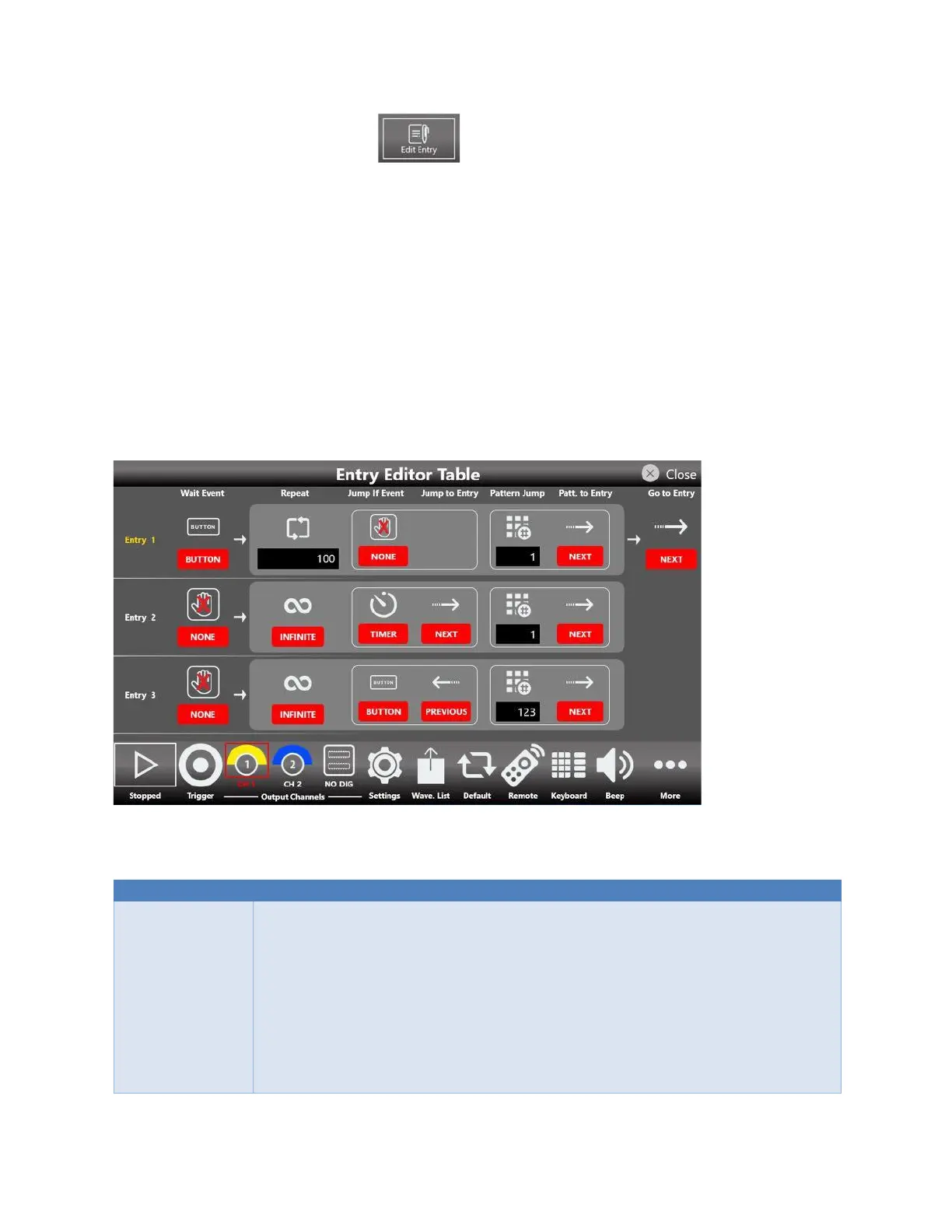
• Press the “Edit Entry” button on Sequencer Area to open the Entry Editor Table.
Entry Editor Table
This table allows you to change all the parameters associated to a selected Entry for the exception of the
Length that should be set on the Sequencer area page.
You can use the swipe up or down gesture to scroll through the table elements, you can touch the table
icons to have access to the available options.
The first column in the Entry Editor Table are the Entry numbers that define the play sequence and they
are used as the targets for the Jump To, Pattern Jump and Go To features.
The selected Entry is highlighted in yellow.
The Entry Editor Table has the following options:
Defines the event that must occur before the waveform is generated.
The waveform output is held until the Wait Event happens, then the waveform
output starts.
• None: No waiting, the waveform plays immediately.
• Button: the event is provided to the instrument by the Trigger button on
the keyboard or Trigger button on the menu bar or from a Remote
Command.
• Timer: the event is internally generated by a Timer you can set on the
Settings ➔ Trigger page.


 To Next Page
 Loading...
