Model 670C Berkeley Nucleonics Corp. 59 of 96
Trigger
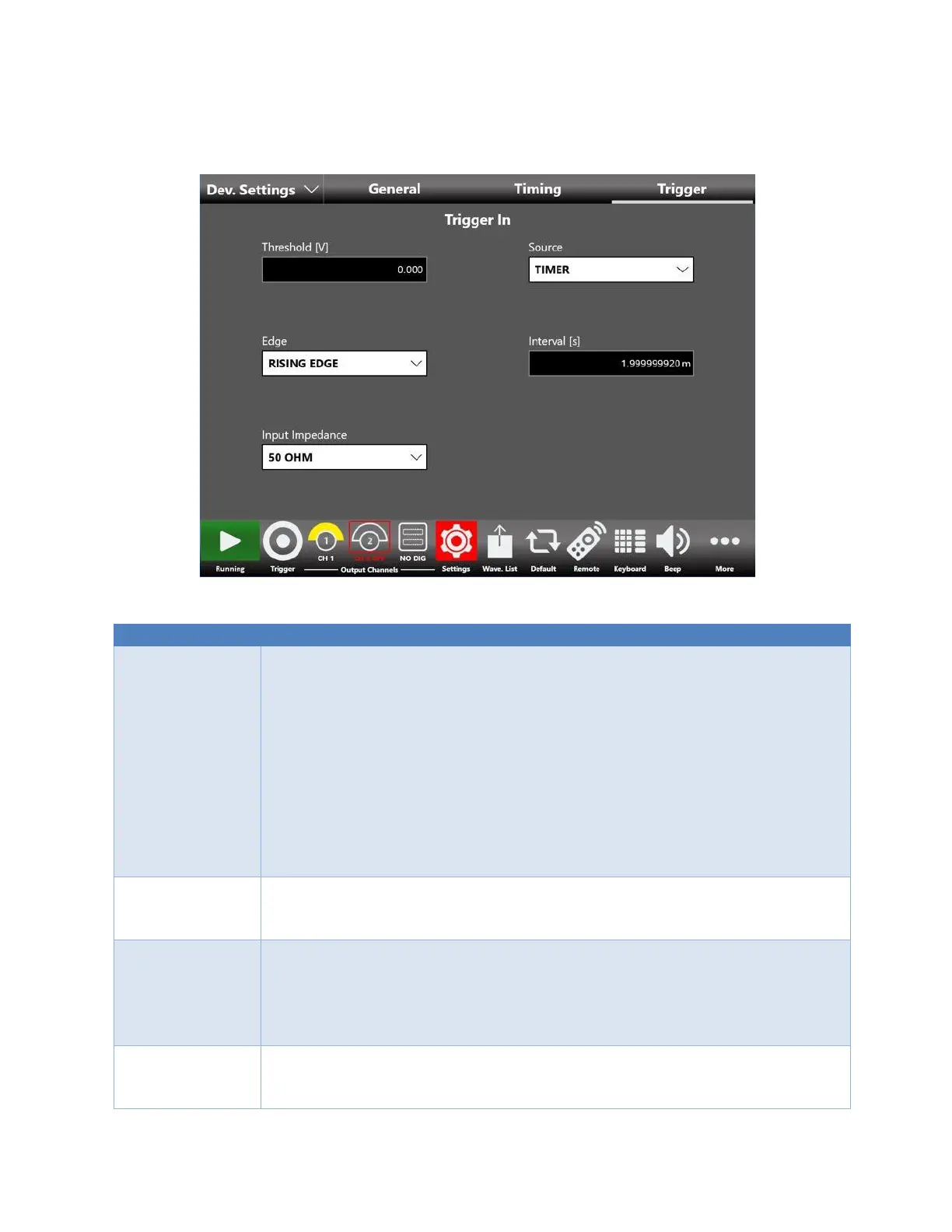
The Trigger settings are common for all the channels
Trigger Button: The Trigger event is provided to the instrument by the Trigger
button on the keyboard or Trigger button on the menu bar or from a Remote
Command.
Timer: The Trigger event is internally generated by a Timer. The Timer count
interval is set by Interval [s] textbox.
Trigger In Connector: the Trigger event is generated by the signal applied
externally on the BNC connector (TRIGGER IN) when it crosses the selected
Threshold with the selected Slope. You can select Threshold value and Slope using
the relative textbox and slider.
Note: The Trigger buttons and the Trigger from remote command are always
active, independently from the selecting Trigger Source.
Sets the timer count interval. It has effect only when the trigger Source is Timer.
The edited value is automatically rounded to the closest value that the hardware
can implement.
The Slope can be positive or negative. When Rising Edge is selected the trigger is
detected when the signal on the “TRIGGER IN” BNC connector crosses the
threshold from low to high. The Falling Edge option is the opposite.
“Both Edges” means that Trigger is sensitive to both edges of the signals.
It has effect only when the selected Source is External.
It is the threshold that the external signal applied to the “TRIGGER IN” connector
must cross to issue a Trigger event to the instrument. It has effect only when the
selected Source is External.


 To Next Page
 Loading...
