S250 Bobcat Loader
SA-10 Operation & Maintenance Manual
DELUXE INSTRUMENT PANEL SETUP (CONT’D)
Deluxe Panel Setup
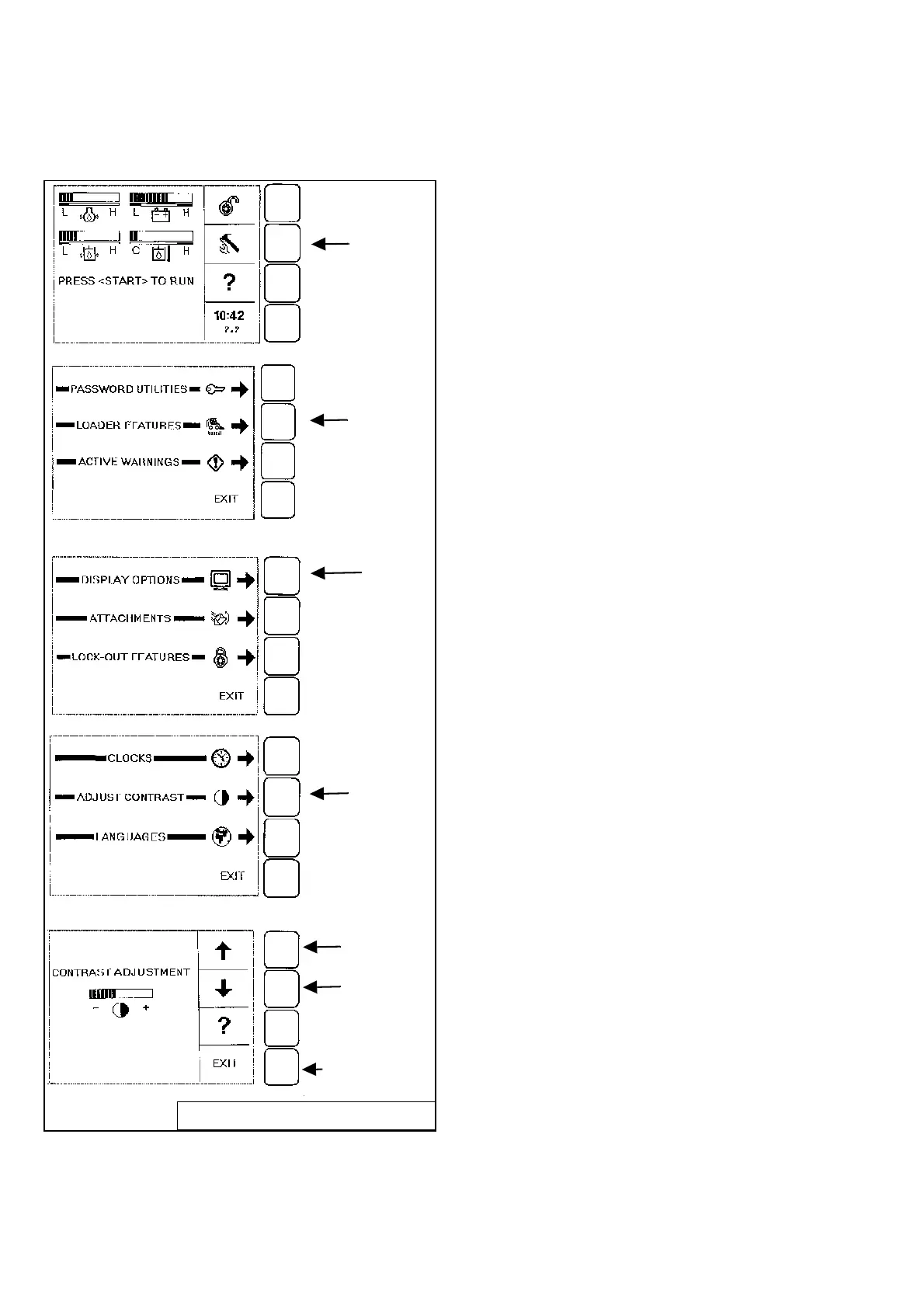
Display Options
Figure SA-3
All new machines with Deluxe Instrumentation arrive at
Bobcat Dealerships with the panel in locked mode. This
means that a password must be used to start the engine
[Figure SA-3].
Passwords (Deluxe)
For security purposes, your dealer may change the
password and also set it in the locked mode. Your
dealer will provide you with the password.
Owner Password:
Allows for full use of the loader and to setup the
Deluxe Panel. Owner can select a password to allow
starting & operating the loader and modify the setup
of the Deluxe Panel. Owner should change the
password as soon as possible for security of the
loader.
User Password:
Allows starting and operating the loader; cannot
change password or any of the other setup features.
DISPLAY
TOOL/SETUP
Press
Press
LOADER
Press
ADJUST
Press
UP OR DOWN
Press
Arrow to
change contrast.
Press EXIT to
return to
previous level
menu.
B-16163/B16164/B-16161/B-16166/B-16167
FEATURES
OPTIONS
CONTRAST



 To Next Page