149 S650 Operation & Maintenance Manual
AIR CLEANER SERVICE (CONT’D)
Replacing Filter Elements (Cont’d)
Outer Filter (Cont’d)
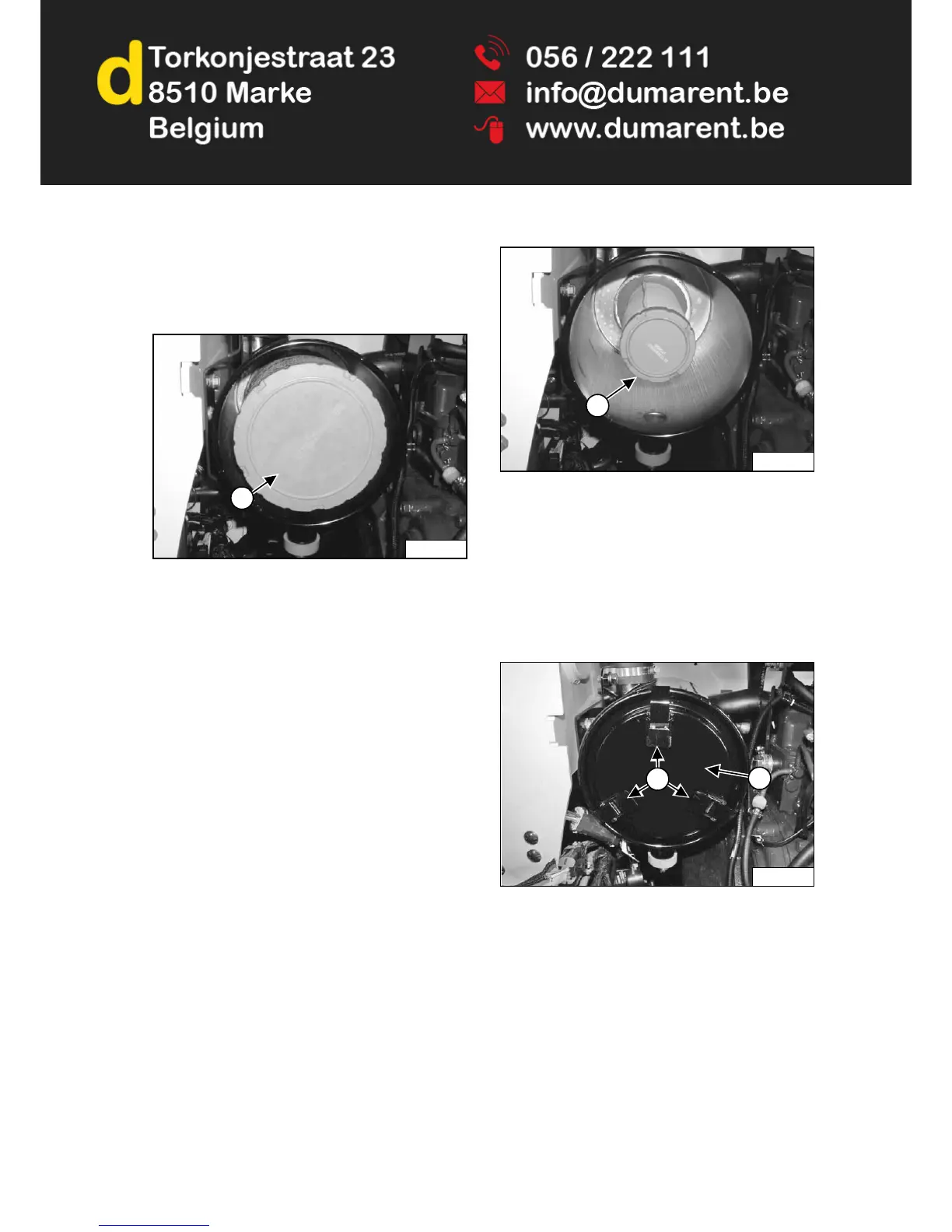
Figure 210
Pull the outer filter element (Item 1) [Figure 210] out and
discard.
NOTE: Make sure all sealing surfaces are free of dirt
and debris. DO NOT use compressed air.
Install new filter element. Push all the way in until it
contacts the base of the housing.
Install the dust cover and secure the latches
[Figure 209].
Inner Filter
Only replace the inner filter element under the following
conditions:
• Replace the inner filter element every third time the
outer filter is replaced.
• After the outer element has been replaced, start the
engine and run at full rpm. If service code [M0117]
(Air Filter Plugged) is still displayed in the data
display, replace the inner filter element.
Remove the dust cover [Figure 209] and the outer filter
element [Figure 210].
Figure 211
Remove the inner filter element (Item 1) [Figure 211].
NOTE: Make sure all sealing surfaces are free of dirt
and debris. DO NOT use compressed air.
Install new inner filter element. Push all the way in until it
contacts the base of the housing.
Install the outer filter element [Figure 210].
Figure 212
Install the dust cover (Item 2) and secure the latches
(Item 1) [Figure 212].
P-90523A
1
P-90524A
1
P100072
2
1



 To Next Page