187 S650 Operation & Maintenance Manual
DIAGNOSTIC SERVICE CODES
Viewing Service Codes
The Service Codes will aid your dealer in diagnosing
conditions which can damage your machine.
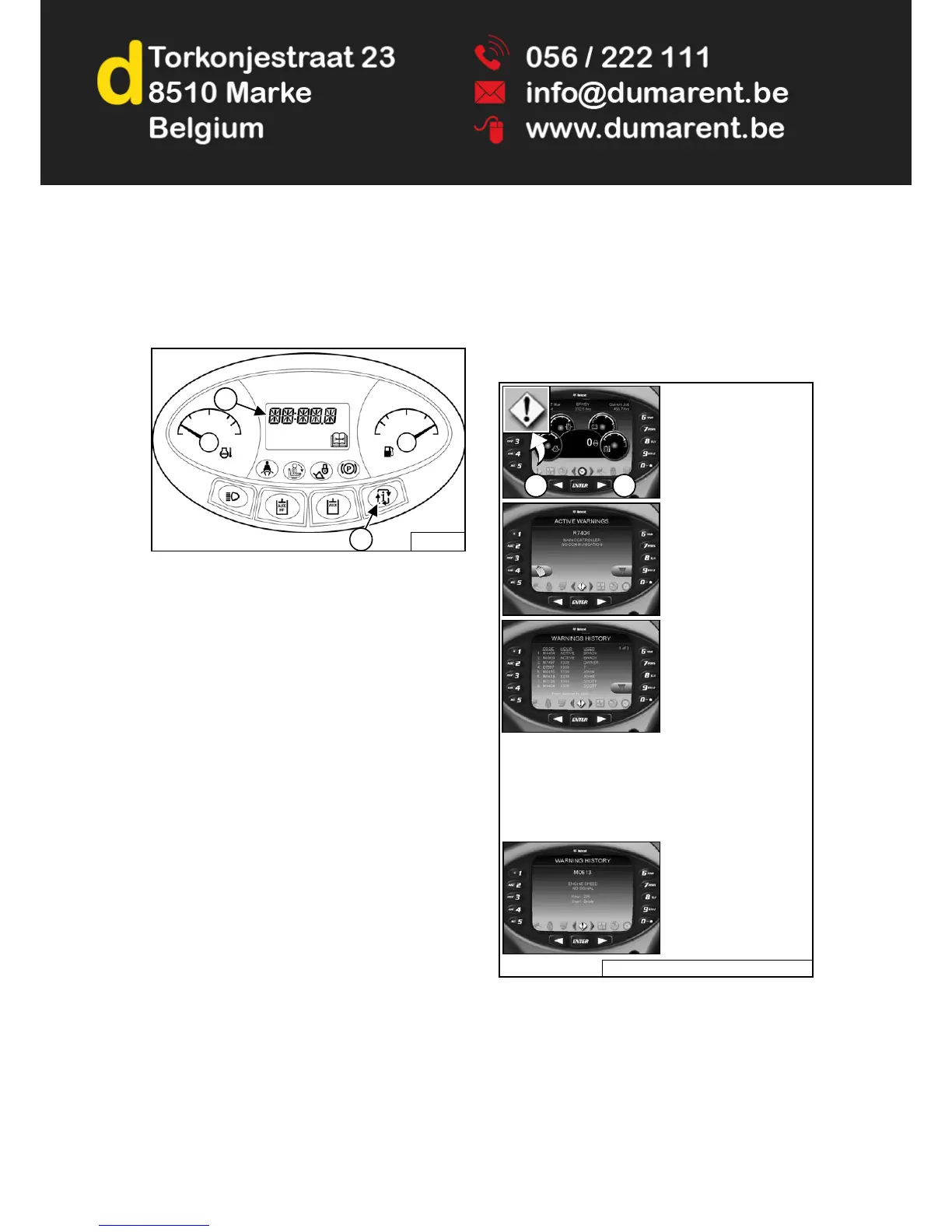
Figure 294
Press the INFORMATION button (Item 1) to cycle the
DATA DISPLAY (Item 2) [Figure 294] until the service
code screen is displayed. If more than one SERVICE
CODE is present, the codes will scroll on the DATA
DISPLAY.
NOTE: Corroded or loose earths can cause multiple
service codes and / or abnormal symptoms.
All instrument panel lights flashing, alarm
sounding, headlights and taillights flashing,
could indicate a bad earth. The same
symptoms could apply if the voltage is low,
such as loose or corroded battery cables. If
you observe these symptoms, check earths
and positive leads first.
Deluxe Instrumentation Panel
The optional Deluxe Instrumentation Panel offers an
additional view of service codes that includes a brief
description.
The last 40 codes stored in history can also be viewed
using the Deluxe Instrumentation Panel.
Figure 295
P-76455G
2
1
P-90378 / NA3025A / NA3000 / NA3038 / NA3035
Press a scroll button
(Item 1) repeatedly until
the Active Warnings
screen icon (Inset) is
highlighted.
1 1
The ACTIVE WARNINGS
screen displays active
service codes. Press [9]
to view the next service
code if more than one is
present. Press [4] to
display a history of
service codes.
The WARNINGS
HISTORY screen will list
the Service Code
Number
(CODE),
Hourmeter reading when
the error occurred
(HOUR), and the User
(USER) who was logged
in to operate the machine
when the error occurred.
Press [9] to view the next eight Service Codes.
A total of 40 Codes can be stored. When more than 40
codes occur, the oldest code will disappear and the
newest code will be in the number 1 position.
Press the list number
next to the service code
for more detail.
Press left scroll button to
back up one screen.


 To Next Page
 Loading...