46 S650 Operation & Maintenance Manual
INSTRUMENT PANEL IDENTIFICATION (CONT’D)
Right Panel (Standard Key Panel)
Figure 12
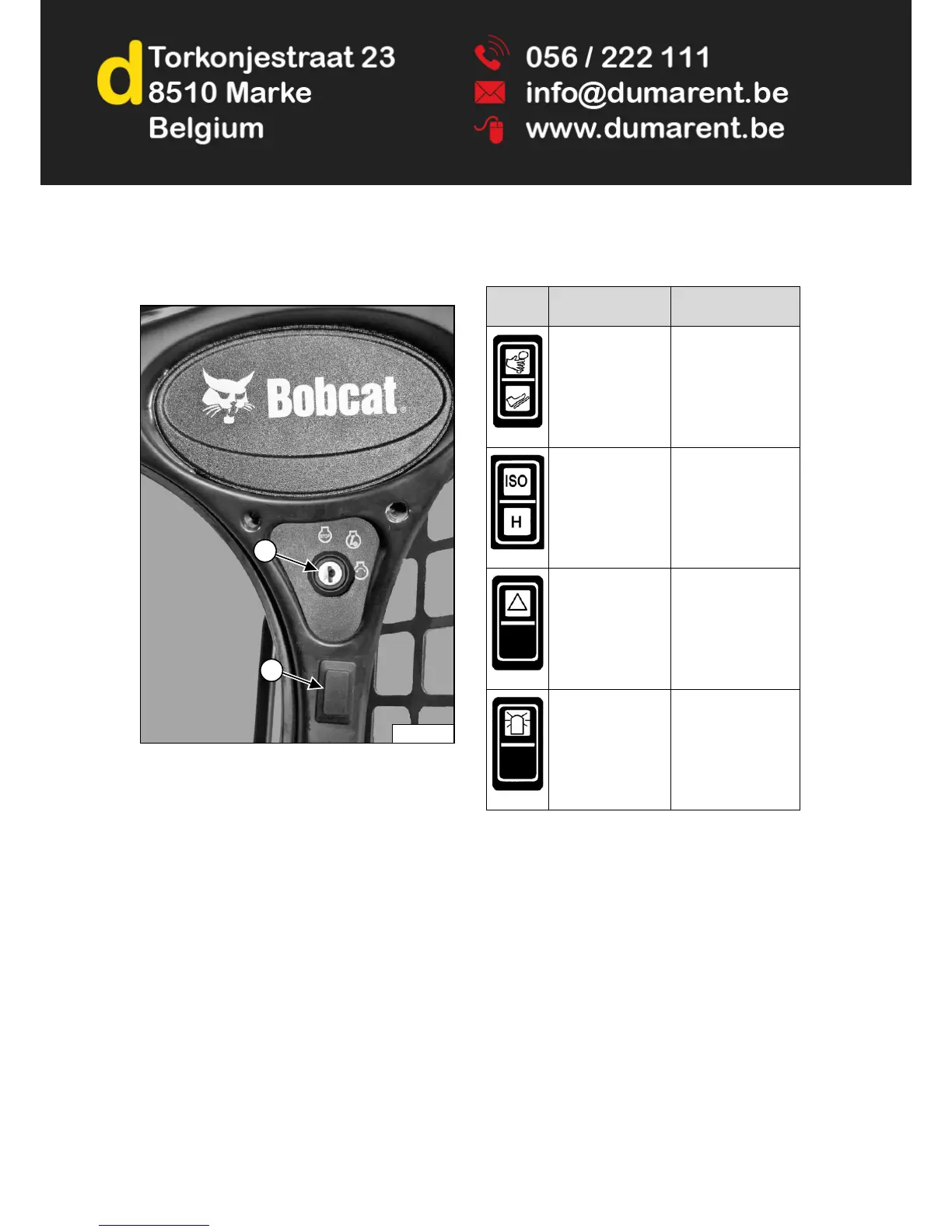
This machine may be equipped with a Standard Key
Panel [Figure 12].
The Standard Key Panel has a key switch (Item 1)
[Figure 12] used to turn the loaders electrical system on
and off, and to start and stop the engine.
The switch location (Item 2) [Figure 12] can have
different functions depending on machine configuration.
See the following table for more information.
P-85285
1
2
REF.
DESCRIPTION
FUNCTION /
OPERATION
ADVANCED
CONTROL SYSTEM
(ACS) (Option)
Press the top to select
Hand Controls; bottom
to select Foot
Controls.
SELECTABLE
JOYSTICK
CONTROLS (SJC)
(Option)
Press the top to select
‘ISO’ Control Pattern;
bottom to select ‘H’
Control Pattern.
FOUR-WAY
FLASHER LIGHTS
(Option)
Press the top to turn
lights ON; bottom to
turn OFF.
ROTATING BEACON
(Option)
or
STROBE LIGHT
(Option)
Press the top to turn
light ON; bottom to
turn OFF.



 To Next Page