47 S650 Operation & Maintenance Manual
INSTRUMENT PANEL IDENTIFICATION (CONT’D)
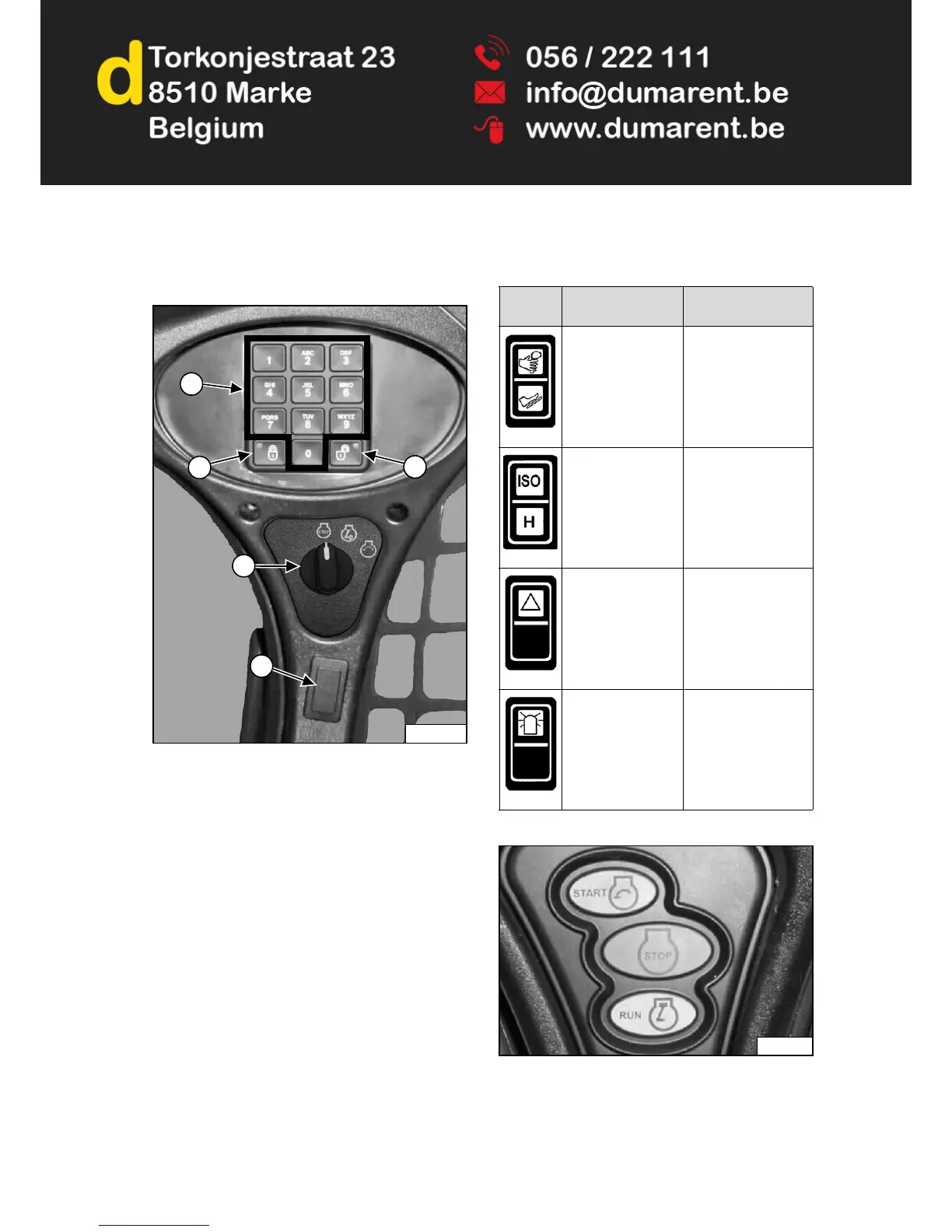
Right Panel (Keyless Start Panel)
Figure 13
1. Keypad (keys 1 through 0): Used to enter a number
code (password) to allow starting the engine. An
asterisk will show in the left panel display screen for
each key press.
2. LOCK Key: Used to lock keypad. The lock key will
display a red light to indicate a password is required
to start the loader. (See Password Lockout Feature
on Page 195.)
3. UNLOCK Key: Used to unlock keypad. The unlock
key will display a green light to indicate the loader can
be started without a password. (See Password
Lockout Feature on Page 195.)
4. Key Switch: Used to turn the loaders electrical
system on and off, and to start and stop the engine.
The switch location (Item 5) [Figure 13] can have
different functions depending on machine configuration.
See the following table for more information.
Figure 14
Earlier models used a push button switch assembly
[Figure 14] instead of a key switch.
P-90819H
4
5
1
2
3
REF.
DESCRIPTION
FUNCTION /
OPERATION
ADVANCED
CONTROL SYSTEM
(ACS) (Option)
Press the top to select
Hand Controls; bottom
to select Foot
Controls.
SELECTABLE
JOYSTICK
CONTROLS (SJC)
(Option)
Press the top to select
‘ISO’ Control Pattern;
bottom to select ‘H’
Control Pattern.
FOUR-WAY
FLASHER LIGHTS
(Option)
Press the top to turn
lights ON; bottom to
turn OFF.
ROTATING BEACON
(Option)
or
STROBE LIGHT
(Option)
Press the top to turn
light ON; bottom to
turn OFF.
P-90214B


 To Next Page
 Loading...