KNOW YOUR VACUUM CLEANER INSTALI ATION OF THE APPLIANCE
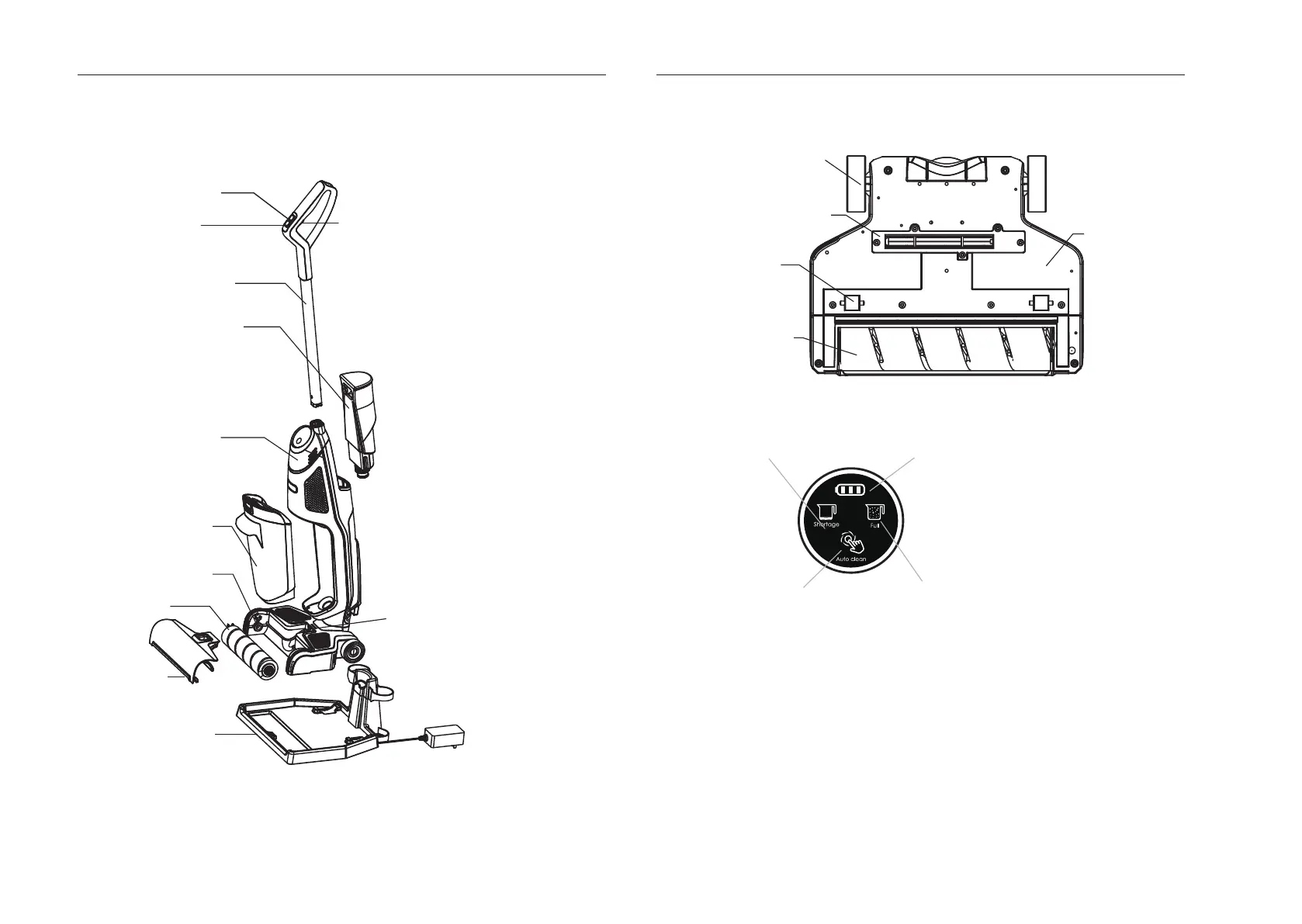
KNOW YOUR VACUUM CLEANER
INSTRUCTION FOR FLOOR BRUSH
INTRODUCTION FOR CONTROL PANEL
INSTALLATION OF THE APPLIANCE
The appliance is relatively large. For the convenience of transportation and storage, the
charger, the handle and the body are packaged separately. Please follow the steps below to
install the appliance when it is used for the first time.
INSTALLATION FOR THE BODY AND THE HANDLE
Insert the handle into the corresponding position at the top of body by followin
g the
direction as shown in Fig 1. There is a fastener at the handle, and the handle is installed
well in position after you hearing a sound of "click" (see Fig.2) .
5 6
Refill indicator
Battery indicato
Auto-clean button
Full indicator
Water button (for increasing
the water amount )
Power button
UV button
Handle
Clean water tank
Body
Dirty water tank
Floor brush
Roller brush
Roller brush
cover
UV indicator
Charger
Rear wheel
UV lamp
Small wheel
Bottom cover
of floor brush
Roller brush


 To Next Page