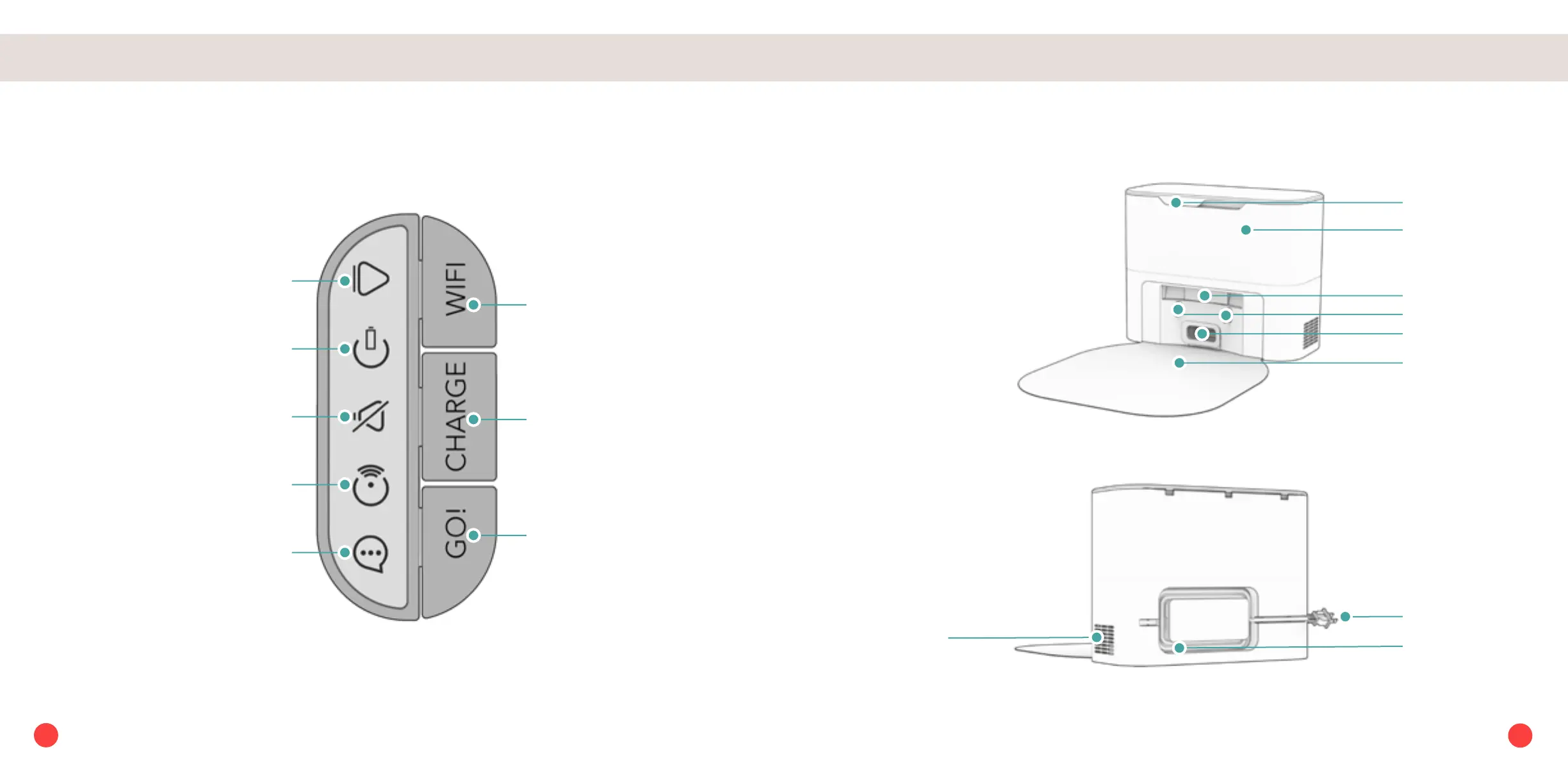
Anatomy Anatomy
CHARGE
Short Press -
Off Station - Charge/Stop
On Station - Self-empty
Long Press - Low Power Standby
mode
GO
Short Press - Start/Pause
Long Press - Power ON/OFF
Wi-Fi
Initiate Wi-Fi search
SOUND
Solid Shine - Muted
GO
Solid Shine - Cleaning
Blinking - Paused
CHARGE
Rapid Blinking - Low battery
Blinking - Finding station
Slow Blinking - Charging
Solid Shine - Fully charged
Wi-Fi
Solid Shine - Connected to Wi-Fi
Blinking - Searching for Wi-Fi
Trouble Indicator
Blinking - Trouble detected
Check the bObsweep App
Charging Bed
Air Vent
Cord
Indoor Plug
Charging Plates
Disposal Vent
Lid
Dust Bag
Display Screen & Buttons
Charging & Self-empty Station
Transmitter
6
5














 To Next Page