EasyManua.ls Logo

BodyTrace BT105 - User Manual

BodyTrace BT105
2 pages
Print Icon
To Next Page IconTo Next Page
Loading...
Remote Patient Monitoring
Quick
Start
Guide
BodyTrace BT105
LTE Blood Pressure Monitor
INSTALL BATTERIES
1
Unpack the device from the box.
Slide open the battery door on the
back of the device.
Insert 4 AA batteries (included with the device)
as shown above. The springs should align with
the negative signs on the batteries.
Slide the battery door closed.
SECURE CUFF
2
Pull the loose end to tighten the cu evenly
around your arm. Close the cu with the
Velcro fastener.
Plug the cu tube
into the device.
This marker should
be aligned with the
center of your arm.
The cu’s edge should
be about 1 inch (2–3 cm)
above your elbow.
You should be able to fit
1 or 2 fingers between
the cu and your arm.
Air tube should point
toward your hand as
it exits the cu.
Expose your le upper arm by removing or
adjusting clothing and jewelry. The cu should
be worn on bare skin.
Position the cu on your le arm as shown in
the diagram below.
Question and Answer IconNeed help?

Do you have a question about the BodyTrace BT105 and is the answer not in the manual?

Summary

Install Batteries

Battery Installation Steps

Unpack the device, open the battery door, insert 4 AA batteries, and close the door.

Secure Cuff

Cuff Placement and Securing

Plug the cuff tube, expose arm, position cuff correctly, and tighten with Velcro.

Take a Reading

Performing a Measurement

Press START/STOP to begin, view results, and confirm transmission.

Tips for Accurate Readings

Optimizing Measurement Accuracy

Avoid caffeine, smoking, exercise before readings, sit correctly, and don't talk.

Measurement Timing and Frequency

Take readings daily, after medication, and avoid measuring right after waking up.

Alertive Mobile App

App Benefits and Download

Install the app for measurement history; download via QR codes for iPhone and Android.

Overview

The Alertive BodyTrace BT105 LTE Blood Pressure Monitor is a remote patient monitoring device designed to help users track their blood pressure accurately and conveniently. This quick start guide outlines the steps for setting up and using the device, as well as providing tips for obtaining accurate readings. The device is part of Alertive's Remote Patient Monitoring (RPM) program, which aims to provide healthcare professionals with a comprehensive view of a patient's blood pressure trends over time.

Function Description

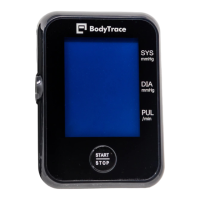
The primary function of the BodyTrace BT105 is to measure and transmit blood pressure readings. It operates by inflating a cuff placed on the upper arm and then deflating it to detect systolic, diastolic, and pulse rate values. Once a measurement is completed, the device automatically sends these results to Alertive, eliminating the need for manual data entry or synchronization. This LTE connectivity ensures that data is transmitted reliably and efficiently, making it a suitable tool for remote patient monitoring. The device is designed to be user-friendly, with a clear display that shows the measurement results.

Usage Features

1. Installing Batteries: To begin using the BodyTrace BT105, the first step is to install the batteries.

  • Unpack the device from its box.
  • Locate the battery door on the back of the device and slide it open.
  • Insert four AA batteries (which are included with the device). It is crucial to ensure that the springs inside the battery compartment align with the negative signs on the batteries to ensure proper power supply.
  • Once the batteries are correctly inserted, slide the battery door closed until it is securely shut.

2. Securing the Cuff: Proper cuff placement is essential for accurate readings.

  • Plug the cuff tube firmly into the designated port on the device.
  • Prepare your left upper arm by removing or adjusting any clothing or jewelry. The cuff should be worn directly on bare skin to ensure proper contact and measurement accuracy.
  • Position the cuff on your left arm according to the diagram provided in the manual. The marker on the cuff should be aligned with the center of your arm.
  • Ensure that the cuff is not too tight or too loose. You should be able to fit one or two fingers comfortably between the cuff and your arm.
  • The bottom edge of the cuff should be positioned approximately 1 inch (2-3 cm) above your elbow.
  • The air tube should point toward your hand as it exits the cuff, preventing kinks or obstructions during inflation.
  • Pull the loose end of the cuff to tighten it evenly around your arm. Secure the cuff using the Velcro fastener to ensure a snug fit.

3. Taking a Reading: Once the device is set up and the cuff is secured, taking a measurement is straightforward.

  • Press the START/STOP button on the device. The device will begin to inflate the cuff and take a reading.
  • During the measurement process, remain still and avoid talking or moving to prevent inaccurate results.
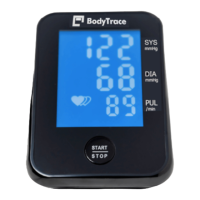
  • When the measurement is complete, your systolic (SYS), diastolic (DIA), and pulse rate (PUL/min) results will be displayed clearly on the screen.
  • The device will then automatically transmit these results to Alertive. During transmission, the device will display a "Transmission in progress" indicator, followed by "Transmission successful" once the data has been sent.

Tips for Getting Accurate Readings: To maximize the effectiveness of the Alertive RPM program and ensure reliable data for your doctor, follow these guidelines:

  • Avoid stimulants: Do not drink caffeine, smoke, or engage in strenuous exercise within 30 minutes before taking a reading. These activities can temporarily elevate blood pressure.
  • Empty your bladder: A full bladder can add 10-15 points to your reading, so it's recommended to empty your bladder before a measurement.
  • Proper posture: Sit in a chair at a table during the reading. Ensure both feet are flat on the floor and your legs are uncrossed. Rest your left arm on the table so that your elbow is at the same height as your heart. Sit quietly for a few minutes before taking a measurement to allow your body to relax.
  • Remain still and silent: Do not talk or move during the measurement process.
  • Timing of measurements: Avoid taking a measurement immediately after waking up, as blood pressure is often highest early in the morning.
  • Cuff size: Always ensure that the cuff you are using is the correct size for your arm. An ill-fitting cuff can lead to inaccurate readings.
  • Frequency: Try to take at least two readings daily—one in the morning and one in the evening. This provides your doctor with a more comprehensive picture of your blood pressure trends.
  • Consistency: Aim to measure your blood pressure around the same time each day. If you are on blood pressure medication, take readings 30-60 minutes after taking your medication.
  • Doctor's instructions: Always prioritize and follow your doctor's specific instructions, especially if they differ from these general suggestions.

Maintenance Features

The BodyTrace BT105 is designed for ease of use and minimal maintenance. The primary maintenance involves ensuring the batteries are correctly installed and replaced when needed. The device's automatic data transmission feature reduces the need for manual data management. While not explicitly detailed as a maintenance feature, the guide encourages users to download the Alertive mobile app, which allows users to view their measurement history, thereby providing a digital record of their progress. This app is available on both the App Store for iPhone users and Google Play for Android users.

The Alertive Care Team is available for any additional questions or concerns, providing support from Monday to Friday, 8 am to 7 pm EST. This support system ensures that users can address any issues they encounter, contributing to the overall reliability and user experience of the device and the RPM program. The program does not strictly require the use of the mobile app, but it is recommended for those with smartphones or tablets to easily track their measurement history.

BodyTrace BT105 Specifications

General IconGeneral
Measurement MethodOscillometric
Display TypeLCD
ConnectivityBluetooth
Memory FunctionYes
Device TypeBlood Pressure Monitor
User Profiles2 Users
Wireless TechnologyBluetooth

Related product manuals