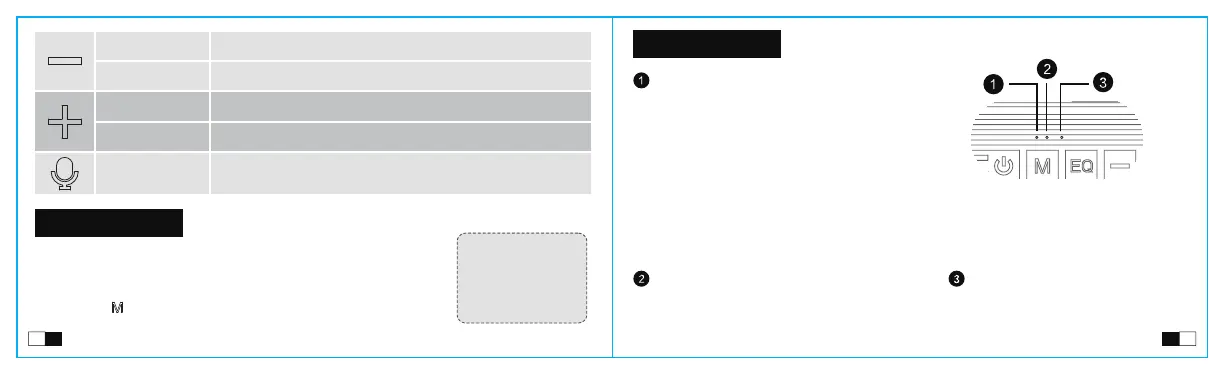
LED Indicator
Multiple Play Modes
a. Ready to pair another speaker: Blinking orange light
b. Two speakers are paired: Solid orange light
TWS LED indicator
3D: Light goes off
Vocal: Solid white light
Super Bass: Solid green light
Sound effects indicator
Ready to connect: Blinking blue;
Connected: Glows solid blue.
a. Bluetooth light
b. Play modes light
AUX/TF card mode: Blue light is slow blinking;
USB-C mode: Red and purple lights blinking alternately.
Status indicator
c. Charging indicator light
Solid red light: Charging.
Red light goes off: Fully charged (When power is off and the adapter must be at least 5V/2A).
Press
Press and hold
Press
Press
Press and hold
Volume down,total 16 levels
Previous track
Volume up,total 16 levels
Next track
Activate the phone voice assistant
Note: Please use a
cable which supports
audio transmission
when you using a
USB-C play mode.
1. This speaker supports up to 64GB TF-card; Supports music format:
APE/FLAC/WAV/MP3.
2. Insert the TF card into the slot and automatically play the audio file in order
after recognition.
3. Press the " " button to switch the playing mode to Bluetooth, Aux-in,
USB-C or TF-card.
02
04
05
06
07
08
03
01
EN EN


 To Next Page