All rights reserved. No part of these instructions may be produced or transmitted in any form or by any means,
electronic, mechanical, photocopying, recording or otherwise, without the prior written permission of BOLERO.
Every effort is made to ensure all details are correct at the time of going to press, however, BOLERO reserve the
right to change specifications without notice.
4
Trouble Shooting
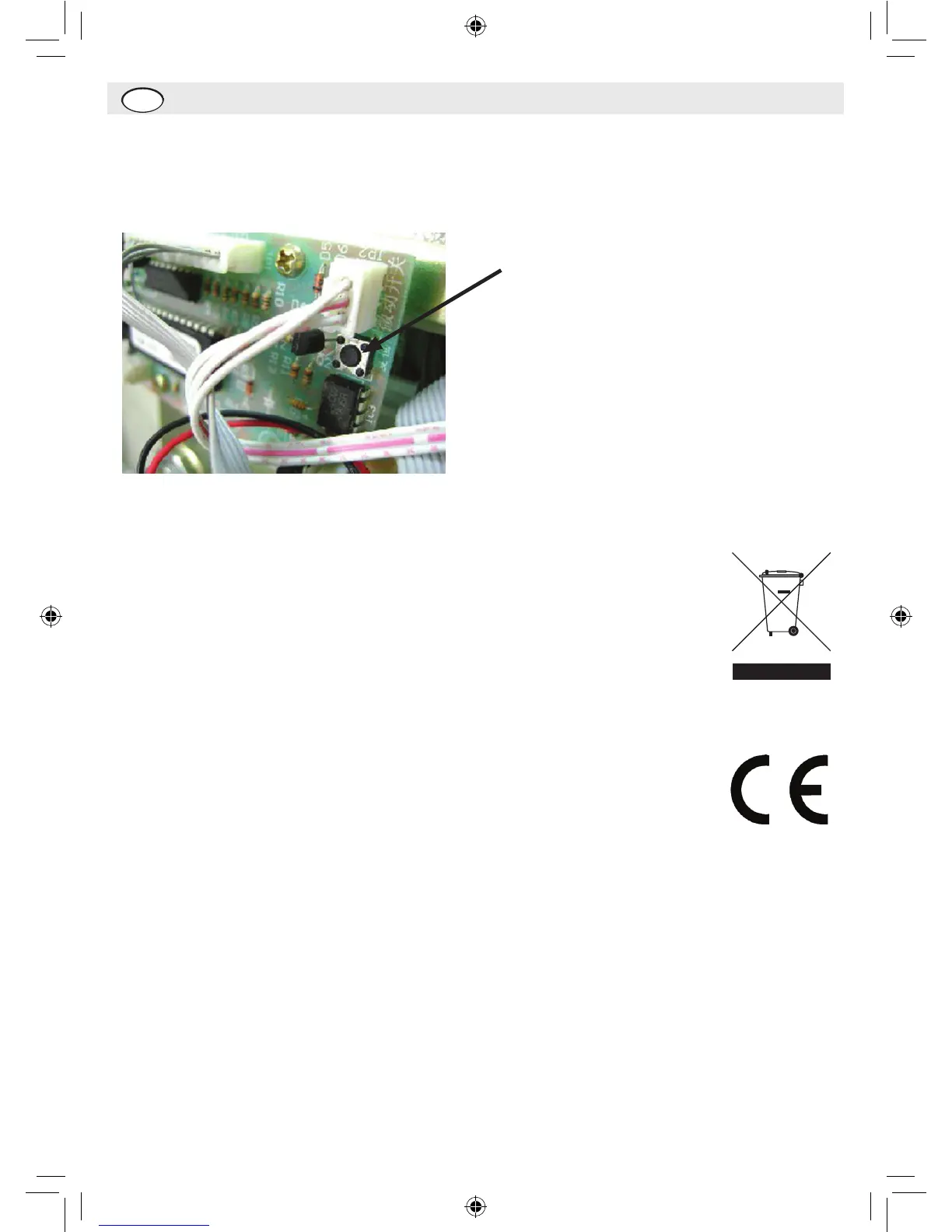
Ifthemastercodeislostorforgotten,openthesafewiththekey,removethemetallockcover(secured
byfourscrews),thenpresstheresetbuttonwhichislocatedonthePCB.
Reset Button – press to reset
Disposal
Disposeofdepletedbatteriesinaccordancewithlocalregulations,withintheECthere
arenominateddisposalpointsforbatteries.
TheWEEElogoonthisproductoritsdocumentationindicatesthattheproductmust
notbedisposedofashouseholdwaste.Thehelppreventpossibleharmtohuman
healthand/ortheenvironment,theproductmustbedisposedofinanapprovedand
environmentallysaferecyclingprocess.Forfurtherinformationonhowtodisposeof
thisproductcorrectly,contacttheproductsupplier,orthelocalauthorityresponsible
forwastedisposalinyourarea.
Compliance
ThebatteriessuppliedwiththisproducthavebeenapprovedtoBSEN1122:2001.


 To Next Page