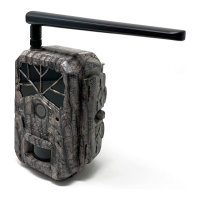
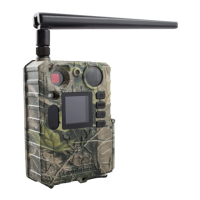
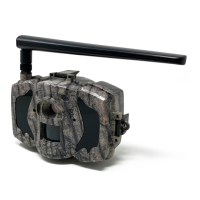
The Boly Trail Camera BG410 Series is a digital infrared surveillance camera designed for various monitoring needs. It features a 1.44" color LCD display and is powered by two 18650 batteries (button top, 67-69mm length). The camera can be charged via a USB port connected to a solar panel.
Function Description:
The BG410 series camera is primarily used for capturing images and videos for surveillance purposes. It supports both non-wireless (BG410-D) and 4G wireless (BG410-M) models, allowing for flexibility based on user requirements. The wireless models enable sending images and videos directly to a wireless device, email, Molnus cloud service, or FTP server, based on the configured Send Mode settings.
Important Technical Specifications:
- Image Sensor: 4MP CMOS Sensor
- Lens: F/NO=2.4, FOV (Field of View)=57°
- LED Type: 940nm and white LED (2pcs)
- PIR Detection Range: 100ft
- Illumination Distance: 100ft
- Display Screen of Remote Control: 1.44" Color LCD
- Memory Card: Up to 32 GB (TF card)
- PIR Sensitivity: Adjustable (High/Normal/Low/OFF)
- Trigger Time: 0.7s
- Weight: BG410-D without battery: 174g
- Operation/Storage Temperature: -20 to +60°C / -30 to +70°C
- Power Supply: 2*18650 batteries or Solar Panel
- Sound Recording: Available
- Mounting: Rope/Belt/Python lock
- Dimensions: BG410: 115*81*45 mm; Solar Panel: 74*89*30mm or 179*126*13mm
- Operation Humidity: 5% - 90%
- Security Authentication: FCC, CE, RoHS
- Supported Wireless Carrier Bands (for wireless models): GSM: B3/B8; WCDMA: B1/B8; LTE FDD: B1/B3/B7/B8/B20/B28A
Usage Features:
- Getting Started: The camera includes an antenna, mic, PIR sensor, power button, lens, LED indicator, LCD, IR LED flash, menu buttons (Menu, Up, Down), USB port, and battery port.
- Battery and Power Supply: The camera is powered by two 18650 batteries. An external USB power supply (5V/2A) or solar panel can also be used for charging. The USB port automatically detects when it's connected to a power source for charging or acts as a mass storage device for accessing photos/videos on the TF card.
- TF Card Information: Supports up to 32GB capacity TF cards. It's crucial to insert the TF card correctly and ensure it's properly formatted. Removing the TF card while the camera is on can damage internal components.
- SIM Card Information (for communication function models): Requires a standard SIM card. A nano or micro SIM card can be used with a SIM card adapter. The camera must recognize the SIM card and have adequate signal strength for communication functions.
- Camera Modes:
- OFF Mode: Turns off the camera and display. Batteries should be removed for long periods of inactivity.
- SETUP Mode [Test Mode]: Activates the display screen. Allows customization of camera settings, playback of pictures and videos on the LCD.
- On [Hunting Mode]: After switching to ON, if left alone for more than 20 seconds, the camera automatically switches to Hunting Mode. In this mode, the red LED light blinks for approximately 10 seconds, then turns off. This allows time to adjust the camera's position. The camera takes pictures or videos when motion is detected and/or at specific time intervals, according to programmed settings.
- Manage Images and/or Videos: In TEST/SETUP mode, pressing the POWER button allows viewing of images or videos on the LCD. Up/Down buttons cycle through media. Videos cannot be viewed directly on the camera.
- Sending via MMS/GPRS/Molnus/FTP (for communication function models):
- Insert TF & SIM card.
- Turn on in TEST/SETUP mode, ensure SIM card is recognized and signal is adequate.
- Select send mode (Molnus, MMS, Email, FTP) and fill in parameters. Videos sent must be less than 20MB.
- Press "Power" to view stored photos.
- Select a picture to send manually.
- Press MENU to access "Send To" option.
- Press "OK" to send the picture via the chosen messaging option.
- Password Setup: A four-digit pre-set password can be entered for encryption. This function is off by default. If forgotten, contact customer support.
- Camera Setup Settings & Display:
- OK/Power: Switch on/off, save parameters, enter/exit playback mode.
- Menu: Enter/exit Menu.
- Up/Down: Setting items switching, manually take photo/record video.
- The display shows image size, camera mode, SIM card status, signal strength, battery level, telecom provider, date, time, and number of images.
- Wireless Model Setup:
- Mobile Communication: Supports sending commands via SMS, Molnus, Apple, or Android applications. SMS functionality requires mobile application setup.
- Setup Software of PC: Download BMC_config.zip from the Boly Media website to configure the camera via USB.
- Setup for Mobile Applications:
- Open BG Tools app, click "+" to add a new device.
- Input model, SIM card number, and camera model number, then click "Add."
- Click "send," choose country and provider, then "Check WAP/Internet Parameters" to fill in required fields.
- In "Select Mail Server," choose Boly Email Service or Other Email Service.
- Set user's parameters or restore defaults.
- Select "Get Photos" to get photos via Cellphone (MMS) or Email (GPRS).
- Cloud Service - Molnus: A cloud service for transferring and storing images. Requires camera with batteries and a SIM-card with internet access. The operator's SIM card provides the APN name.
- Register Molnus account.
- Log in to Molnus account and go to "My Cameras" page.
- In SETUP Mode, set "Send mode" to "Molnus."
- Camera Setup Options:
- Language: English (default), Czech, German, French, Spanish, Swedish, Finnish, Norsk, Dansk, Italian, Russian.
- Camera Mode: Photo (default), Video, Picture + Video. Picture + Video mode disables photo burst.
- Set Clock: Set date and time.
- Photo Size: 4MP (default).
- Photo Burst: 1 Photo (default). If Pic+Video is selected, Photo burst defaults to 1 photo regardless of entered value.
- Video Size: 1080P (default).
- Video Length: 10 seconds (default). Valid values 5-60 seconds.
- Time Lapse: Camera captures images or videos at a preset time interval. Off (default). If PIR Trigger/Sensitivity and Time Lapse options are BOTH OFF, the camera will not capture any photos or videos.
- PIR Trigger/Sensitivity: Normal (default). Four sensitivity parameters: High, Normal, Low, and Off. High sensitivity for areas with little environmental interference, Low sensitivity for areas with a lot of interference.
- Picture Type: Black&White (default). Select 940nm LED for night photography.
- PIR Interval: This setting indicates how long the PIR sensor will be disabled after each camera triggering. Set between zero seconds to a maximum of 1 hour.
- Work Day: All (default). Choose days of the week for camera to work. Only available in Hunting Mode.
- Work Hour: Off (default). Defines a certain time in a day for camera to be triggered. Effective values 00:00 to 23:59.
- Camera Position: Off (default). Used for multiple cameras, A-Z indicator.
- Recycle Storage: Off (default). If TF card is full, oldest images/videos are overwritten. In SETUP mode, this option is disabled.
- Send To: Molnus (default). Send image to phone/email. Options: MMS, Email, Molnus, FTP.
- Send Mode:
- Daily: Only works in ON mode. Sends summarized photo information and last picture taken at end of time.
- Photo Mode: Sends summarized photo information and last picture taken at end of time.
- Video Mode: Sends summarized video information and last video taken at end of time (less than 10M).
- Pic+Video Mode: Sends summarized information for photos and videos and last picture taken at end of time.
- Instant: Only works in ON mode. Sends message instantly after capture. OFF disables all communication functions. NOTE: Some cellular carriers limit file size.
- SMS Control: Off (default). Enables mobile communication functionality.
- SIM Set: Auto (default). Camera automatically recognizes carrier after booting. Manual setup available.
- Select network: Auto (default). Select 2G, 3G, 4G option.
- Attachment Size: Low (default). Sends a slightly compressed picture. Normal sends a compressed picture. High sends original pictures.
- Password Set: Off (default). Enter four-digit password to power on camera.
- Time Stamp: ON (default). Camera prints time and Logo on video.
- Format SD: Deletes all information on TF card. Make sure to backup important data.
- Default Settings: Restores all settings to default values.
- Version: Shows firmware version.
- Register Camera: Used only for Molnus app to register camera.
Maintenance Features:
- Troubleshooting:
- Camera lens blocked: If the camera is not broken, it's an IR-cut filter. When powered on, the IR-cut will cover the lens. When off, it will be at a random place, sometimes covering the lens.
- Display screen is suddenly black: In "Hunting mode," press MENU to wake it up. If no response, check batteries. Press and hold OK/POWER button until display turns on.
- Phone cannot receive MMS: MMS/GPRS function needs SIM cards in both camera and phone to have enough balance and data exchange.
- PIR Detection Zone: The camera features a new patented PIR with a smaller field of view (FOV) angle (β) compared to normal PIR. This design reduces empty picture rates and captures more objects in motion.
- Warranty: The camera manufacturer provides a 12-month warranty against manufacturing defects or malfunctions. The warranty does not cover improper use. Extended service is available after warranty expiration, but the customer is responsible for additional charges. Contact your reseller for warranty service.

 Need help?
 General

 To Next Page