11 12
Ba ck Vie w
Fron t v iew
2
3
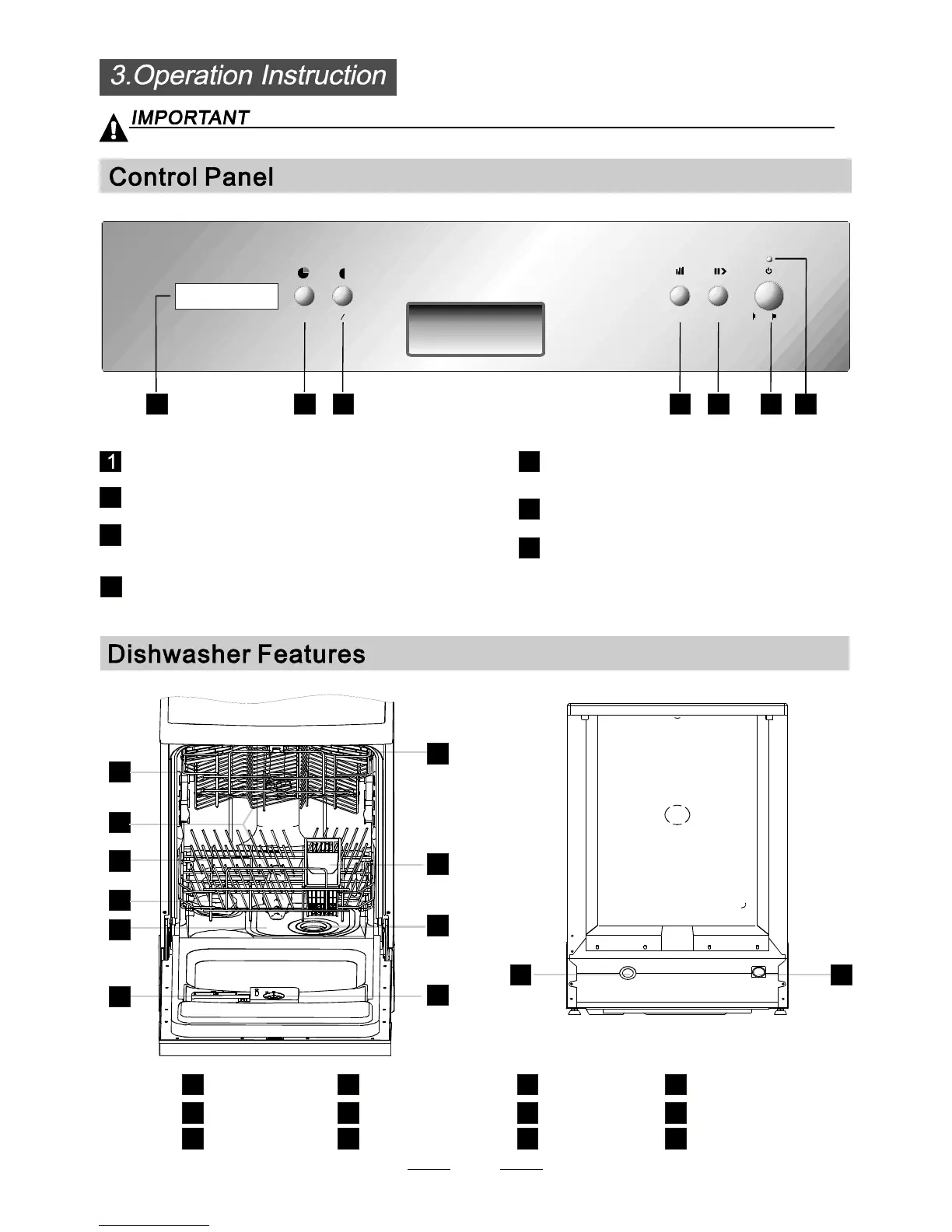
Power indicator light: To show the power supply.
Start /Pause butto n: To start the selected
washing program or pause the washing program
when the machine is working.
Power switch: To turn on/off the power supply.
Main Filter
Detergent Dispenser
Cup Shelf
Cutlery Basket
Coarse Filter
Rinse A id D ispe nse r
Inle t pi pe c onne cto r
Drain pipe conne ctor
Lower Basket
Spra y A rms
Upper Basket
1
Sa lt Con tai ne r
3
befo re u si ng it f o r the fi rst tim e.
To g e t t h e best p er fo r m anc e fr om y o u r d i sh was he r, r e a d all o p er at i n g i ns t ru ct io n s
5
6
7
8
9
10
12
11
3
2
4
4
5
Washin g P r og r a m S el ec t o r : To s el e c t o n e o f
th e si x wa sh in g p rogra m s.
7
6
Delay Button : To Press the button to delay.
De lay
12
Prog.
Start/Pa use
On Off/
17 23456
Half load functions Button: To select Half load
functions.
Display window: Display the program, program
remai ning time , delay time , fau lt co des and etc.
1
2
3
4
5
6
7
8
9
10


 To Next Page