and repeating the whole programming operation correctly.
If a setting error has been made, the oven will not switch on.•
Deleting a programme
To delete a programme, press the •
key followed by the “-” key until the display shows 0.00.
The (hand symbol) key should be pressed at the end of every
programmed cooking operation; otherw11:49ise the oven does not work in
manual mode.
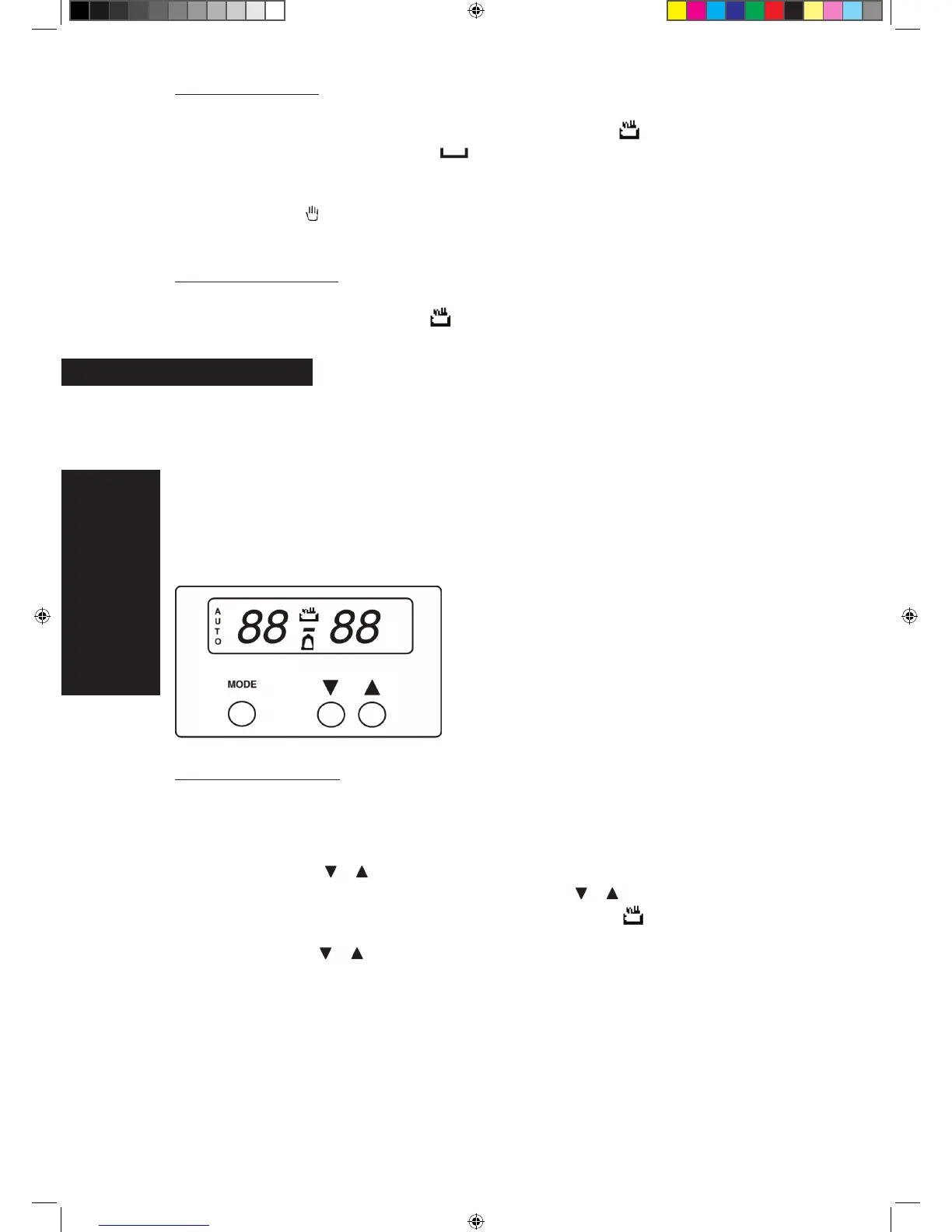
How to use the three-button timer (Fig. 5).
Allows programming of the duration of cooking in the oven. If the cooking procedure does •
not require monitoring, it can also take place in the user’s absence.
On installation or after a power blackout, the display fl ashes. This indicates that the correct •
time has to be set.
fi g.5
Setting the correct time
To set the correct time, proceed as follows:
Press the “MODE” key.1.
Press the 2. key to set the current time. Adjustment continues to be possible
for 7 seconds after the last time either of the key is pressed. After the time
has been set, the display no longer fl ashes and the
symbol is lit up.
N.B.: Pressing the key increases or decreases the time at a speed varying depend-
ing on the time for which the key is pressed.
WARNING
:
13



 To Next Page