12
SKS-500 User Manual Rev. 01 – 220722
9. Mixing Motor Technologies
Sidekick supports a variety of motor technologies. Follow the instructions
below to learn how to expand your Sidekick capabilities.
If at any time you wish to cancel the change, you may press the UP button to exit. If you enter
an invalid code, or press any other key during the sequence, or there is no activity for 20
seconds, Sidekick will go back to normal operation without any change.
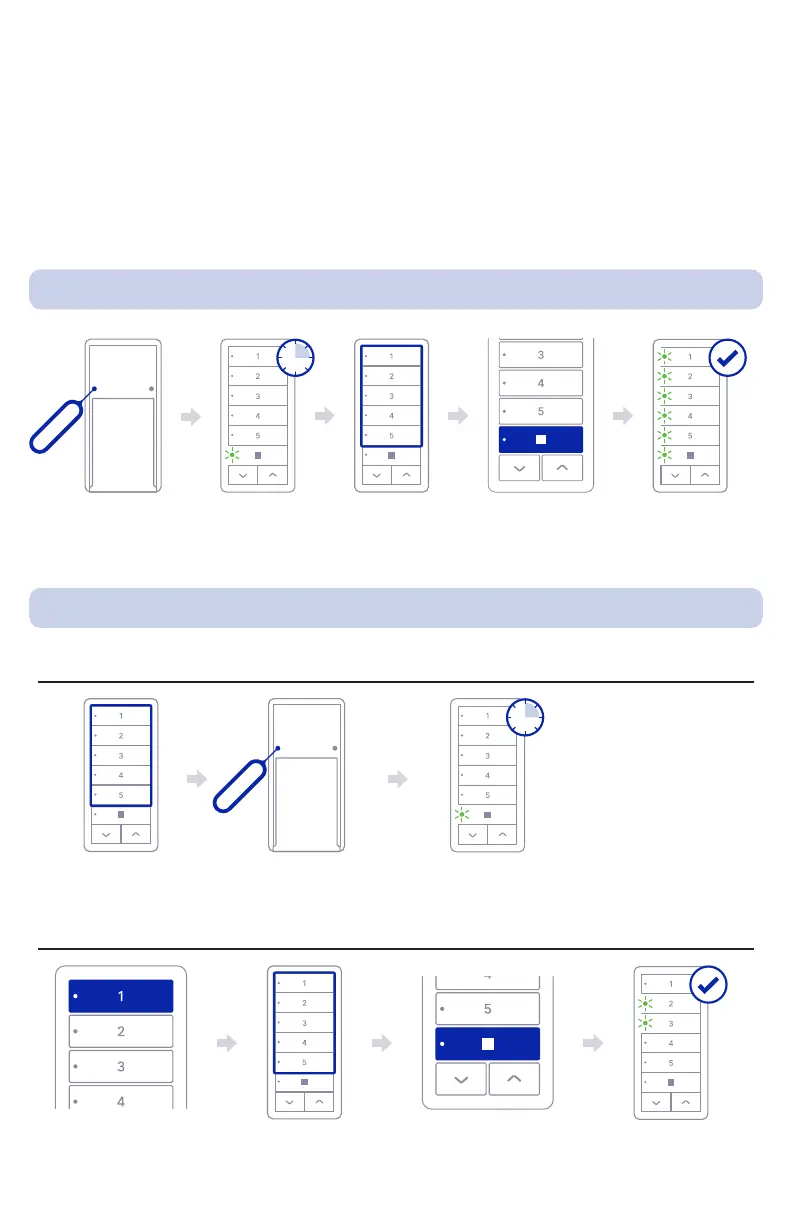
9.1. Changing technology for all channels
Select which channel
you want to use
Press MENU
Press MENU Sidekick will wait
for code for 5
seconds
STOP LED will
blink for 5 seconds
Insert Code
see charts in
next page
Insert Code
see charts in next page
Selected channels
LEDs will blink to
conrm change
Press STOP
Press STOP
All LEDs will blink to
conrm change
9.2. Changing technology in selected/desired channels
Step 01: Channel(s) Selection
Step 02: Setting Technology
5s
5s
Press 1



 To Next Page