4
SKS-500 User Manual Rev. 01 – 220722
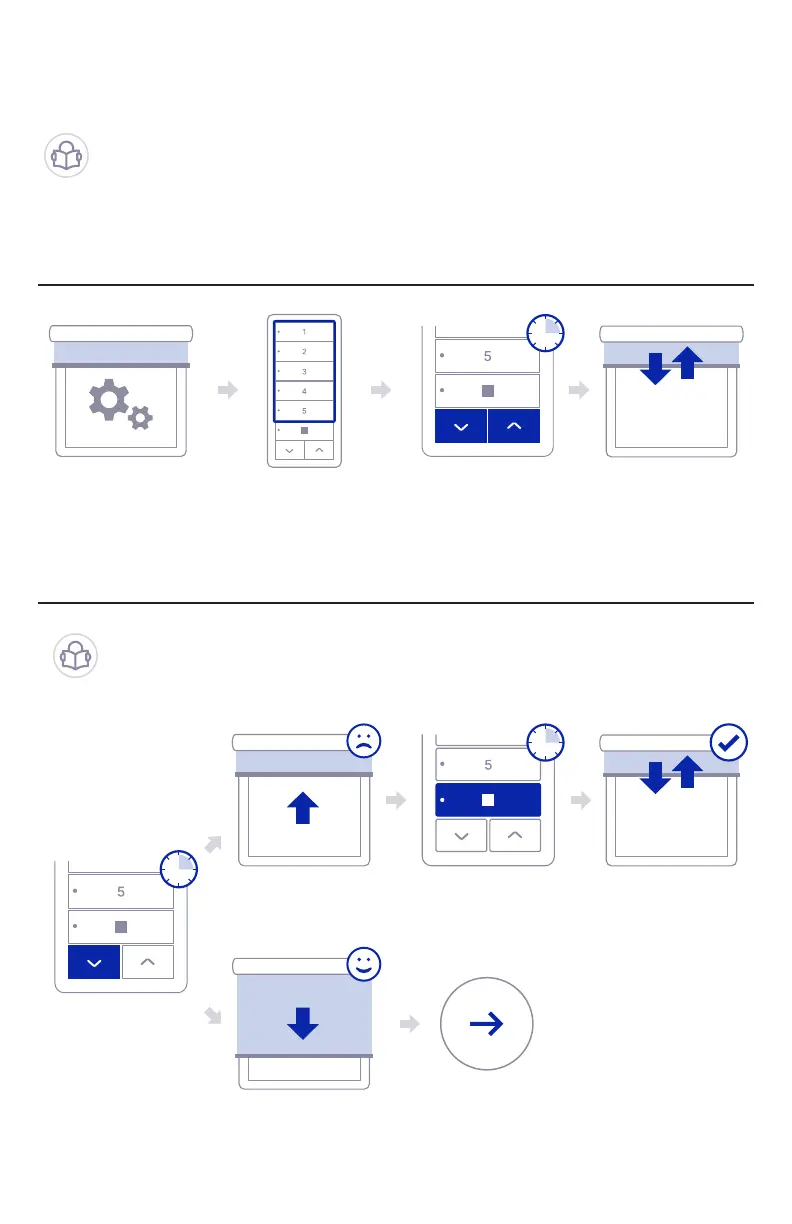
Step 01: Pair Sidekick with new shade motors
Step 02: Check motor directions
To pair your Sidekick with a window covering without any
previously paired control, you must set the motor to factory
mode, which can vary from motor to motor. Please check
your motor instructions if needed.
When in Factory Setup Mode, the motor will only move
so long as the UP or DOWN buttons are held. Now check
the direction of motion and reverse if desired.
Set your Shade to
Factory Setup Mode
Hold DOWN
Select which
channel you want
to use
If shade start raising
instead of lowering
If shade starts
lowering as expected
Hold both
UP and DOWN
Hold STOP for 5
seconds
Shade will jog
once
Shade will jog once,
conrming that
direction was reversed
Go to step 03
4. Setup with New Motors
5s



 To Next Page