6
SKS-500 User Manual Rev. 01 – 220722
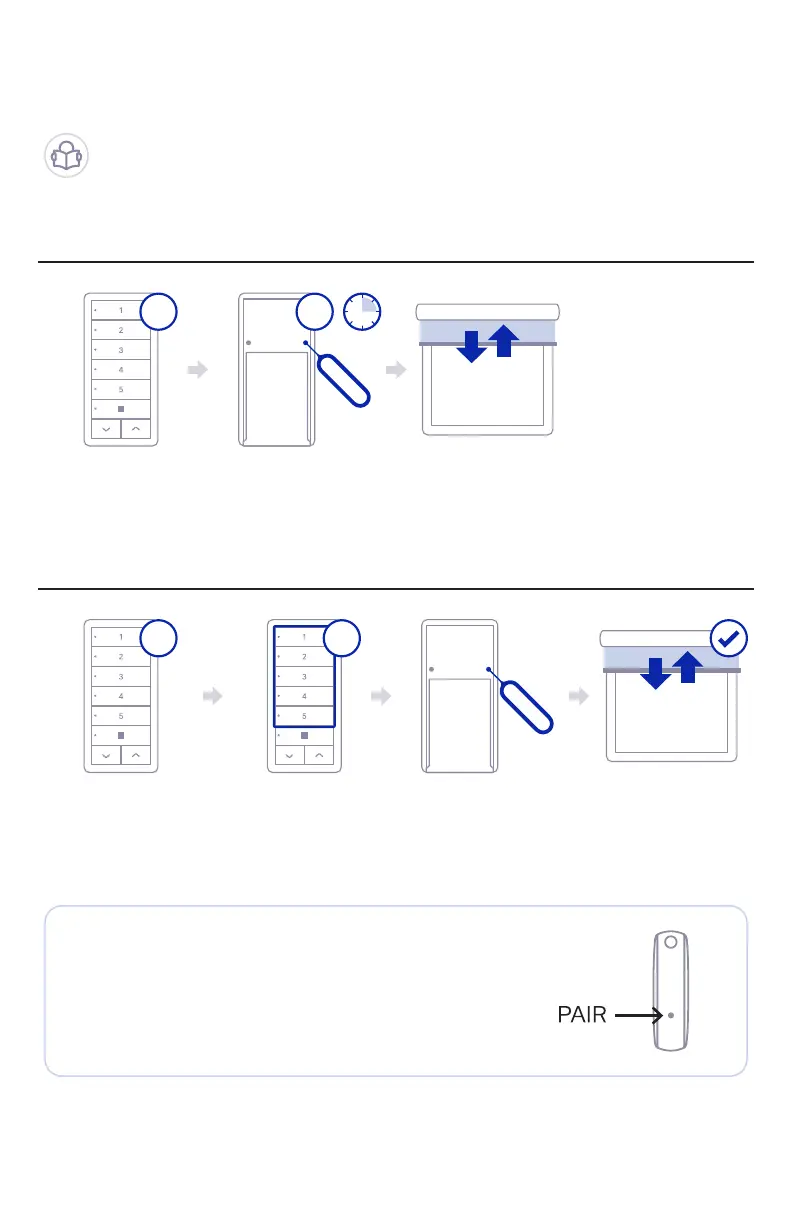
5. Setup as an Additional Keypad (Remote Control)
Step 01
Step 02
On Sidekick that
is already paired
with shade
On Sidekick to
be added to the
shade
Hold PAIR with
tool or paperclip
Select which
channel you want
to use
Shade will jog once
setting shade to
listen mode
Press PAIR with
tool or paperclip
Shade will jog once
to conrm that
keypad was paired
AA
B B
You can pair additional Sidekicks with your shade.
You will need to use the existing keypad (A) to
introduce the new keypad (B) as shown below.
NOTE: You can also introduce a new Sidekick (B)
using a Somfy Telis or Situo remote instead of
Sidekick (A). Just follow the instructions above using
the button in the back of your Somfy Telis or Situo
remote controller as Sidekicks PAIR button.



 To Next Page