3) How to install JAZZ+ +
Jazz+ + is a Midi sequencer, a program able to record Midi events (notes, volumes etc.)
played with the keyboard reproducing them identically.
Installation:
1) download the programm from:
www.bontempi.com download section.
Two versions are available:
• a “zip” version that needs the Winzip program or Windows XP (“.zip” extension)
folder compressor
• a self-extraction version (“.exe” extension)
2) Decompressing one of the two files a folder called "JAZZ" is created
3) Start the installation program “SETUP.EXE” and follow the simple istructions.
4) How to record, play and listen a sequence recorded with Jazz+ +
After installation of Jazz+ + available on internet on www.bontempi.com it is possible to
record a sequence in a very friendly way following the instructions shown below
Connect the keyboard to the
Computer and turn it on
Open Jazz+ + programm
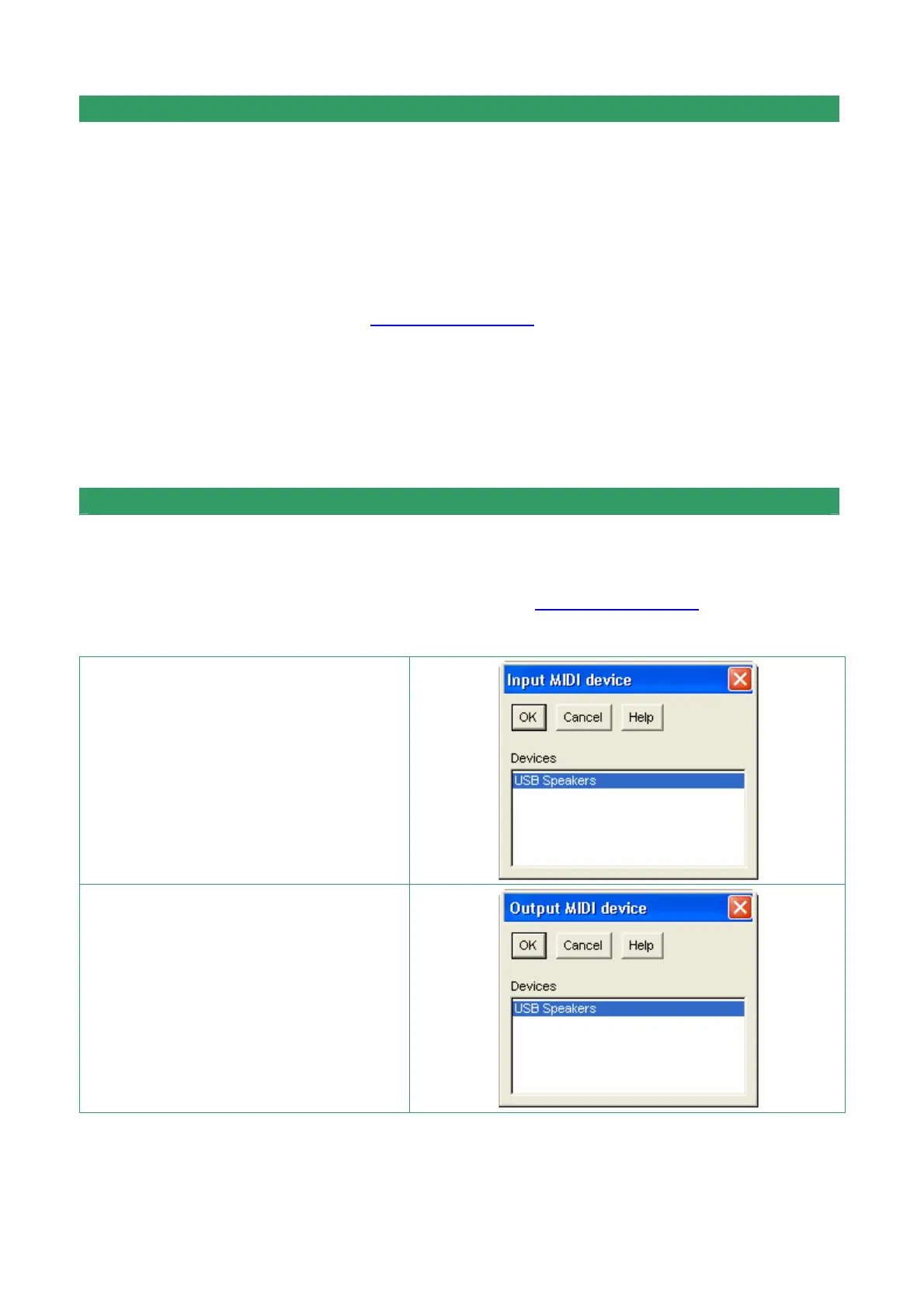
Only for the first execution of
JAZZ+ + select “USB Speakers” in
“I nput MIDI device” option
Only for the first execution of
JAZZ+ + select “USB Speakers” in
“I nput MIDI device” option


 To Next Page