Safety and operation instructio n s
Maintenance
I n s t r u c t i o n C a r d
Turnlock 100 / 150 / 200
Turnlock 100 / 150 / 200
Caution ! Caution using water near or in the control boxes.
Warning ! Switch the power supply off before carrying out any maintenance and/or
other work on the Turnlock.
Weekly : Clean stainless steel, polycarbonate or aluminium surfaces with a damp cloth.
Monthly :
Annually : The Turnlock should be serviced once a year. Always have this carried out by a
Maintenance
Boon Edam Inc. 420 McKinny Parkway Lillington, NC 27546, USA
Test the emergency and safety devices every day and check
that the Turnlock is generally working properly !
Dealer
For further information: consult the operating manual.
Version : 2014/01/22
Explanation of the symbols
Turnlock locked
Turnlock free to use
Turnlock unlocked
Power supply
Card or ticket reader authorisation
Pushbutton authorisation
No access*
Authorised access*
Action after 4 seconds or
4 s
Turnlock 100 / 150 Turnlock 100 / 150 Turnlock 200
T
urnlock
200
No power supply
Turnlock can be used in one or two
directions / free access
adjustable (1 to 25 seconds)
Issue : TU/100/150/200-INS-UK
Daily : Check daily the functionality of the Turnlock.
Clean stainless steel, polycarbonate or aluminium surfaces with a damp cloth and soft soap.
Boon Edam approved dealer. The same applies to repairs.
Turnlock speedcontrol*
*
Option

 Need help?
 General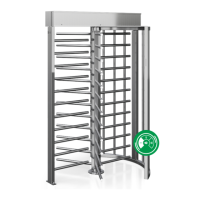

 To Next Page

