• High, prolonged fever requires medical
attention, especially for young children.
Please contact your physician.
• Performance of thermometer may be
degraded if operated or stored outside
stated temperature and humidity ranges
or the patient’s temperature is below the
ambient (room) temperature.
SPECIAL PRODUCT FEATURES:
• Fast 8-second oral and rectal readings
• Flexible tip for added comfort
• Bath water temperature measurement
• Ambient temperature measurement
• Last Memory recall
• Automatic shut-off after approximately 5
minutes for longer battery life
• Replaceable battery
• Low battery indicator “
”.
• Waterproof probe for easy cleaning
MEMORY FUNCTION:
The thermometer memory function stores
1 measurement. The last measurement
will appear after mode switched and no
pressing for 3 seconds. For Body Mode,
the last measurement will appear with
green backlight (temperature lower than
99.5°F/37.5°C) or red backlight (temperature
higher than 99.5°F/37.5°C) for 1 second.
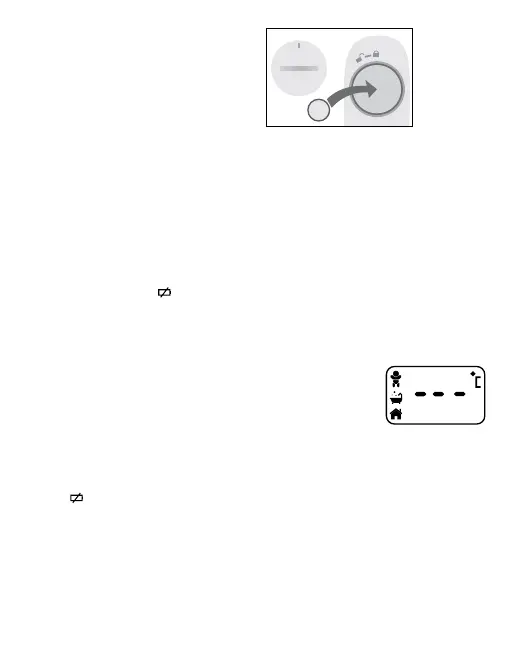
REPLACING THE BATTERY:
When “ ” appears in the lower right of
the display, the battery is exhausted. Using
a coin or screwdriver, turn the battery cover
counter clockwise to unlock and remove
cover. Remove the old battery. Be aware of
any local regulations concerning disposal
of batteries. Place a 3V “CR2032” lithium
battery inside with the positive side facing
up. Place cover onto thermometer and rotate
clockwise to lock in place.
CAUTION:
Replace only with 3V “CR2032” lithium
battery or equivalent. Use of other types of
batteries may present a risk of fire or rupture.
WWARNING:
• Keep battery out of child’s reach.
Swallowing battery could be fatal.
Battery should not be charged or placed
into extreme heat as it may explode.
• Used batteries should be disposed of
properly.
CHANGING FROM CELSIUS TO
FAHRENHEIT:
• While thermometer
is OFF, press and
hold the ON/OFF
button for about 5
seconds.
• Release button and you will see display (as
shown).
• Press it again to switch between °F or
°C. Power off automatically after switch
completed.
CLEANING AND CARE:
• Clean the thermometer tip and probe
using isopropyl alcohol or soap and water
before and after each use. DO NOT
immerse in water over 3ft (91.4cm).
• Store the unit in its storage case while
not in use.
+


 To Next Page