EasyManua.ls Logo

Boonton Electronics 71A, 71AR - Operating Instructions

Boonton Electronics 71A, 71AR
40 pages
Print Icon
To Next Page IconTo Next Page
To Previous Page IconTo Previous Page
Loading...
L
SECTION
III
Operating
Instructions
3.1
Initial
Installation
3.1.1
Unpacking
On
unpacking~
inspect
the
instrument
for
possible
damage
in
transit.
If
the
instrument
is
damaged~
contact
your
local
Sales
Engineering
Representative
or
the
factory
(see
title
page
for
factory
address)
for
further
instructions.
If
no
damage
is
found~
the
instrument
may
be
put
into
service
by
the
following
procedure:
3.1.2
Mechanical
Zero
Adjustment
with
the
instrument
unpowered
and
in
a
normal
operating
position~
check
to
see
that
the
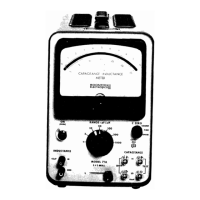
indicator
needle
rests
at
zero.
If
not~
set
to
zero
by
adjusting
the
mechanical
zero
control
on
the
meter
housing.
3.1.3
Turn-on
Procedure
and
Warm-up
Plug
the
instrument
into
a
source
of
117
V (±10%)
50/60
HZ
power
and
push
the
front
panel
ON
button.
(Note:
The
translucent
red
center
button
of
the
ON
switch
also
serves
as
the
pilot
light.
This
switch
is
turned
off
by
pulling
the
outer
black
disk
outward.
It
should
be
noted
that
this
switch
also
serves
as
the
fuse
holder.
(To
remove
the
fuse~
turn
the
switch
off~
twist
the
black
ring
counterclockwise~
and
withdraw
the
assembly.)
The
instrume~t
may
be
operated
approximately
30
seconds
after
turn-on.
However~
for
maxi-
mum
accuracy~
a
warm-up
of
approximately
a
half-hour
should
be
allowed.
3.1.4
Initial
Installation
Checks
and
Adjustments
3.1.4.1
General
Before
the
instrument
is
put
into
service,
there
are
several
initial
checks
which
should
be
made~
and~
if
necessary,
adjustments
perfor.med:
3.1.4.2
(a)
Allow
an
initial
warm-up
of
a
half
hour.
(b)
Set
the
Llc
selector
to
C.
3-1
71A
c