Home
Boox
eBook Reader
A60
Page 22 (Date)
Boox A60 - Date
119 pages
Manual
Save Page as PDF
To Next Page
To Next Page
To Previous Page
To Previous Page
Loading...
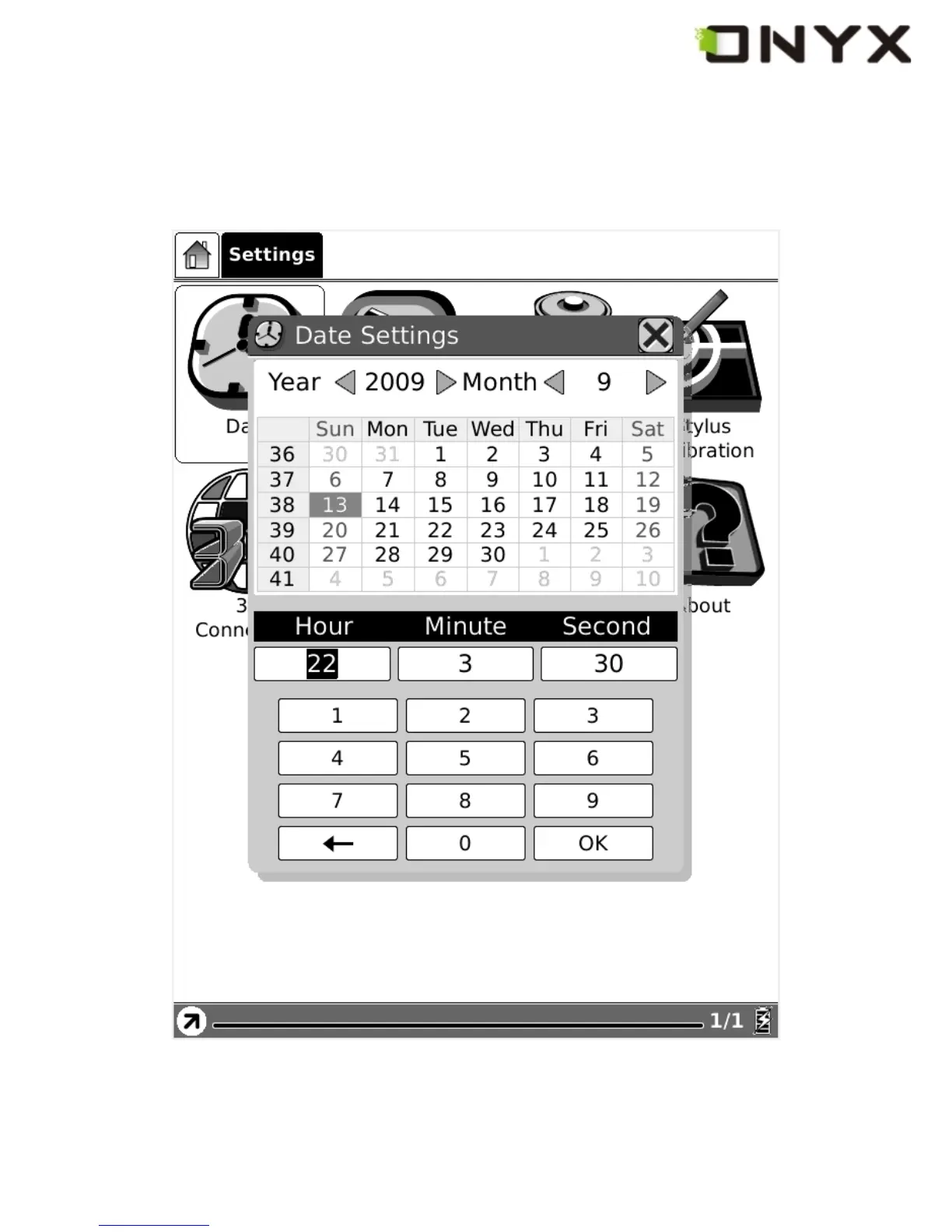
6.1.4.1 Date
Select the Date button in settings, you can set
current date (y
ear
, month, day) and time
(hour
, minute, second) of device.
Fig. 6.1.4.1 Dat
a Configuration Dialog
Copyright © 2009 Onyx International
.
All
rights
reserved.
22
21
23
Table of Contents
Main Page
Default Chapter
2
Table of Contents
2
1 Preface
9
2 Guidelines
10
3 Precautions
11
4 Components
12
Boox 60
12
Power Adaptor
12
USB Cable
12
Cover
12
SD Card
12
5 Boox
13
Power Key
15
MENU Key
15
BACK Key
15
NEXT Key
15
PREV Key
15
Direction Key
15
Volume Keys
16
Wifi Key
16
Headphone Jack
16
Indicator Light
16
6 User Interface
17
Main View
17
Internal Flash
18
SD Card
19
Recent Document
20
Settings
21
Date
22
Locale
23
Power Management
24
Stylus Calibration
25
Format Flash
30
About
31
Web Sites
32
Navigation Bar
33
Tool Bar
34
Menu Button
34
Progress Bar
34
Stylus Indicator
39
Annotate
39
Erase Sketches
39
Hand Tool
39
Selection Zoom
39
Sketch
39
Erase Annotations
40
Power Indicator
40
Menu
40
Screen Rotation
40
Save Remove SD Card
40
Music
40
Standby
40
Shutdown
41
View
41
List View
41
Details View
42
Thumbnail View
44
By Name
45
By Type
46
By Size
47
By Access Time
48
By Rating
49
Ascending
50
Descending
51
File
51
Delete
52
Search
53
Settings
54
Date Settings
55
Locale Settings
55
Power Management
55
Screen Calibration
55
Format Flash
55
About
55
Font
55
By Levels
56
By Numbers
57
By Ratio
58
Bold
59
Italic
60
Zooming
61
To Page
61
To Width
61
To Height
61
Selection Zoom
62
By Ratio
64
Annotations
65
Add Annotation
65
Erase Annotation
67
All Annotations
68
Sketch
69
Erase Sketch
70
Sketch Colors
70
Sketch Shapes
72
Layout
73
Single Page
73
Scroll
74
Tools
75
Search
75
Dictionary Lookup
78
Add Bookmark
80
Delete Bookmark
81
Show Bookmarks
81
Hand Tool
82
Next View
83
Previous View
83
Slide Show
84
Thumbnail View
85
Table of Content
86
Font Family
87
Encoding
88
Backward
89
Forward
89
Full Refresh Switch
89
Home
89
Navigation
89
Network
89
Wifi
89
Web Browser
90
Input by Keyboard
91
Tool Bar
91
Music Player
92
Minimize Button
93
Playlist
93
Close Button
94
Next Song Button
94
Play/Pause Switch Button
94
Previous Song Button
94
Repeat Playlist Button
94
Shuffle Switch Button
94
Stop Button
94
Next
95
Previous
95
Repeat Current Song Button
95
Playing Status Bar
96
Keyboard
97
Caps Key
97
Character Keys
97
Number Keys
97
Back Key
98
Shift Key
98
Space Key
98
Search View
99
Free Text Search
99
Input Box
100
Clear Button
101
File Search
102
Input Box
102
Search Button
103
Check Button of Including Subdirectories
104
Clear Button
104
Dictionary View
104
Content View
105
Explanation Button
105
Dictionaries Button
106
Similar Words Button
106
Annotations View
107
Bookmarks View
108
Wifi Configuration Dialog
108
Connecting Message Area
110
Refresh Button
110
Scanning List
110
Configuring WPA Security Access Point
111
Configuring WEP Security Access Point
112
7 Sketch
113
Make New Sketches
113
Erase
114
8 Annotation
115
Add Annotation
115
Erase Annotations
116
9 Software Update
117
10 Connect to PC
118
11 Charge
119
Related product manuals
Boox Color Series
167 pages
Boox Palma
74 pages
Boox Leaf2
72 pages
Boox TabX
105 pages



 To Next Page