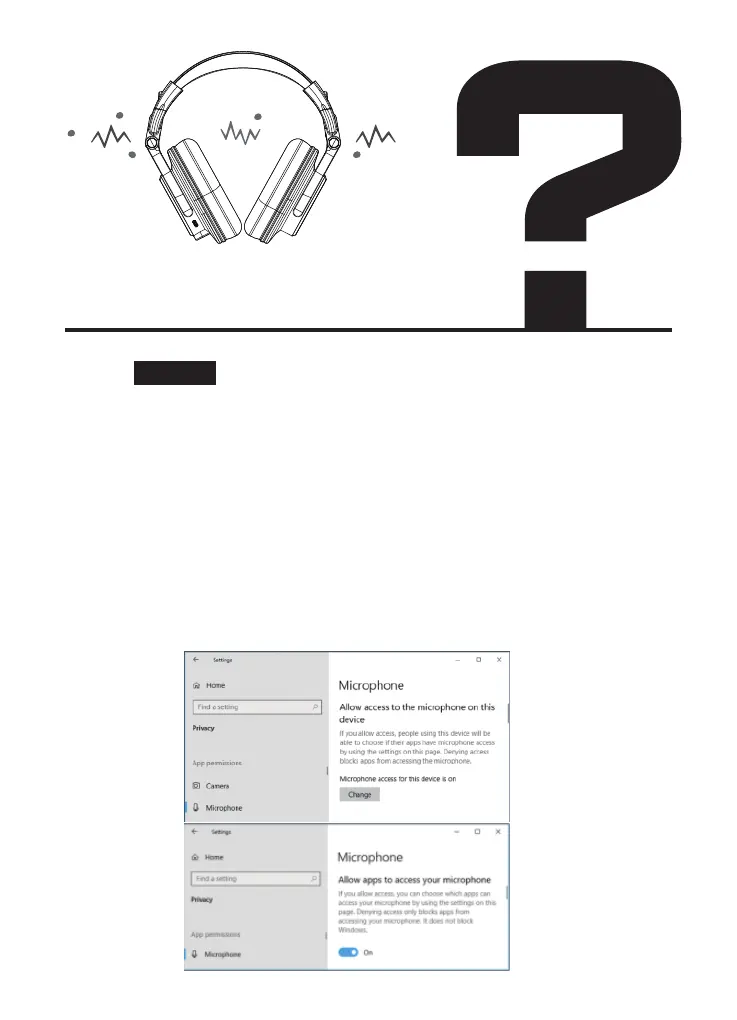
3.If your microphone isn’t working, head to Settings > Privacy >
Microphone > Microphone access for this device is on. If Windows
says microphone access is off, click the “Change” button and set it to
“On.”
If access is off, Windows and all applications on your system can’t
access audio from your microphone. Below that, ensure “Allow apps
to access your microphone” is set to “On.” If microphone access is
off, all applications on your system won’t be able to hear audio
from your microphone. However, the Windows operating system
itself will still have access. Under “Choose which apps can access
your microphone,” ensure the app that wants to access your
microphone isn’t listed and set to “Off.” If it is, set it to “On.”
Mic& Speakers cannot work
in my laptop/ computer
Solution:



 To Next Page