5
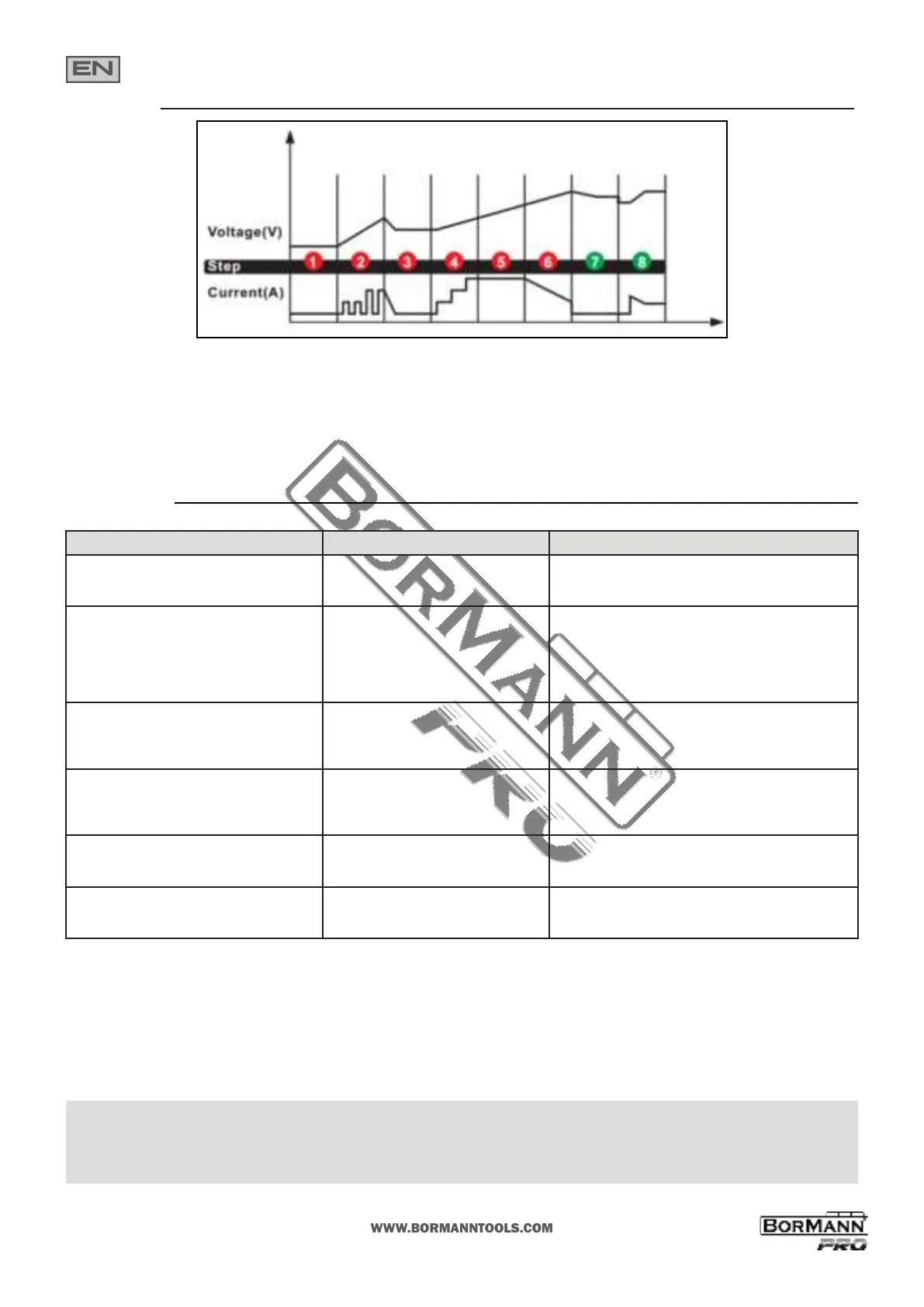
Charging Steps
STEP 1: DIAGNOSIS (Check if baery has connected with the charger and also check baery voltage)
STEP 2: DESULPHATION (If baery voltage is too low, programs automacally generate pulsing current to remove sulphate, up to 10 minutes)
STEP 3: ANALYSE (Check if the baery voltage reaches to the threshold aer desulphaon, and charging begins if the baery voltage is OK)
STEP 4: SOFT START (Charge with echelon constant current)
STEP 5: BULK (Charge with constant maximum current unl baery voltage is reached to the threshold)
STEP 6: ABSORPTION (Provide gradually declining current charge for maximum baery voltage)
STEP 7: ANALYSE (Test if the baery can hold charge)
STEP 8: MAINTENANCE (Connuously monitor the baery, and charging current will intelligently adapt to the variable baery voltage)
LCD DISPLAY CAUSE SOLUTION
ERROR + OVERHEATING The charger is overheated
The charging will automacally pause. Do NOT cut o the
power supply, and the charger will work again when cooled
down.
ERROR + NO CONNECTION
1) Open-circuit
2) Dirty Baery Posts
3) Dead Baery
4) Output Short Circuit
1) Connect the red and black clamps to the baery posts
2) Clean the baery posts
3) Replace the baery with a new one immediately
4) Disconnect red and black output terminals
ERROR + BATTERY
VOLTAGE MISMATCH
Charging in 12 V Mode(s) for 24 V baery Restart the charger and choose the correct charge mode.
ERROR + BAD BATTERY Baery cannot store energy or cannot be
recovered through Repair Mode
1) Replace the baery with a new one
2) If REPAIR Mode has not be tried, try it for recovery
ERROR + REVERSE POLARITY Reverse Polarity
Exchange the red and black clamps to
the correct baery posts
ERROR + OVERLOAD
Overload in SUPPLY Mode
(will automacally shut down
for 30 seconds as protecon)
Disconnect the external device
Troubleshoong
EN * The manufacturer reserves the right to make minor changes to product design and technical specicaons without prior noce unless these changes signicantly aect the performance and safety of
the products. The parts described / illustrated in the pages of the manual that you hold in your hands may also concern other models of the manufacturer's product line with similar features and may not be
included in the product you just acquired.
* Please note that our equipment has not been designed for use in commercial, trade or industrial applicaons. Our warranty will be voided if the machine is used in commercial, trade or industrial businesses
or for equivalent purposes.
* To ensure the safety and reliability of the product and the warranty validity, all repair, inspecon, repair or replacement work, including maintenance and special adjustments, must only be carried out by
technicians of the authorized service department of the manufacturer.


 To Next Page
 Loading...