EasyManua.ls Logo

borne BTSPK34 - Bluetooth Speaker Controls Overview; Charging the Bluetooth Speaker

borne BTSPK34
8 pages
Print Icon
To Next Page IconTo Next Page
To Previous Page IconTo Previous Page
Loading...
E-2
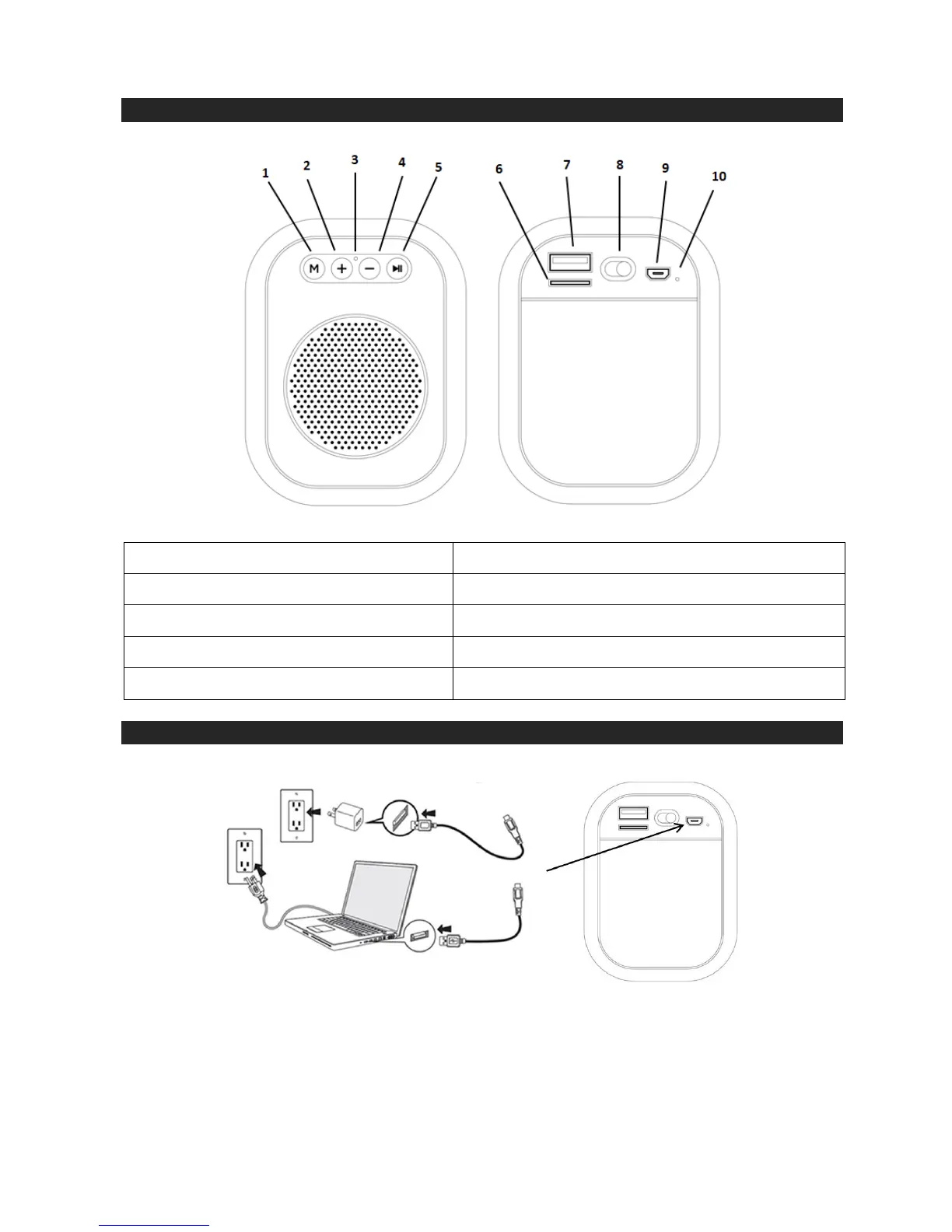
LOCATION OF CONTROLS
CHARGING THE SPEAKER
Using the Charging Cable provided, plug the Micro USB Tip into the Micro USB Charging Port and
plug the other end (USB Tip) into a USB port on your computer or USB wall charger (not included).
A red LED indicator light will illuminate while charging and turn off when completed.
A full charge will take approximately 4 to 5 hours.
1. Mode Button
6. Micro SD Slot
2. Volume Up / Next Track
7. USB Jack
3. Microphone
8. ON/OFF Switch
4. Volume Down / Previous Track
9. Micro USB Charging Port
5. Play/Pause Control/ Call Answer/End
10. Charging Indicator

Related product manuals