2. Press and hold the Power Button, release it when you will hear “ready for pairing” and the
LED Indicator Light will start to flash blue quickly.
3. Turn on the Bluetooth function on your Bluetooth enabled device and search for Bluetooth
devices. When the search is complete, select “BTSPK80” from the Bluetooth device list. (If a
password is required, use “0000” to finalize the pairing process.)
4. When the Bluetooth connection is successful, you will hear “connected” and the LED
Indicator Light will illuminate blue. This means you are connected and the speaker is ready
for use.
NOTE:
• If pairing was unsuccessful, turn off the speaker first and repeat the steps above to re-pair
again.
• After successful pairing, paired devices will remember each other. Unless pairing information
is deleted, re-pairing is not required after the first time.
• If you want to pair the unit with other Bluetooth enabled devices, please disconnect/remove
the existing device and pair with the new device according to the steps above.
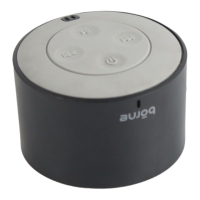
5. To increase or decrease the volume on the speaker, press and hold the Volume + or Volume
- button until the desired volume is reached.
6. To skip songs forward or backward, press the Previous or Next Button quickly until the
desired song is selected
7. To pause and resume playback, press the Play/Pause button.
HANDSFREE SPEAKERPHONE
While the speaker is on Bluetooth Mode and successfully paired to your smartphone, you can
answer phone calls through this speaker and use it as a speakerphone.
Press the Call Answer/End Button to pick up and hang up a phone call.
To adjust the volume press and hold the Volume + or the Volume - Button on the speaker.
PRODUCT AND BATTERY DISPOSAL
This product contains a built-in lithium battery and should not be disposed of in normal household
waste. The battery in this device is not intended to be removed by the individual or end user. For
disposal and recycling, please contact your local waste management authorities. The recycling and
processing of electronic waste will make a significant contribution towards helping protect the
environment.
Warning: To reduce the risk of fire and burns, do not disassemble, crush, puncture, short external
contacts or dispose of in fire or water.


 To Next Page