Page 10
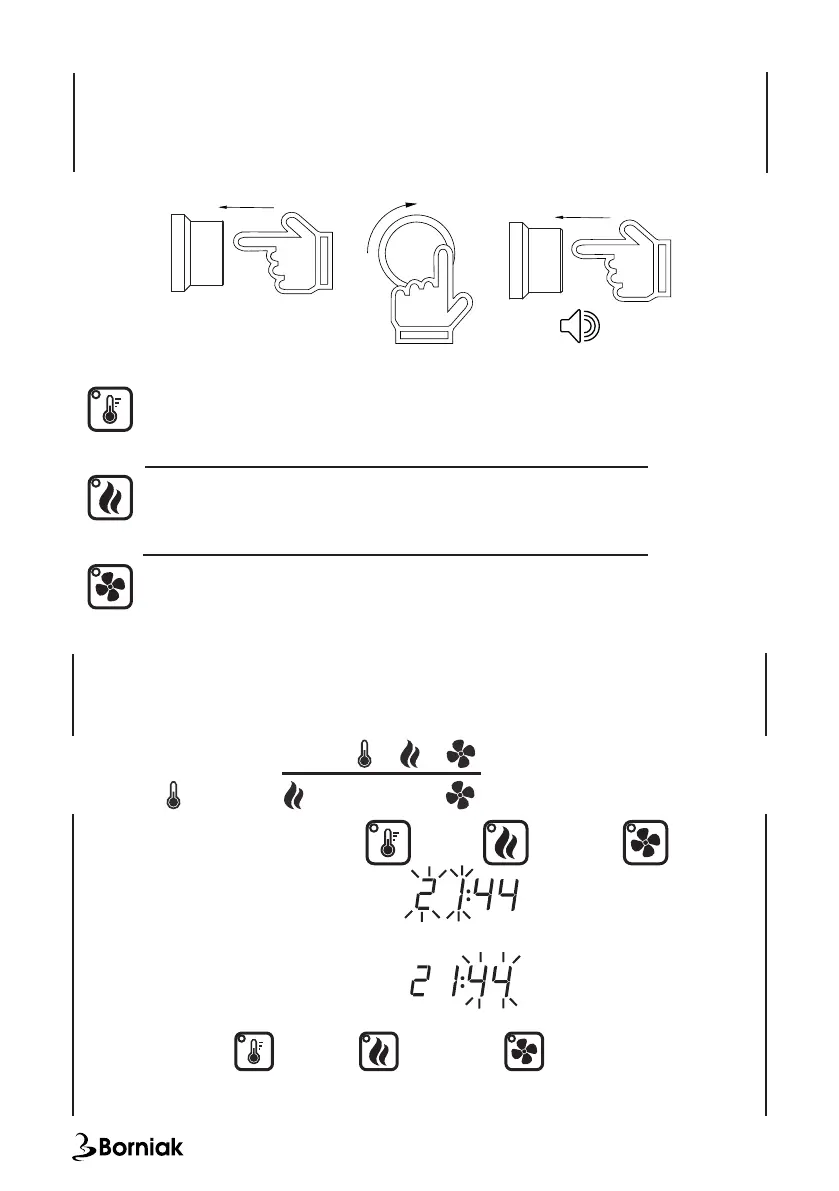
Change target temperature:
• Press the knob
• Set the desired temperature
• Press the knob again
After setting the temperature correctly, you will hear the sound.
PRESS
SET PRESS
Setting the time:
• Keep the button (2) pressed for 2s, or or
• The rst two elds for setting the hours
will start ashing on the display (1).
• Use the rotary knob (5) to set the appropriate value and conrm by pressing the knob.
•
• The next two elds to set the minutes
will start ashing on the display.
• Use the rotary knob (5) to set the appropriate value and conrm by pressing the knob.
After switching on or or the time for a specic
function is counted down, the lamp starts ashing. When the countdown ends, the device
turns off.
The illuminated symbol (4) shows the function for which the time is shown on the display (1).
Turn the knob (5) to change the lit icon (4) and the operating time shown on the display (1).
Pressing - turns the heater on / off
Press for approx. 2 seconds - time setting
The lamp is on - heating is on
The lamp ashes - the heater is running with a time countdown
Pressing - turns on/off the smoke generator
Press for approx. 2 seconds - time setting
The lamp is on - the smoke generator is on
The lamp ashes - the smoke generator is running with a countdown
Pressing - turns dryer on/off
press for approx. 2 seconds - time setting
Lamp is on - dryer is on
The lamp ashes - the dryer is turned on with the countdown of time
TIME
Heating
Smoke generator Dryer
Description of the function keys:


 To Next Page