-8-
Operating Instructions
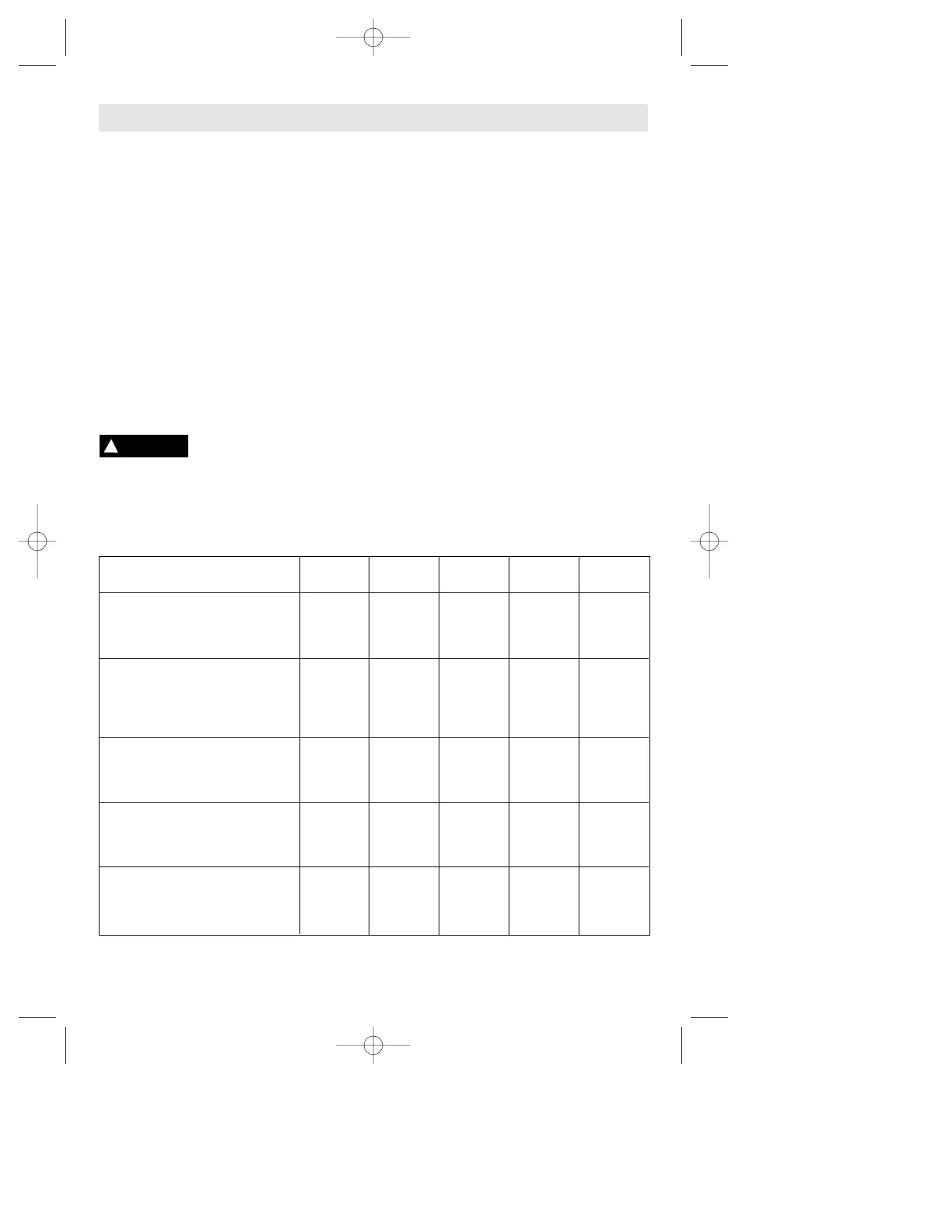
Rough Fine Drive Switch Backing
Material sanding sanding position setting pad
Woods: Grit size Grit size
Softwoods 60 240 b 1-4 soft
Hardwoods 60 180/240 a/b 3 / 6 med
Veneers 240 400 b 1-2 soft
Metals:
Steel 80/180 600 a 3-6 med/hard
Stainless 120 240 a 4-6 med
Aluminum 80 240/400 a/b 1-3 med
Rust spots 24 120 a 4-6 soft
Synthetic paint:
Sanding 180 400 b 3 med
Scratches 120 220 a/b 3-4 hard
Stripping 24/40 80/120 a 5-6 med
Acrylic paint:
Sanding 180 400/1200 b 3-4 med
Scratches 120 224 a/b 2-4 hard
Stripping 60 80/120 a 3-6 med
Plastics
PC/polystyrene 120 240 a/b 1-3 soft/med
Thermoplastics 60 180 a/b 1-2 med
Glass fiber reinforsed plastics 80/120 20/320 a 1-3 med/hard
SLIDE ON-OFF SWITCH WITH LOCK
The tool is switched “ON” by the switch
button located at the side of the motor
housing. The switch can be locked in the
“ON” position, a convenience for long
grinding operations.
TO TURN THE TOOL “ON” without locking
it, slide the switch button forward by
applying pressure ONLY at the REAR portion
of the button. When pressure is released the
switch button will snap to “OFF” position.
TO LOCK THE SWITCH “ON”, slide the
switch button forward and press “IN” the
FRONT portion.
TO UNLOCK THE SWITCH, simply press
and release the REAR portion of the button.
Switch is spring loaded and will snap back
automatically.
Hold the tool with both
hands while starting the tool,
since torque from the motor can cause the
tool to twist.
Start the tool before applying to work and let
the tool come to full speed before contacting
the workpiece. Lift the tool from the work
before releasing the switch. DO NOT turn the
switch “ON” and “OFF” while the tool is
under load; this will greatly decrease the
switch life.
ELECTRONIC FEEDBACK CIRCUITRY (EFC)
The internal electronic feedback system
provides a "soft start", which will reduce the
stresses that occur from a high torque start.
The system also helps to keep the no load
speed virtually constant between no-load
and load conditions.
VARIABLE SPEED WITH DIAL SETTING
Your sander is also equipped with a variable
speed dial. The sander's orbital pad speed
can be preset from zero to maximum
nameplate OPM by rotating the dial in the
housing. The dial may be set on or between
any of six positions (1=low through 6=high).
The following table may be used as a general
guide for abrasive and backing pad selection,
but the best results will be obtained by
sanding a test sample of the workpiece first.
!
WARNING



 To Next Page