


 Need help?
Do you have a question about the Bosch 4 Series and is the answer not in the manual?
Selects the desired washing programme for the appliance.
Shows the remaining washing time or programme status.
Allows delaying the start of the washing programme.
Adjusts the spin speed or deactivates the spin cycle.
Starts or pauses the selected washing programme.
Indicates the current stage of the washing programme.
Cancels the current programme or settings.
Recalls or saves a favourite programme setting.
Lights up when the appliance lid is not properly closed.
Indicates a fault or required maintenance.
Signals that the water supply is interrupted.
Alerts when the drain pump needs cleaning.
Guidance on liquid detergent use with specific options.
Notes on limited spin speeds for enhanced laundry care.
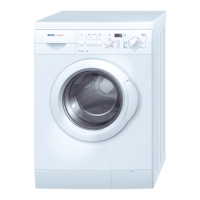
This document describes a washing machine, outlining its functions, usage features, and maintenance aspects.
The washing machine is designed to efficiently clean various types of laundry using a range of predefined programs and customizable options. It operates by filling with water, adding detergent, agitating the laundry, rinsing, and then spinning to remove excess water. The machine incorporates features for energy and water efficiency, with consumption values provided for standard programs. It also includes safety mechanisms, such as a lid lock during operation and fault indicators to alert users to potential issues. The appliance is equipped with a program sequence display that visually guides the user through the current phase of the wash cycle (Wash, Rinse, Spin). An "Lid open" indicator signals when the lid can be safely opened. The machine automatically switches off after approximately 15 minutes of inactivity post-program completion to save energy.
Program Selection: Users can select from a variety of programs tailored for different fabric types and soil levels, including Cotton (90°C, <60°C, <40°C), Quick/Mixed, Allergy+, Easy-care+, Easy-care, Delicates, Wool/Silk, and Wool. Each program has a default temperature, load capacity, and spin speed.
Temperature Control: While programs have default temperatures, users can often adjust these. For instance, selecting a temperature between 30°C and 60°C with the "Clean+" option increases the washing temperature by 4°C.
Spin Speed Adjustment: Each program has a predefined spin speed, but users can press the "Spin" button to set a different spin speed according to their needs.
Memory Function: Users can save a frequently used program setting (program, temperature, spin speed, and options). To save, select the desired settings, then press and hold the "Memory" button for at least 3 seconds. The "Memory" indicator will flash and then light up. To recall, select the program, press "Memory," and then "Start (Pause)."
Start Delay: This feature allows users to delay the start of a program by up to 24 hours. Select the program, spin speed, and options, then press the "Start delay" button repeatedly to set the desired delay. Start the countdown by pressing "Start (Pause)." The "Start delay" indicator flashes and then goes out when the program begins. The delay time on the display will be replaced by the program's remaining time. The delay can be changed after pressing "Start (Pause)" by pressing "Start delay" again. To delete the start delay before pressing "Start (Pause)," turn the program selector or press "Cancel." After pressing "Start (Pause)," press "Start (Pause)" again.
Starting a Program: Open the water tap, load the machine, add detergent, close the lid, turn the program selector, and then press "Start (Pause)." The "Start (Pause)" indicator will light up, and the program sequence display will show the current phase. The display becomes active when the load is determined or program duration is adjusted. In case of a power interruption, the program will resume from where it left off.
Changing Programs/Options During Operation: To change a program or options after it has started, press "Start (Pause)" to pause the program. Select the new program, options, and spin speed, then press "Start (Pause)" again. The new program will start from the point where the previous one was interrupted. No additional detergent should be added.
Cancelling an Active Program: To cancel a program before it finishes, press and hold the "Cancel" button for at least 3 seconds. Any water will be drained, and the lid will unlock after a short delay.
End of Program: All indicators in the program sequence display turn off, and the "Lid open" indicator lights up. After approximately 15 minutes, the machine switches off. Users should turn the program switch to "Stop," turn off the water tap, open the lid and drum, and unload the laundry. Leaving the lid open for a while allows the inside of the machine to dry.
Pre-Wash Preparation: Before each wash, users should load the machine, ensure the drum door is closed, and add detergent and any additives as instructed in the manual.
Fault Indicators: The machine is equipped with fault indicators that alert users to potential issues.
In case of any fault indicator flashing, users should consult the instruction manual for troubleshooting steps. Regular cleaning of the pump and other components is implied by the "Clean pump" indicator, ensuring proper drainage and machine function. Leaving the lid open after a wash cycle helps to dry the interior, preventing mold and odors.
 General
| Weight | 69 kg |
|---|---|
| Color | White |
| Energy Efficiency | A+++ |
| Wash Programmes | Cotton, Wool, Rinse, Spin |
| Special Features | SpeedPerfect, Reload Function |
| Motor Type | EcoSilence Drive |
| Dimensions (HxWxD) | 848 x 598 x 590 mm |




 To Next Page