Need help?
Do you have a question about the Bosch BFR634GS1 and is the answer not in the manual?
Safety warnings and precautions specifically related to the microwave function of the appliance.
Covers issues like sparks, foil containers, operating without food, moisture, dirty seals, and popcorn.
Covers initial use, language selection, and setting the clock before first operation.
Instructions on powering the appliance on/off and fundamental steps for starting/pausing operations.
How to pause operations, select modes, and guidelines for suitable/unsuitable cookware.
Details on available power settings, how to set microwave output, and adjust cooking times.
Guide to common faults, their possible causes, and remedies, including error messages.
This document describes a Bosch microwave oven, providing comprehensive information on its functions, usage, and maintenance.
The microwave oven is designed for the rapid cooking, heating, and defrosting of food. It offers various operating modes and power settings to suit different culinary needs. The appliance can be used for general microwave operations, as well as for specific pre-programmed dishes.
For general microwave use, the appliance allows users to manually select a microwave power output ranging from 90 W to 900 W, along with a corresponding cooking time. The power settings are categorized for different food types and tasks: 90 W for defrosting delicate foods, 180 W for defrosting and continued cooking, 360 W for cooking meat and heating delicate foods, 600 W for heating and cooking food, and 900 W for heating liquids. The appliance suggests a default cooking time for each power setting, which can be adjusted by the user. It's important to note that for the 900 W setting, the maximum power is gradually reduced to 600 W after a certain period to protect the appliance, with full power becoming available again after a cooling period.
The appliance also features a "Programmes" function, which simplifies cooking by providing pre-set options for various dishes. Users select a program and input the weight of their food, and the appliance automatically applies the most suitable settings for cooking, heating, or defrosting. These programs often include instructions for turning or stirring food during preparation, and the operation pauses to allow for these interventions.
A "Timer" function is available for use as a kitchen timer, running independently of other settings, even when the appliance is switched off. It provides an audible signal when the set time has elapsed.
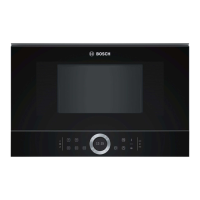
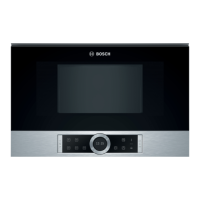
The microwave oven is operated via a control panel that includes buttons, touch fields, and a rotary selector, with current settings displayed on an integrated screen.
To begin, the appliance is switched on using the on/off button. All touch fields illuminate red, and the Bosch logo appears, followed by the maximum microwave output. Operations are started by pressing the start/stop button. If the appliance door is opened during an operation, the process pauses and must be manually restarted once the door is closed.
Selecting an operating mode involves touching the appropriate field, then using the rotary selector to adjust the selection. Further settings, such as cooking time or weight, can be modified by touching the relevant field and using the rotary selector.
The display is designed for clear readability, with the currently adjustable value highlighted in white and underlined, while background values are shown in grey. A display ring around the main display indicates progress or position within selection lists.
The appliance incorporates several convenience features:
For optimal microwave use, specific cookware guidelines are provided. Heat-resistant materials like glass, glass ceramic, porcelain, ceramic, or heat-resistant plastic are suitable, as they allow microwaves to pass through. Metal cookware is generally unsuitable as it blocks microwaves and can cause sparks, potentially damaging the appliance. A "cookware test" is described to help users determine if their dishes are microwave-safe.
Detailed tables are included in the manual, offering guidelines for defrosting, heating, and cooking various foods. These tables specify recommended weights, microwave power outputs, and cooking times, along with helpful notes on preparation and handling. For defrosting, instructions include placing food in open containers, turning or stirring, and allowing resting time. For heating and cooking, advice covers covering food, stirring, and allowing standing time after heating to ensure even temperature distribution and flavor retention.
Proper care and cleaning are essential to maintain the appliance's appearance and functionality. The manual provides specific instructions for cleaning different surfaces and components.
For general cleaning, hot soapy water and a soft cloth are recommended. A microfibre cloth or a slightly damp cloth is advised for the display. For stainless steel surfaces, specialized stainless-steel cleaning agents are suggested to remove limescale, grease, and other residues, which can cause corrosion if left untreated.
The manual explicitly lists cleaning agents and tools to avoid:
It is emphasized that new sponge cloths should be thoroughly washed before use. The interior surfaces of the cooking compartment should be cleaned with hot soapy water or a vinegar solution, and allowed to dry thoroughly. Oven sprays or other aggressive oven cleaners are not to be used.
Regular cleaning of the cooking compartment, door seal, door, and door stop is crucial to prevent damage from food residue and to ensure that microwave energy does not escape due to a compromised seal. In case of unpleasant odors, a simple solution of lemon juice and water can be heated in the microwave to neutralize them.
The appliance should always be allowed to cool down before cleaning, and children should be kept at a safe distance due to hot surfaces. High-pressure cleaners or steam cleaners are strictly prohibited to avoid electric shock.
In the event of a fault, a troubleshooting table is provided to help users identify possible causes and remedies before contacting after-sales service. This includes issues like the appliance not working, not heating up, or error messages. Users are advised to check basic connections and settings, and to deactivate demo mode if it is active. For issues with the rotary selector, cleaning or re-seating it is suggested. If an error message persists, contacting after-sales service with the fault code is recommended. Incorrect repairs are dangerous, and only trained after-sales technicians should perform repairs or replace damaged power cables.
 General
| Turntable | No |
|---|---|
| Cord length | 1.5 m |
| Control type | Touch |
| Display type | TFT |
| Certification | CE, VDE |
| Product color | Stainless steel |
| Interior light | Yes |
| Microwave power | 900 W |
| Appliance placement | Built-in |
| Number of power levels | 5 |
| Auto programs quantity | 7 |
| Current | 10 A |
| Connected load | 1220 W |
| AC input voltage | 220-240 V |
| AC input frequency | 50 - 60 Hz |
| Package weight | 21000 g |
 Weight and Dimensions
| Depth | 318 mm |
|---|---|
| Width | 594 mm |
| Height | 382 mm |
| Weight | 19000 g |
| Installation compartment dimensions (WxDxH) | 568 x 300 x 382 mm |

 To Next Page